
The LogCollectionPolicies API allows you to create the rules that a Fabric-enabled LogPoint uses to collect logs.
You can configure different collectors and fetchers in a log collection policy. Once created, you can apply the same policy to multiple devices to speed up the configuration process.
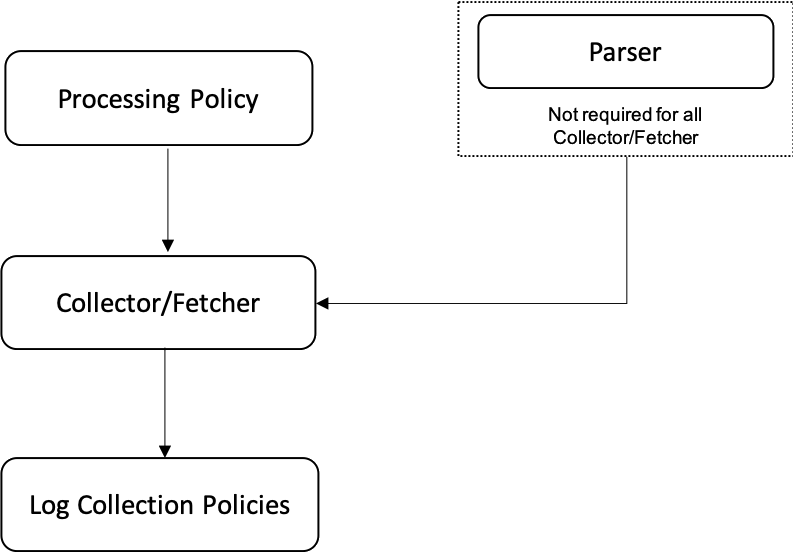
Configuring a collector or fetcher in a log collection policy
Follow the steps mentioned below to configure a Collector or Fetcher in a Log Collection Policy:
Execute the LogCollectionPolicies - Create API with the required parameters.
Execute the ProcessingPolicies - List API to obtain the value of the id parameter. Use this value in the processpolicy parameter of the Collector/Fetcher - Create API. Refer to the Create a Processing Policy section if you have not already created the processing policy.
Execute the LogCollectionPolicies - List API to obtain the value of the policy_id parameter. Use this value in the policy_id parameter of the Collector/Fetcher - Create API.
Execute the Collector/Fetcher - Create API with the required parameters. For instance, to create an FTP collector, execute the FTPCollectorPlugin - Create API.
Note
You can add one or more collector/fetcher in a log collection policy.
While adding a Syslog collector in a log collection policy, the value of the proxy_condition parameter must be None.
Execute the LogCollectionPolicies - Create API.
POST
https://api-server-host-name/configapi/{pool_UUID}/{logpoint_identifier}/LogCollectionPolicies
Request:

{
    "data": {
    "name": "lcp1",
    "description": "CreatedfromAPI"
    }
}

Response:

{
    "status": "Success",
    "message": "monitorapi/17b77d08934744fdbd7c1d0194ba22aa/41b5b7fffa6c4e3cb6bc6d799a5ee6e5/orders/5f356524-9001-4dd6-899a-b128e2acf1f0"
}

Monitoring API:

.. code::

GET
https://api-server-host-name/monitorapi/17b77d08934744fdbd7c1d0194ba22aa/41b5b7fffa6c4e3cb6bc6d799a5ee6e5/orders/5f356524-9001-4dd6-899a-b128e2acf1f0

Response:

{
"request": {},
"logpoint_identifier": "41b5b7fffa6c4e3cb6bc6d799a5ee6e5",
"pool_uuid": "17b77d08934744fdbd7c1d0194ba22aa",
"response": {
    "success": true,
    "id": "5e035dfed8df1d8bd876c7f1",
    "message": "Logcollection policy added"
    }
}
This step successfully creates a log collection policy.
Execute the ProcessingPolicies - List API to obtain the value of the id parameter. Use this value in the processpolicy parameter of the Collector/Fetcher - Create API.
Config API:

GET
https://api-server-host-name/configapi/v1/{pool_UUID}/{logpoint_identifier}/ProcessingPolicy

Response:
[
{
    "routing_policy": "5af2b98c20c2083136f877cf",
    "policy_name": "TestProcessingPolicy",
    "tid": "",
    "enrich_policy": "5af2b1aa20c2083136f877cd",
    "active": true,
    "norm_policy": "TestNormalizationPolicy",
    "id": "5af2bd8920c208313a16f3cb"
}
]
Execute the LogCollectionPolicies - List API to obtain the value of the policy_id parameter. Use this value in the policy_id parameter of the Collector/Fetcher - Create API.
Config API:

GET
https://api-server-host-name/configapi/{pool_UUID}/{logpoint_identifier}/LogCollectionPolicies/{id}

Response:
[
    {
    "name": "lcp1",
    "description": "CreatedFromAPI",
    "tid": "",
    "active": true,
    "col_apps": [],
    "id": "5e035dfed8df1d8bd876c7f1"
    }
]
Execute the Collector/Fetcher - Create API with the required parameters. For instance, to create an FTP collector, execute the FTPCollectorPlugin - Create API.
Config API:

POST
https://api-server-host-name/configapi/v1/{pool_UUID}/{logpoint_identifier}/FTPCollectorPlugin
{
  "data":
    {
        "username": "TestCollector",
        "charset": "utf_8",
        "sourcename": "linuxBase",
        "parser": "TestParser",
        "processpolicy": "5af2bd8920c208313a16f3cb",
        "password": "password",
        "policy_id":"5e035dfed8df1d8bd876c7f1"
        ]
    }
}

Response:
{
    "status": "Success",
    "message": "monitorapi/v1/17b77d08934744fdbd7c1d0194ba22aa/41b5b7fffa6c4e3cb6bc6d799a5ee6e5/orders/4624be84-66db-4248-aca4-2b125d0474c7"
}

Monitoring API:

GET
https://api-server-host-name/monitorapi/v1/17b77d08934744fdbd7c1d0194ba22aa/41b5b7fffa6c4e3cb6bc6d799a5ee6e5/orders/4624be84-66db-4248-aca4-2b125d0474c7

Response:
{
    "request": {},
    "logpoint_identifier": "41b5b7fffa6c4e3cb6bc6d799a5ee6e5",
    "pool_uuid": "17b77d08934744fdbd7c1d0194ba22aa",
    "response":
    {
        "message": " Successfully added",
        "success": true
    }
}
This step successfully adds an FTP collector in a log collection policy.