Page Contents
- Adding a device in the LogPoint Collector (LPC) setup

Follow the steps mentioned below to create a Collector/Fetcher in the LogPoint Collector (LPC) setup:
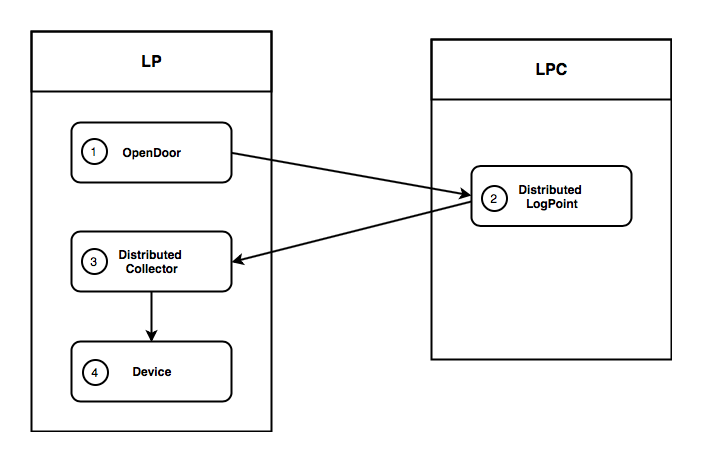
Creating a Collector/Fetcher on two LogPoints in the Distributed LogPoint setup
Execute the OpenDoor - Create API in the Director Console API.
Execute the OpenDoor - List API in the first LogPoint to obtain the value of the network parameter. Use this value in the private_ip parameter of the DistributedLogPoints - Create API in the LogPoint Collector (LPC).
Execute the DistributedLogPoints - Create API.
Execute the DistributedCollectors - Refresh List API.
Execute the DistributedLogPoints - List API to obtain the value of the id parameter. Use this value in the id parameter of the URL of the DistributedCollectors - Activate API.
Execute the DistributedCollectors - Activate API.
Execute the DistributedCollectors - List API to obtain the value of the id parameter. Use this value in the distributed_collector parameter of the Devices - Attach API.
Execute the Devices - Attach API.
Execute the OpenDoor - Create API in the Director Console API.
Config API:

POST
https://api-server-host-name/configapi/v1/{pool_UUID}/{logpoint_identifier}/OpenDoor

{
    "data":
    {
      "netmask": "255.255.255.0",
      "password": "examplePassword",
      "opened": "on",
      "network": "10.4.0.1"
    }
}

Response:

{
"status": "Success",
"message": "monitorapi/v1/336294dbd0f141ce86cb925bca74133a/41b5b7fffa6c4e3cb6bc6d799a5ee6e5/orders/71c23e11-a25b-4688-a88d-275e14251d6c"
}

Monitoring API:

GET
https://api-server-host-name/monitorapi/v1/336294dbd0f141ce86cb925bca74133a/41b5b7fffa6c4e3cb6bc6d799a5ee6e5/orders/71c23e11-a25b-4688-a88d-275e14251d6c

Response:

{
"request": {},
"logpoint_identifier": "41b5b7fffa6c4e3cb6bc6d799a5ee6e5",
"pool_uuid": "336294dbd0f141ce86cb925bca74133a",
"response":
    {
        "message": "Opendoor preferences edited",
        "errors": [],
        "success": true
    }
}
This step successfully enables a secure connection for the Distributed LogPoint setup in LogPoint Collector (LPC).
Note
Make sure that the collector machine is in the LogPoint Collector mode. If it’s in the LogPoint mode, run the SystemSettingsModesofOperation - Save API with the value of is_li_lite parameter as on.
Execute the OpenDoor - List API to obtain the value of the network parameter.
Config API:

GET
https://api-server-host-name/configapi/v1/{pool_UUID}/{logpoint_identifier}/OpenDoor

[
{
    "id": "5b335c0a4503642a0bc92ef8",
    "netmask": "255.255.255.0",
    "password_hash": "sha1$88a49cfc04e031ef00b465295a8e023efef17453$01a7b8cc34e12216a6184b487ec498c8998ccd9e",
    "opened": true,
    "network": "10.4.0.1"
}
]
Execute the DistributedLogPoints - Create API. Use the value obtained from step 1 in the private_ip parameter of the DistributedLogPoints - Create API.
The logpoint_identifier, in this case, should be the identifier of the LogPoint Collector (LPC). The ip_dns is the IP of the LogPoint to which the LogPoint Collector will connect. The password is the password used when executing the Create API above.
Config API:

POST
https://api-server-host-name/configapi/v1/{pool_UUID}/{logpoint_identifier}/DistributedLogpoints

{
    "data":
    {
      "ip_dns": "10.45.9.33",
      "password": "examplePassword",
      "private_ip": "10.4.0.1"
    }
}

Response:

{
    "status": "Success",
    "message": "monitorapi/v1/336294dbd0f141ce86cb925bca74133a/3324b10a5bbb4a51891860b50cf7b6b9/orders/741c2f01-915f-495a-8c2b-2c4735bfb9b7"
}

Monitoring API:

GET


https://api-server-host-name/monitorapi/v1/336294dbd0f141ce86cb925bca74133a/3324b10a5bbb4a51891860b50cf7b6b9/orders/741c2f01-915f-495a-8c2b-2c4735bfb9b7

{
    "request": {},
    "logpoint_identifier": "3324b10a5bbb4a51891860b50cf7b6b9",
    "pool_uuid": "336294dbd0f141ce86cb925bca74133a",
    "response":
    {
        "message": " Remote LogPoint successfully added",
        "success": true
    }
}
This step successfully creates a Distributed LogPoint setup in the LogPoint Collector (LPC).
Execute the DistributedCollectors - Refresh List API.
Config API:

POST
https://api-server-host-name/configapi/v1/{pool_UUID}/{logpoint_identifier}/DistributedCollectors/refreshlist

Response:

{
    "status": "Success",
    "message": "monitorapi/v1/336294dbd0f141ce86cb925bca74133a/41b5b7fffa6c4e3cb6bc6d799a5ee6e5/orders/0cd268cb-a7e8-4d25-8426-b30c58fa20e2"
}

Monitoring API:

GET
https://monitorapi/v1/336294dbd0f141ce86cb925bca74133a/41b5b7fffa6c4e3cb6bc6d79a5ee6e5/orders/0cd268cb-a7e8-4d25-8426-b30c58fa20e2

Response:

{
    "request": {},
    "logpoint_identifier": "41b5b7fffa6c4e3cb6bc6d799a5ee6e5",
    "pool_uuid": "336294dbd0f141ce86cb925bca74133a",
    "response":
    {
        "message": "Distributed Collector lists updated",
        "success": true
    }
}
Execute the DistributedLogPoints - List API to obtain the value of the id parameter.
Config API:

GET
https://api-server-host-name/configapi/v1/{pool_UUID}/{logpoint_identifier}/DistributedLogpoints

Response:

[
    {
        "status": "Connected",
        "remote": "192.168.2.23",
        "name": "",
        "is_higher_security_lite": false,
        "vpn_ip": "",
        "private_ip": "10.2.1.1",
        "id": "5b34a4d84503642cfcc07ef5"
    }
]
Execute the DistributedCollectors - Activate API. Use the value of id paramter obtained from step 2, in the id parameter of the URL of the DistributedCollectors - Activate API.
Config API:

POST
https:://api-server-host-name/configapi/v1/{pool_UUID}/{logpoint_identifier}/DistributedCollectors/5b34a4d84503642cfcc07ef5/activate

Response:

{
    "status": "Success",
    "message": "monitorapi/v1/336294dbd0f141ce86cb925bca74133a/41b5b7fffa6c4e3cb6bc6d799a5ee6e5/orders/ec6b9cc6-58d6-4d58-a383-72ac7af8e42d"
}

Monitoring API:

GET

Response:

{
    "request": {},
    "logpoint_identifier": "41b5b7fffa6c4e3cb6bc6d799a5ee6e5",
    "pool_uuid": "336294dbd0f141ce86cb925bca74133a",
    "response":
    {
        "message": "Distributed Collector activated",
        "success": true
    }
}
This step successfully activates a Distributed Collector.
Execute the DistributedCollectors - List API to obtain the value of the id parameter.
Config API:

POST
https:://api-server-host-name/configapi/v1/{pool_UUID}/{logpoint_identifier}/DistributedLogpoints

Response:

{
    "name":"LogPoint33",
    "identifier":"398f0a18c11646ef8e42aa7985113b4c",
    "file_socket_port":6900,
    "ip":"10.45.9.77",
    "is_li_light":true,
    "active":false,"tid":"",
    "buffering":true,
    "id":"5b39c800a0ad97202d484e36",
    "description":""
}
Execute the Devices - Attach API. Use the value obtained from the id parameter above, in the distributed_collector parameter of the Devices - Attach API.
Config API:

POST
https:://api-server-host-name/configapi/v1/{pool_UUID}/{logpoint_identifier}/Devices/{{id}}/attach

{
    "data":
    {
    "distributed_collector": "5b39c800a0ad97202d484e36"
    }
}

Response:

{
    "status": "Success,
    "message": "monitorapi/v1/336294dbd0f141ce86cb925bca74133a/41b5b7fffa6c4e3cb6bc6d799a5ee6e5/orders/bdc2d245-a099-45cf-8dbb-be382971042a"
}

Monitoring API:

GET
https:://api-server-host-name/monitorapi/v1/336294dbd0f141ce86cb925bca74133a/41b5b7fffa6c4e3cb6bc6d799a5ee6e5/orders/bdc2d245-a099-45cf-8dbb-be382971042a

Response:

{
    "request": {},
    "logpoint_identifier": "41b5b7fffa6c4e3cb6bc6d799a5ee6e5",
    "pool_uuid": "336294dbd0f141ce86cb925bca74133a",
    "response":
    {
        "message": "Distributed Collector added",
        "success": true
    }
}
Note
Use the value of id parameter obtained from Devices - List API in the id parameter of the URL of the Devices - Attach API.
This step successfully adds a device in the LogPoint Collector (LPC) setup.