Page Contents
- Creating a Collector/Fetcher or an SNMP Fetcher from the Director Console API
- Creating a Collector/Fetcher in the Director Console API
- Sample API Requests and Responses for creating an FTP Collector

The following diagram illustrates the API call processes for configuring a collector/fetcher or an SNMP fetcher using the Director Console API.
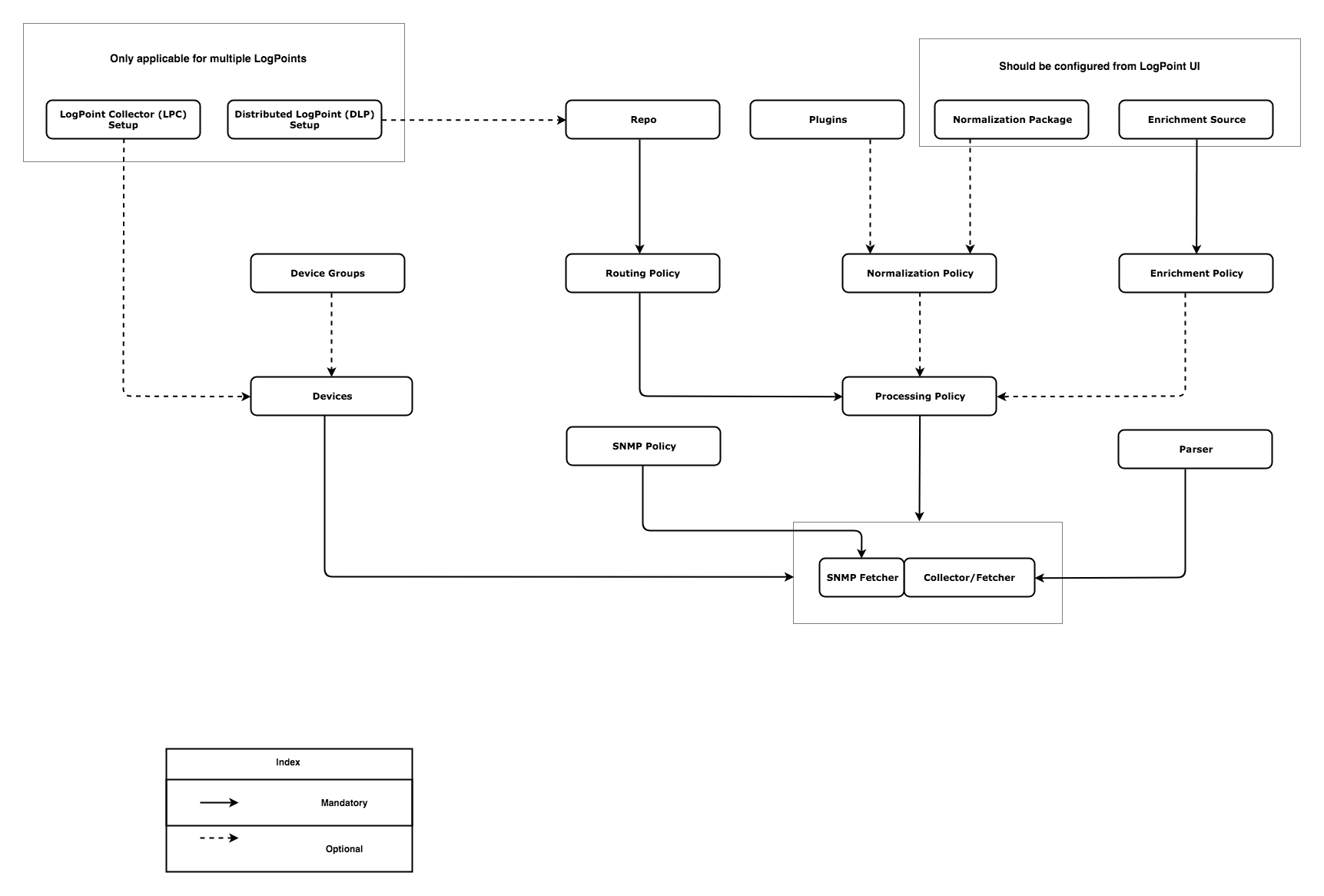
Creating a Collector/Fetcher or an SNMP Fetcher from the Director Console API
The required steps are mentioned below:
Follow the steps mentioned below to create a collector/fetcher or an SNMP fetcher in a LogPoint.
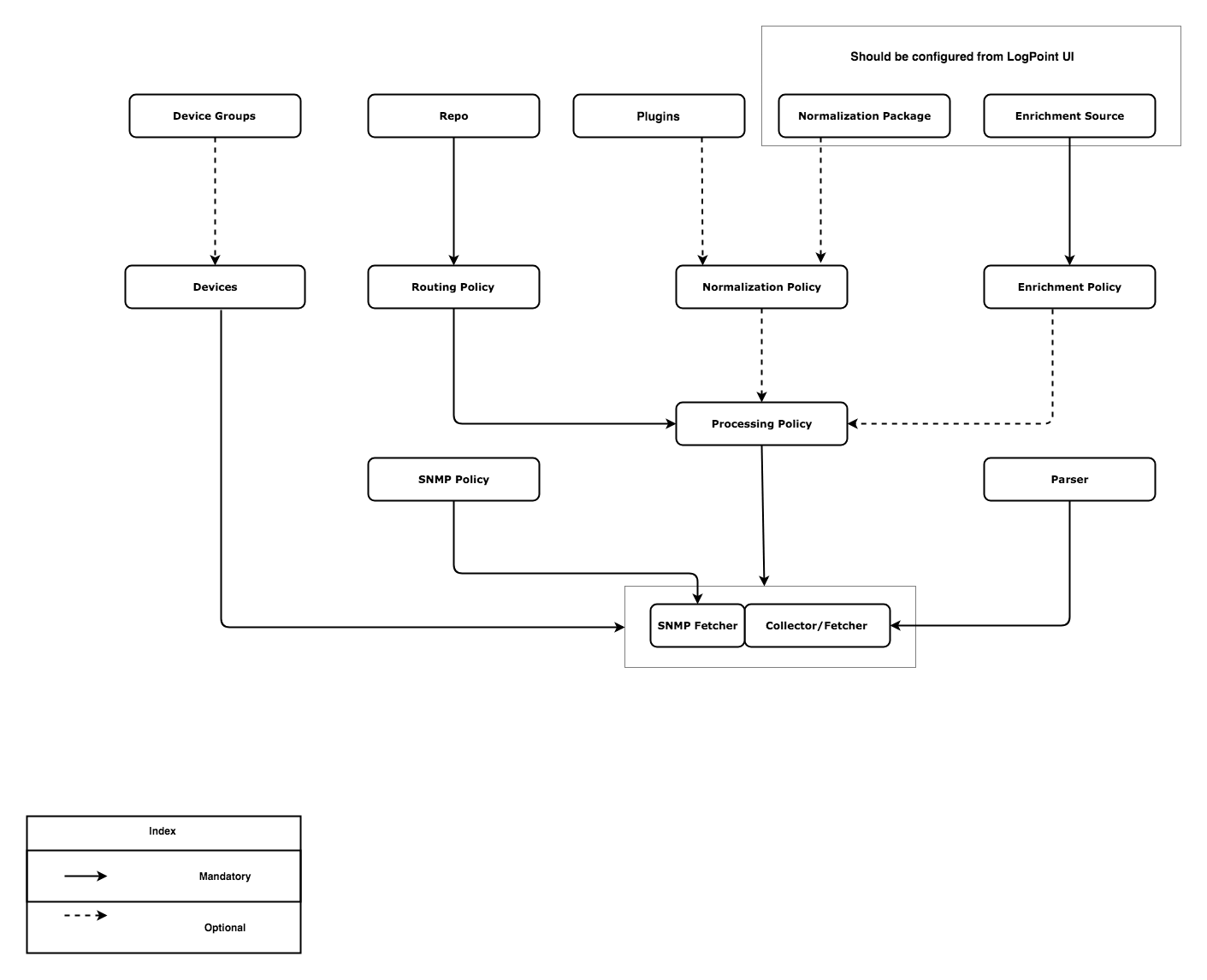
Creating a Collector/Fetcher or an SNMP Fetcher in a Single LogPoint
A device can be created with or without the use of device groups.
Option A: To create a device using device groups:
Execute the DeviceGroups - Create API in the Director Console API.
Execute the DeviceGroups - List API to obtain the value of the id parameter. Use this value in the devicegroup parameter of the Devices - Create API.
Execute the Devices - Create API.
Option B: To create a device without using device groups:
Execute the Devices - Create API with the remaining parameters.
Execute the Repos - Create API in the Director Console API.
Execute the Repos - List API to obtain the value of the name parameter. Use this value in the repo parameter of the RoutingPolicies - Create API.
Execute the RoutingPolicies - Create API.
The normalization policy can be created with or without the use of the normalization package and with or without the use of compiled normalizer. You can also use the existing vendor packages to make the normalization policy.
Option A: To create a normalization policy using a normalization package:
Execute the NormalizationPackage - Create API from the Director Console API.
Execute the NormalizationPackage - RefreshList API from the Director Console API.
Execute the NormalizationPackage - List API from the Director Console API to obtain the value of the id parameter of the created normalization package or the id parameter of the existing vendor packages. Use this value in the norm_packages parameter of the NormalizationPolicy - Create API.
Execute the NormalizationPolicy - Create API.
Option B: To create a normalization policy without normalization Package:
Execute the NormalizationPolicy - Create API with the remaining parameters.
Option C: To create a normalization policy with compiled normalizer.
Execute the NormalizationPackage - ListCompiledNormalizers API to obtain the value of the name parameter. Use this value in the compiled_normalizer parameter of the NormalizationPolicy - Create API.
Create an enrichment source from the LogPoint user interface (mandatory).
Note
You can configure the Threat Intelligence Plugin using the Director Console API. Refer to Threat Intelligence API Documentation for more information.
Execute the EnrichmentSource - RefreshList API from the Director Console API.
Execute the EnrichmentSource - List API to obtain the value of the source_name parameter. Use this value in the source parameter of the EnrichmentPolicy - Create API.
Execute the EnrichmentPolicy - Create API.
Execute the EnrichmentPolicy - List API to obtain the value of the id parameter. Use this value in the enrich_policy parameter of the ProcessingPolicy - Create API. If you have not created an enrichment policy, the value of enrich_policy must be None.
Execute the NormalizationPolicy - List API to obtain the value of the name parameter. Use this value in the norm_policy parameter of the ProcessingPolicy - Create API. If you have not created a normalization policy, the value of norm_policy must be None.
Execute the RoutingPolicies - List API to obtain the value of the id parameter. Use this value in the routing_policy parameter of the ProcessingPolicy - Create API.
Execute the ProcessingPolicy - Create API.
Execute the Parser - Create API in the Director Console API.
Execute the Parser - List API to obtain the value of the name parameter. Use this value in the parser parameter of the Collector/Fetcher - Create API.
Execute the ProcessingPolicy - List API to obtain the value of the id parameter. Use this value in the processpolicy parameter of the Collector/Fetcher - Create API.
Execute the Devices - List API to obtain the value of the id parameter. Use this value in the device_id parameter of the Collector/Fetcher - Create API.
Execute the Collector/Fetcher - Create API. For instance, to create an FTP collector, execute the FTPCollectorPlugin - Create API.
Execute the SNMPPolicy - Create API in the Director Console API.
Execute the ProcessingPolicy - List API to obtain the value of the id parameter. Use this value in the processpolicy parameter of the SNMP Fetcher - Create API.
Execute the Devices - List API to obtain the value of the id parameter. Use this value in the device_id parameter of the SNMP Fetcher - Create API.
Execute the SNMP Policy - List API to obtain the value of the id parameter. Use this value in the snmp_policy parameter of the SNMP Fetcher - Create API.
Execute the SNMP Fetcher - Create API.
Execute the Devices - Create API.
Config API:

POST
https://api-server-host-name/configapi/v1/{pool_UUID}/{logpoint_identifier}/Devices
{
    "data":
    {
    "name": "TestDevice",
    "ip":
    [
      "172.165.34.29"
    ],
    "timezone": "Asia/Kathmandu",
    "integrity": "Minimal",
    "availability": "Minimal",
    "confidentiality": "Minimal"
    }
}

Response:
{
    "status": "Success",
    "message": "monitorapi/v1/a88eff627cc14105b28bac889e900882/ea92ab66cae24e4e9fe22189468056f8/orders/2bb77400-4a46-441c-8bff-0aa67e20fb1f"
}

Monitoring API:

GET
https://api-server-host-name/monitorapi/v1/a88eff627cc14105b28bac889e900882/ea92ab66cae24e4e9fe22189468056f8/orders/2bb77400-4a46-441c-8bff-0aa67e20fb1f

Response:
{
    "request": {},
    "logpoint_identifier": "ea92ab66cae24e4e9fe22189468056f8",
    "pool_uuid": "a88eff627cc14105b28bac889e900882",
    "response":
    {
        "node_change_count": 1,
        "message": "Device added",
        "success": true,
        "id": "5af2c14520c2083135223b14"
    }
}
This step successfully creates a device.
Execute the Repos - Create API (mandatory).
Config API:

POST
https://api-server-host-name/configapi/v1/{pool_UUID}/{logpoint_identifier}/Repos
{
    "data":
    {
    "hiddenrepopath":
    [
      {
        "path": "/opt/immune/storage/",
        "retention": 10
      }
    ],
    "name": "TestRepo"
    }
}

Response:
{
    "status": "Success",
    "message": "monitorapi/v1/a88eff627cc14105b28bac889e900882/ea92ab66cae24e4e9fe22189468056f8/orders/9ce29efb-b167-41f6-8681-21610dcdbb32"
}

Monitoring API:

GET
https://api-server-host-name/monitorapi/v1/a88eff627cc14105b28bac889e900882/ea92ab66cae24e4e9fe22189468056f8/orders/9ce29efb-b167-41f6-8681-21610dcdbb32
{
    "request": {},
    "logpoint_identifier": "ea92ab66cae24e4e9fe22189468056f8",
    "pool_uuid": "a88eff627cc14105b28bac889e900882",
    "response":
    {
        "message": "Repo added",
        "success": true
    }
}
This step successfully creates a repo.
Execute the Repos - List API.
Config API:

GET
https://api-server-host-name/configapi/v1/{pool_UUID}/{logpoint_identifier}/Repos
[
{
    "repoha": [],
    "name": "TestRepo",
    "repo_number": 4,
    "id": "5af2b7fa20c208313a16f3ca",
    "repopath":
    [
        {
            "path": "/opt/immune/storage/",
            "retention": 10
        }
    ],
    "tid": "",
    "used_size": "0.00000 MB",
    "active": true
}
]
Execute the RoutingPolicies - Create API and use the value of the name parameter obtained from step 1 in the repo parameter of the API.
Config API:

POST
https://api-server-host-name/configapi/v1/{pool_UUID}/{logpoint_identifier}/RoutingPolicies
{
    "data":
    {
    "catch_all": "default",
    "routing_criteria":
    [
      {
        "repo": "TestRepo",
        "drop": "store",
        "type": "KeyPresent",
        "value": "",
        "key": "user"
      }
    ],
    "policy_name": "TestRoutingPolicy"
    }
}

Response:
{
    "status": "Success",
    "message": "monitorapi/v1/a88eff627cc14105b28bac889e900882/ea92ab66cae24e4e9fe22189468056f8/orders/3ecb5a47-dc32-4048-a150-f7197c6eecf7"
}


Monitoring API:

GET
https://api-server-host-name/monitorapi/v1/a88eff627cc14105b28bac889e900882/ea92ab66cae24e4e9fe22189468056f8/orders/3ecb5a47-dc32-4048-a150-f7197c6eecf7

Response:
{
    "request": {},
    "logpoint_identifier": "ea92ab66cae24e4e9fe22189468056f8",
    "pool_uuid": "a88eff627cc14105b28bac889e900882",
    "response":
    {
        "message": "Routing Policy added successfully",
        "success": true
    }
}
This step successfully creates a routing policy.
Execute the NormalizationPackage - List API. You can use one or multiple vendor packages. We have used “LogPoint Alert Triggered Incident” vendor package for this example.
Config API:

GET
https://api-server-host-name/configapi/v1/{pool_UUID}/{logpoint_identifier}/NormalizationPackage

Response:
[
{
    "signatures":
    [
    {
        "kb_version":
        [
            "2"
        ],
        "vid": "SIG_405000",
        "extra_key_value":
        {
            "norm_id": "LogPointAlert"
        },
        "which_norm_package": 771,
        "replace_key_value": {},
        "sig_id": 405000,
        "pattern_hash": "5d6915e0817bee12bd3bc0538a0cb192"
    },
    {
        "kb_version":
        [
            "2"
        ],
        "vid": "SIG_405001",
        "extra_key_value":
        {
            "norm_id": "LogPointAlert"
        },
        "which_norm_package": 771,
        "replace_key_value": {},
        "sig_id": 405001,
        "pattern_hash": "3096b95613f2b8dff6a35ff0304f3eff"
    }
    ],
    "description": "LogPoint Alert Triggered Incident",
    "vid": "NORMPACKAGE_771",
    "unused_signatures": [],
    "last_sig_id": 405001,
    "active": true,
    "version": 3,
    "share_is": false,
    "tid": "",
    "fields_info": [],
    "id": "5a46702cd8aaa40965bcbc67",
    "name": "LP_LogPointAlerts"
}
]
Execute the NormalizationPolicy - Create API and use the value of the id parameter obtained from step 1 in the norm_packages parameter of the API.
Config API:

POST
https://api-server-host-name/configapi/v1/{pool_UUID}/{logpoint_identifier}/NormalizationPolicy
{
    "data":
    {
    "name": "TestNormalizationPolicy",
    "norm_packages": "5a46702cd8aaa40965bcbc67"
    }
}

Response:
{
    "status": "Success",
    "message": "monitorapi/v1/a88eff627cc14105b28bac889e900882/ea92ab66cae24e4e9fe22189468056f8/orders/57ff751f-1c0b-4933-b91d-b660e1acef10"
}

Monitoring API:

GET
https://api-server-host-name/monitorapi/v1/a88eff627cc14105b28bac889e900882/ea92ab66cae24e4e9fe22189468056f8/orders/57ff751f-1c0b-4933-b91d-b660e1acef10

Response:
{
    "request": {},
    "logpoint_identifier": "ea92ab66cae24e4e9fe22189468056f8",
    "pool_uuid": "a88eff627cc14105b28bac889e900882",
    "response":
    {
        "message": "Normalization policy added",
        "success": true
    }
}
This step successfully creates a normalization policy.
As a mandatory step, create an enrichment source from the LogPoint user interface.
Execute the EnrichmentPolicy - RefreshList API.
Config API:

POST
https://api-server-host-name/configapi/v1/{pool_UUID}/{logpoint_identifier}/EnrichmentSource/refreshlist
{
    "data": {}
}

Response:
{
    "status": "Success",
    "message": "monitorapi/v1/a88eff627cc14105b28bac889e900882/ea92ab66cae24e4e9fe22189468056f8/orders/aba1fa71-4eb4-4f3f-87cf-5c633fb81984"
}

Monitoring API:

GET
https://api-server-host-name/monitorapi/v1/a88eff627cc14105b28bac889e900882/ea92ab66cae24e4e9fe22189468056f8/orders/aba1fa71-4eb4-4f3f-87cf-5c633fb81984

Response:
{
    "request": {},
    "logpoint_identifier": "ea92ab66cae24e4e9fe22189468056f8",
    "pool_uuid": "a88eff627cc14105b28bac889e900882",
    "response":
    {
        "message": "Enrichment Source list updated",
        "success": true
    }
}
Execute the EnrichmentSource - List API.
Config API:

GET
https://api-server-host-name/configapi/v1/{pool_UUID}/{logpoint_identifier}/EnrichmentSource

Response:
[
{
    "source_info":
    {
        "source_name": "CSV",
        "id": "9c9c709bcdad30c01ad8d9ffd2d3a6c1"
    },
    "plugin_info":
    {
        "csv_file": "/opt/immune/app_store/norm/enrichment/csv/TestEnrichmentSource.csv",
        "includes_header": true,
        "charset": "utf_8",
        "source_name": "TestEnrichmentSource",
        "source_fields":
        [
            {
                "field": "user",
                "type": "string",
                "name": "ext-gen3260"
            },
            {
                "field": "mobile_number",
                "type": "string",
                "name": "ext-gen3261"
            },
            {
                "field": "address",
                "type": "string",
                "name": "ext-gen3262"
            }
        ]
    },
    "source_name": "TestEnrichmentSource",
    "source_type": "CSV",
    "reason": null,
    "result": "Updated",
    "tid": "",
    "last_updated": 1525853318,
    "active": true,
    "id": "5af2ac8420c2083137a3bb6c",
    "delete_status": ""
}
]
Execute the EnrichmentPolicy - Create API. Use the value of the source_name parameter obtained from step 3 in the source parameter of the API.
Config API:

POST
https://api-server-host-name/configapi/v1/{pool_UUID}/{logpoint_identifier}/EnrichmentPolicy
{
  "data":
  {
    "specifications":
    [
      {
        "rules":
        [
          {
            "category": "simple",
            "operation": "Equals",
            "source_key": "user",
            "prefix": false,
            "event_key": "address"
          }
        ],
        "source": "TestEnrichmentSource",
        "criteria":
        [
          {
            "type": "KeyPresents",
            "value": "",
            "key": "user"
          }
        ]
      }
    ],
    "name": "TestEnrichmentPolicy",
    "description": "Description of enrichment policy"
  }
}
Note
source_key must be present in the enrichment source and should be consistent with the value of field parameter from step 3.
Response:
{
    "status": "Success",
    "message": "monitorapi/v1/a88eff627cc14105b28bac889e900882/ea92ab66cae24e4e9fe22189468056f8/orders/061657cc-953a-4176-aa09-d8b536167d9b"
}

Monitoring API:

GET
https://api-server-host-name/monitorapi/v1/a88eff627cc14105b28bac889e900882/ea92ab66cae24e4e9fe22189468056f8/orders/061657cc-953a-4176-aa09-d8b536167d9b"

Response:
{
    "request": {},
    "logpoint_identifier": "ea92ab66cae24e4e9fe22189468056f8",
    "pool_uuid": "a88eff627cc14105b28bac889e900882",
    "response":
    {
        "message": "Enrichment policy added",
        "success": true
    }
}
This step successfully creates an enrichment policy.
Execute the EnrichmentPolicy - List API to obtain the id of the desired enrichment policy.
Config API:

GET
https://api-server-host-name/configapi/v1/{pool_UUID}/{logpoint_identifier}/EnrichmentPolicy

Response:
[
{
    "name": "TestEnrichmentPolicy",
    "specifications":
    [
    {
        "rules":
        [
        {
            "category": "simple",
            "name": "rule1",
            "source_key": "user",
            "prefix": false,
            "operation": "Equals",
            "event_key": "address"
        }
        ],
    "source": "TestEnrichmentSource",
    "criteria":
    [
    {
        "type": "KeyPresents",
        "key": "user",
        "value": ""
    }
    ]
    }
    ],
    "active": true,
    "tid": "",
    "id": "5af2b1aa20c2083136f877cd",
    "description": "Description of enrichment policy"
}
]
Execute the NormalizationPolicy - List API to obtain the name of the desired normalization policy.
Config API:

GET
https://api-server-host-name/configapi/v1/{pool_UUID}/{logpoint_identifier}/NormalizationPolicy

Response:
[
{
    "name": "TestNormalizationPolicy",
    "compiled_normalizer": [],
    "id": "5af2b71220c2083136f877ce",
    "tid": "",
    "active": true,
    "selected_signatures":
    [
        "sig_10534",
        "sig_10535",
        "sig_10536"
    ],
    "normalization_packages":
    [
        "5a46702cd8aaa40965bcbc67"
    ]
}
]
Execute the RoutingPolicies - List API to obtain the id of the desired routing policy.
Config API:

GET
https://api-server-host-name/configapi/v1/{pool_UUID}/{logpoint_identifier}/RoutingPolicies

Response:
[
{
    "routing_criteria":
    [
    {
        "repo": "TestRepo",
        "drop": "store",
        "type": "KeyPresent",
        "key": "user",
        "value": ""
    }
    ],
    "policy_name": "TestRoutingPolicy",
    "catch_all": "default",
    "tid": "",
    "user": "admin",
    "active": true,
    "id": "5af2b98c20c2083136f877cf"
}
]
Execute the ProcessingPolicy - Create API. Use the values of the id parameter obtained from step 1 in the enrich_policy parameter, the name parameter obtained from step 2 in the norm_policy parameter and the id parameter obtained from step 3 in the routing_policy parameter of the API.
Config API:

POST
https://api-server-host-name/configapi/v1/{pool_UUID}/{logpoint_identifier}/ProcessingPolicy
{
  "data":
  {
    "routing_policy": "5af2b98c20c2083136f877cf",
    "norm_policy": "TestNormalizationPolicy",
    "enrich_policy": "5af2b1aa20c2083136f877cd",
    "policy_name": "TestProcessingPolicy"
  }
}

Response:
{
    "status": "Success",
    "message": "monitorapi/v1/a88eff627cc14105b28bac889e900882/ea92ab66cae24e4e9fe22189468056f8/orders/729fad88-ed23-495c-9709-58d4038f0216"
}

Monitoring API:

GET
https://api-server-host-name/monitorapi/v1/a88eff627cc14105b28bac889e900882/ea92ab66cae24e4e9fe22189468056f8/orders/729fad88-ed23-495c-9709-58d4038f0216

Response:
{
    "request": {},
    "logpoint_identifier": "ea92ab66cae24e4e9fe22189468056f8",
    "pool_uuid": "a88eff627cc14105b28bac889e900882",
    "response":
    {
        "message": "Processing policy created",
        "success": true
    }
}
This step successfully creates a processing policy.
Execute the Parser - Create API.
Config API:

POST
https://api-server-host-name/configapi/v1/{pool_UUID}/{logpoint_identifier}/Parsers
{
    "data":
    {
    "pattern": "\"[0-9]{3}\"",
    "name": "testParser",
    "example": "\"123\""
   }
}

Response:
 {
    "status": "Success",
    "message":  "monitorapi/v1/a88eff627cc14105b28bac889e900882/ea92ab66cae24e4e9fe22189468056f8/orders/e688c70d-23da-452d-98a2-b5f4fb834417"
 }

Monitoring API:

GET
https://api-server-host-name/monitorapi/v1/a88eff627cc14105b28bac889e900882/ea92ab66cae24e4e9fe22189468056f8/orders/e688c70d-23da-452d-98a2-b5f4fb834417

Response:
{
    "request": {},
    "logpoint_identifier": "ea92ab66cae24e4e9fe22189468056f8",
    "pool_uuid": "a88eff627cc14105b28bac889e900882",
    "response":
   {
        "message": "Regex parser added successfully",
        "id": "5af2be7720c208313a16f3cc",
        "success": true
    }
}
This step successfully creates a parser.
Execute the Parser - List API to obtain the value of the name parameter.
Config API:

GET
https://api-server-host-name/configapi/v1/{pool_UUID}/{logpoint_identifier}/Parsers

Response:
[
{
    "_permission":
    {
        "edit": true,
        "delete": true
    },
    "vid": "",
    "pattern": "\"[0-9]{3}\"",
    "id": "5af2be7720c208313a16f3cc",
    "tid": "",
    "user": "admin",
    "active": true,
    "type": "RegexParser",
    "example": "\"123\"",
    "name": "TestParser"
}
]
Execute the ProcessingPolicy - List API to obtain the value of the id parameter.
Config API:

GET
https://api-server-host-name/configapi/v1/{pool_UUID}/{logpoint_identifier}/ProcessingPolicy

Response:
[
{
    "routing_policy": "5af2b98c20c2083136f877cf",
    "policy_name": "TestProcessingPolicy",
    "tid": "",
    "enrich_policy": "5af2b1aa20c2083136f877cd",
    "active": true,
    "norm_policy": "TestNormalizationPolicy",
    "id": "5af2bd8920c208313a16f3cb"
}
]
Execute the Devices - List API to obtain the value of the id parameter.
Config API:

GET
https://api-server-host-name/configapi/v1/{pool_UUID}/{logpoint_identifier}/Devices
[
{
    "col_apps": [],
    "risk_values":
    {
        "integrity": "Minimal",
        "confidentiality": "Minimal",
        "availability": "Minimal"
    },
    "ip":
    [
        "172.165.34.29"
    ]
    "tid": "",
    "active": true,
    "timezone": "Asia/Kathmandu",
    "distributed_collector": [],
    "type": null,
    "id": "5af2c14520c2083135223b14",
    "name": "TestDevice"
}
]
Execute the FTPCollectorPlugin - Create API. Use the values of the name parameter obtained from step 1 in the parser parameter, the id parameter obtained from step 2 in the processpolicy parameter and the id parameter obtained from step 3 in the device_id parameter of the API.
Config API:

POST
https://api-server-host-name/configapi/v1/{pool_UUID}/{logpoint_identifier}/FTPCollectorPlugin
    {
      "data":
        {
            "username": "TestCollector",
            "charset": "utf_8",
            "sourcename": "linuxBase",
            "parser": "TestParser",
            "processpolicy": "5af2bd8920c208313a16f3cb",
            "password": "password",
            "device_id": "5af2c14520c2083135223b14"
        }
    }

    Response:
    {
        "status": "Success",
        "message": "monitorapi/v1/a88eff627cc14105b28bac889e900882/ea92ab66cae24e4e9fe22189468056f8/orders/4624be84-66db-4248-aca4-2b125d0474c7"
    }

Monitoring API:

GET
https://api-server-host-name/monitorapi/v1/a88eff627cc14105b28bac889e900882/ea92ab66cae24e4e9fe22189468056f8/orders/4624be84-66db-4248-aca4-2b125d0474c7

Response:
{
    "request": {},
    "logpoint_identifier": "ea92ab66cae24e4e9fe22189468056f8",
    "pool_uuid": "a88eff627cc14105b28bac889e900882",
    "response":
    {
        "message": " Successfully added",
        "success": true
    }
}
This step successfully creates an FTP collector.