
Audit logs provide information on what events occurred and who (or what) caused them. You can generate different audit logs for different Director Console events and security records. These logs have digital footprints known as audit trails. These trails help trace the type of change, the user who made the change and the time of the change.
Logpoint generates audit logs relating to user management, installation & uninstallation, license upload & report generation, clicked action tasks and Director Console login attempts. A remote Syslog server receives these audit logs. The Syslog server can be a Logpoint instance or any other log receiving service. Once it collects the data, only users assigned the relevant roles can view it.
Audit logs also include licensing logs and API calls.
You can configure and view Logpoint audit logs by creating a device and configuring a syslog collector. To learn more, go to Adding a Device.
The following device properties are specific to Audit Logs. It’s important that you configure these properties for Audit Logs to generate correctly.
Select _logpoint as Processing Policy for correct normalization of audit logs.
In Proxy Server, select None.
Note
Go to Devices to learn how to create a device on a Fabric-enabled Logpoint using Director Console. Go to Syslog Collectors to learn how to add a Syslog Collector to a device.
To view audit logs:
Go to Search from the navigation bar.
Enter the search query.
Click Search to view the audit logs.
Note
You cannot view Director Console audit logs if you have not configured the remote Syslog server. To configure the remote Syslog server, execute the following command as the cmdr-admin from the API:
change-rsyslogip


Enter the IP address of the Logpoint where you want to view the audit logs in the **Remote Syslog Server** and click **OK**.
Example of query: label=”DirectorConsole”
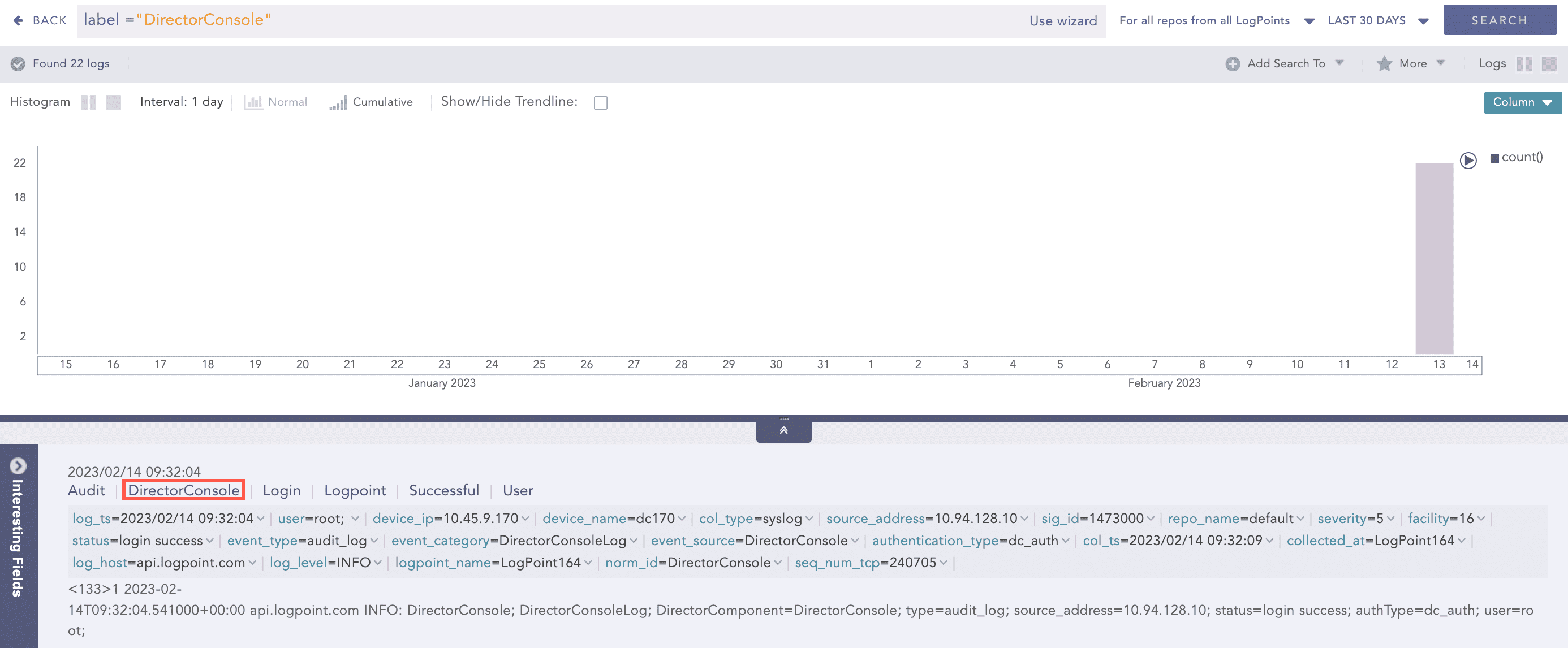
Viewing Audit Logs
Director Console audit logs include the DirectorComponent field which provides the DirectorConsole as a field value.
Examples of Director Console audit logs include:
Actions/Events |
Components |
Sample Logs |
|---|---|---|
Upload License |
License Management |
2023-01-03T03:54:12.109000+00:00 api217.logpoint.local INFO: DirectorConsole; DirectorConsoleLog; DirectorComponent=DirectorConsole; type=audit_log; status=install license; user=root; source_address=10.94.128.12; |
Generate PDF License Report |
License Management |
2023-01-03T03:58:36.708000+00:00 api217.logpoint.local INFO: DirectorConsole; DirectorConsoleLog; DirectorComponent=DirectorConsole; type=audit_log; status=download report; entityType=Director License; user=root; from=2023-01-01; to=2023-03-31; reportType=Q1; pool=ksipool; |
Generate CSV License Report |
License Management |
2023-01-03T04:01:03.151000+00:00 api217.logpoint.local INFO: DirectorConsole; DirectorConsoleLog; DirectorComponent=DirectorConsole; type=audit_log; source_address=10.94.128.12; user=ksi; authType=dc_auth; status=export license report as CSV success; from=2023-01-01; to=2023-03-31; |
Upload Patch File |
Assets Management |
2023-01-02T05:59:20.792000+00:00 api217.logpoint.local INFO: DirectorConsole; DirectorConsoleLog; DirectorComponent=DirectorConsole; type=audit_log; name=logpoint_7.0.1.pak; user=ksi; status=Upload; entityType=Asset; source_address=10.94.128.62; |
Install Patch File |
Assets Management |
2023-01-03T04:57:14.749000+00:00 api217.logpoint.local INFO: DirectorConsole; DirectorConsoleLog; DirectorComponent=DirectorConsole; type=audit_log; name=logpoint_7.2.0.102.pak; pool=ksipool; machine=LogPoint202; status=Install; assetType=PATCH; user=ksi; source_address=10.94.128.79; |
Upload Normalization Package File |
Assets Management |
2023-01-02T04:47:23.564000+00:00 api217.logpoint.local INFO: DirectorConsole; DirectorConsoleLog; DirectorComponent=DirectorConsole; type=audit_log; name=normpackage.pak; user=ksi; status=Upload; entityType=Asset; source_address=10.94.128.62; |
Install Normalization Package |
Assets Management |
2023-01-02T04:59:38.488000+00:00 api217.logpoint.local INFO: DirectorConsole; DirectorConsoleLog; DirectorComponent=DirectorConsole; type=audit_log; name=normpackage.pak; pool=ksipool; machine=LogPoint204; status=Install; assetType=NORMALIZATION PACKAGE; user=ksi; source_address=10.94.128.62; |
Upload Plugins Package File |
Assets Management |
2023-01-02T05:01:41.918000+00:00 api217.logpoint.local INFO: DirectorConsole; DirectorConsoleLog; DirectorComponent=DirectorConsole; type=audit_log; name=CiscoUmbrella_5.2.0.pak; user=ksi; status=Upload; entityType=Asset; source_address=10.94.128.62; |
Install Plugins Package |
Assets Management |
2023-01-02T05:02:37.419000+00:00 api217.logpoint.local INFO: DirectorConsole; DirectorConsoleLog; DirectorComponent=DirectorConsole; type=audit_log; name=CiscoUmbrella_5.2.0.pak; pool=ksipool; machine=LogPoint204; status=Install; assetType=PLUGIN; user=ksi; source_address=10.94.128.62; |
Upload Label Package File |
Assets Management |
2023-01-02T05:04:41.424000+00:00 api217.logpoint.local INFO: DirectorConsole; DirectorConsoleLog; DirectorComponent=DirectorConsole; type=audit_log; name=ksi_label.pak; user=ksi; status=Upload; entityType=Asset; source_address=10.94.128.62; |
Install Label Package |
Assets Management |
2023-01-02T05:05:38.394000+00:00 api217.logpoint.local INFO: DirectorConsole; DirectorConsoleLog; DirectorComponent=DirectorConsole; type=audit_log; name=ksi_label.pak; pool=ksipool; machine=LogPoint204; status=Install; assetType=LABEL PACKAGE; user=ksi; source_address=10.94.128.62; |
Upload IPLookup Package File |
Assets Management |
2023-01-02T05:06:58.843000+00:00 api217.logpoint.local INFO: DirectorConsole; DirectorConsoleLog; DirectorComponent=DirectorConsole; type=audit_log; name=IP.csv; user=ksi; status=Upload; entityType=Asset; source_address=10.94.128.62; |
Install IPLookup Package File |
Assets Management |
2023-01-02T05:08:50.796000+00:00 api217.logpoint.local INFO: DirectorConsole; DirectorConsoleLog; DirectorComponent=DirectorConsole; type=audit_log; name=IP.csv; pool=ksipool; machine=LogPoint204; status=Install; assetType=IPLOOKUP; user=ksi; source_address=10.94.128.62; |
Upload List Package File |
Assets Management |
2023-01-02T05:50:31.590000+00:00 api217.logpoint.local INFO: DirectorConsole; DirectorConsoleLog; DirectorComponent=DirectorConsole; type=audit_log; name=listpak.pak; user=ksi; status=Upload; entityType=Asset; source_address=10.94.128.62; |
Install List Package File |
Assets Management |
2023-01-02T05:51:44.098000+00:00 api217.logpoint.local INFO: DirectorConsole; DirectorConsoleLog; DirectorComponent=DirectorConsole; type=audit_log; name=listpak.pak; pool=ksipool; machine=LogPoint204; status=Install; assetType=LISTS; user=ksi; source_address=10.94.128.62; |
Uninstall Plugins Package |
Assets Management |
2023-01-02T05:12:33.567000+00:00 api217.logpoint.local INFO: DirectorConsole; DirectorConsoleLog; DirectorComponent=DirectorConsole; type=audit_log; name=Applications; pool=ksipool; machine=LogPoint204; status=Uninstall; assetType=PLUGIN; user=ksi; source_address=10.94.128.62; |
Asset Delete |
Assets Management |
2023-01-02T05:14:40.672000+00:00 api217.logpoint.local INFO: DirectorConsole; DirectorConsoleLog; DirectorComponent=DirectorConsole; type=audit_log; name=CiscoUmbrella_5.2.0.pak; status=Delete; assetType=Asset; user=ksi; source_address=10.94.128.62; |
Configure Plugin |
Plugin |
2023-01-02T05:17:56.796000+00:00 api217.logpoint.local INFO: DirectorConsole; DirectorConsoleLog; DirectorComponent=DirectorConsole; type=audit_log; name=STIX/TAXII Enrichment Source-6.0.0; pool=ksipool; machine=LogPoint204; status=create; entityType=Plugins; pluginType=StixTaxiiEnrichmentSource; source_address=10.94.128.62; |
Edit Plugin |
Plugin |
2023-01-02T05:19:28.150000+00:00 api217.logpoint.local INFO: DirectorConsole; DirectorConsoleLog; DirectorComponent=DirectorConsole; type=audit_log; name=STIX/TAXII Enrichment Source-6.0.0; pool=ksipool; machine=LogPoint204; status=change; entityType=Plugins; pluginType=StixTaxiiEnrichmentSource; source_address=10.94.128.62; |
Delete Plugin Configuration |
Plugin |
2023-01-02T05:21:23.418000+00:00 api217.logpoint.local INFO: DirectorConsole; DirectorConsoleLog; DirectorComponent=DirectorConsole; type=audit_log; name=ThreatIntelligence-6.1.0; pool=ksipool; machine=LogPoint204; status=delete; entityType=Plugins; pluginType=ThreatIntelligence; source_address=10.94.128.62; |
Download Report |
Entities |
2023-01-03T04:31:25.121000+00:00 api217.logpoint.local INFO: DirectorConsole; DirectorConsoleLog; DirectorComponent=DirectorConsole; type=audit_log; status=download report; entityType=Devices; user=ksi; reportType=Create; pool=ksipool; machine=74388e040fd742928277685bfb5e8c99; |
Download Report |
Operations |
2023-01-03T04:23:19.941000+00:00 api217.logpoint.local INFO: DirectorConsole; DirectorConsoleLog; DirectorComponent=DirectorConsole; type=audit_log; status=download report; entityType=CreateBackup; user=ksi; reportType=Operations; pool=ksipool; machine=74388e040fd742928277685bfb5e8c99; |
Retry Operation |
Tasks Page |
2023-01-02T05:47:25.505000+00:00 api217.logpoint.local INFO: DirectorConsole; DirectorConsoleLog; DirectorComponent=DirectorConsole; type=audit_log; entityType=NormalizationPackage; machine=LogPoint204; status=Retry; |
Upload UEBA License |
UEBA |
2023-01-02T06:24:24.768000+00:00 api217.logpoint.local INFO: DirectorConsole; DirectorConsoleLog; DirectorComponent=DirectorConsole; type=audit_log; name=uebalicense201.pak; user=ksi; status=Upload; entityType=Asset; source_address=10.94.128.62; |
Install UEBA License |
UEBA |
2023-01-03T05:14:08.377000+00:00 api217.logpoint.local INFO: DirectorConsole; DirectorConsoleLog; DirectorComponent=DirectorConsole; type=audit_log; name=license1672722773.pak; pool=ksipool; machine=LogPoint202; status=Install; assetType=UEBA; user=ksi; source_address=10.94.128.79; |