
Alert rule notification API allows you to set up and view details for HTTP notifications. You must create a JWT using the following scope to use the alert rule API. Go to Creating a JSON Web Token for more information.
Scope name |
Function |
|---|---|
alertrules:write |
|
alertrules:read |
To setup alert HTTP notifications, use /pluggables/Notification/HTTPNotification/create_api.
Endpoint URL
https://Logpoint-IP/pluggables/Notification/HTTPNotification/create_api
Method
POST
Request Headers
Content-Type = application/json
Authorization = Bearer <TOKEN>
Parameters
Parameters are data sent with the API request. You must include them in the request body as raw text.
Field |
Type |
Description |
|---|---|---|
type |
string |
Alert rule notification type. Must be http. Optional Field. |
http_url |
string |
IP address or domain name where the HTTP request must be sent. Mandatory Field. Example: https://example.com, https://8.8.8.8 |
http_request_type |
string |
The HTTP method to be used for the request, including POST, GET, PUT, DELETE, PATCH, or HEAD. Mandatory Field. |
http_querystring |
string |
Query string to include in the request URL, like information about the logs. Optional Field. |
notify_http |
boolean |
Whether to enable or disable HTTP notification. By default, it is true. Optional Field. |
http_format_query |
string |
Formatted value of http_querystring to include in the request URL. For example: If you add http_querystring = ”x=34&y={{foo|date}}”, where, foo is a reserved Jinja placeholder , it is formatted as http_format_query = “x34&y={{foo| date(format, timezone)}}” The timezone and date format is used according to what the user selected in their User Preference. Optional Field. |
http_body |
string |
The body content of the HTTP request. You must input JSON string. Optional Field. |
protocol |
string |
Protocol used for the notification: HTTP or HTTPS. By default, it is HTTP. Optional Field. |
dispatch_option |
string |
Option to send notification when the alert is triggered: * auto : to send every time the alert rule is triggered. * manual: to manually send from incident actions. By default, it is auto. Optional Field. |
http_header |
object |
Custom HTTP headers to include in the request for authentication. Must be one of the following in additionalProp1:
Optional Field. |
http_threshold_value |
integer |
Number of incidents that must be triggered before sending the HTTP notification. Optional Field. |
http_threshold_option |
string |
Option to set the time for the http_threshold_value. Either minute, hour, or day. Optional Field. |
ids |
array of strings |
List of alert rule IDs. Get the list of ids from Listing Alert Rules. |
Request Example
{
    "type": "http",
    "http_url": "https://example.com/",
    "http_request_type": "string",
    "http_querystring": "string",
    "notify_http": true,
    "http_format_query": "",
    "http_body": "string",
    "protocol": "HTTPS",
    "dispatch_option": "auto",
    "http_header": {
        "additionalProp1": {}
    },
    "http_threshold_value": 0,
    "http_threshold_option": "minute",
    "ids": [
        "string"
    ]
}
Success Response
{
  "success": true,
  "data": [
    "string"
  ],
  "message": "string"
}
Validation Error Response
{
  "success": false,
  "validationErrors": {
    "additionalProp1": {}
  },
  "message": "string"
}
To view an alert HTTP notification, use /pluggables/Notification/HTTPNotification/read_api.
Endpoint URL
https://Logpoint-IP/pluggables/Notification/HTTPNotification/read_api
Method
GET
Request Header
Authorization = Bearer <TOKEN>
Parameters
Parameters are data sent with the API request. You must include it in parameters as Key and Value.
Field |
Type |
Description |
|---|---|---|
id |
string |
Id of the created Alert Rule. Get the list of ids from Listing Alert Rules. |
Request Example:
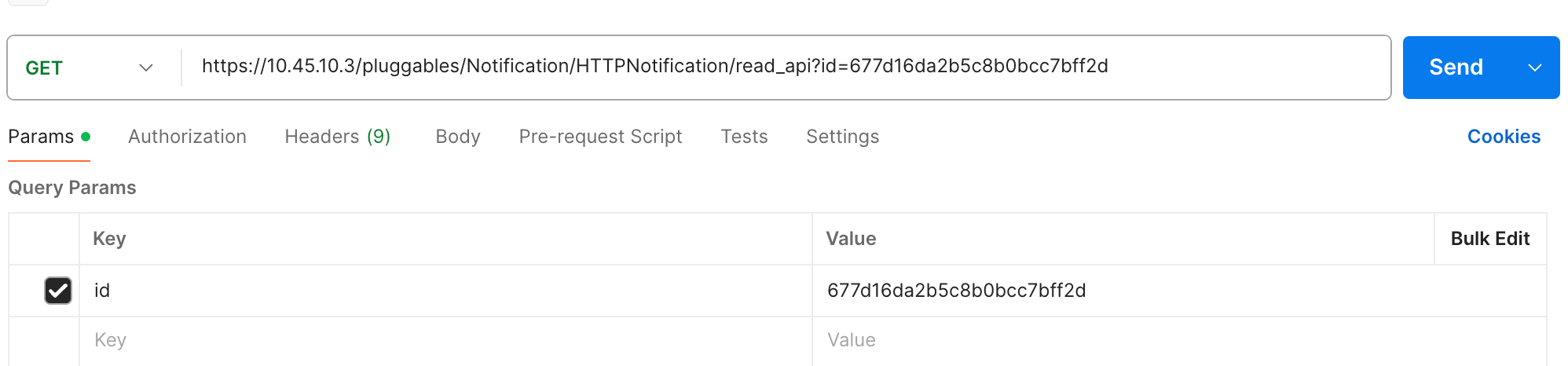
Viewing HTTP Notification using Postman
Success Response
{
    "success": true,
    "data": {
        "type": "string",
        "http_url": "https://example.com/",
        "http_request_type": "string",
        "http_querystring": "string",
        "notify_http": true,
        "http_format_query": "string",
        "http_body": "string",
        "dispatch_option": "string",
        "http_header": {
        "additionalProp1": "string",
        "additionalProp2": "string",
        "additionalProp3": "string"
        },
        "http_threshold_value": 0,
        "http_threshold_option": "minute",
        "protocol": "string"
    },
    "message": "string"
}
Validation Error Response
{
  "success": false,
  "validationErrors": {
    "additionalProp1": {}
  },
  "message": "string"
}