
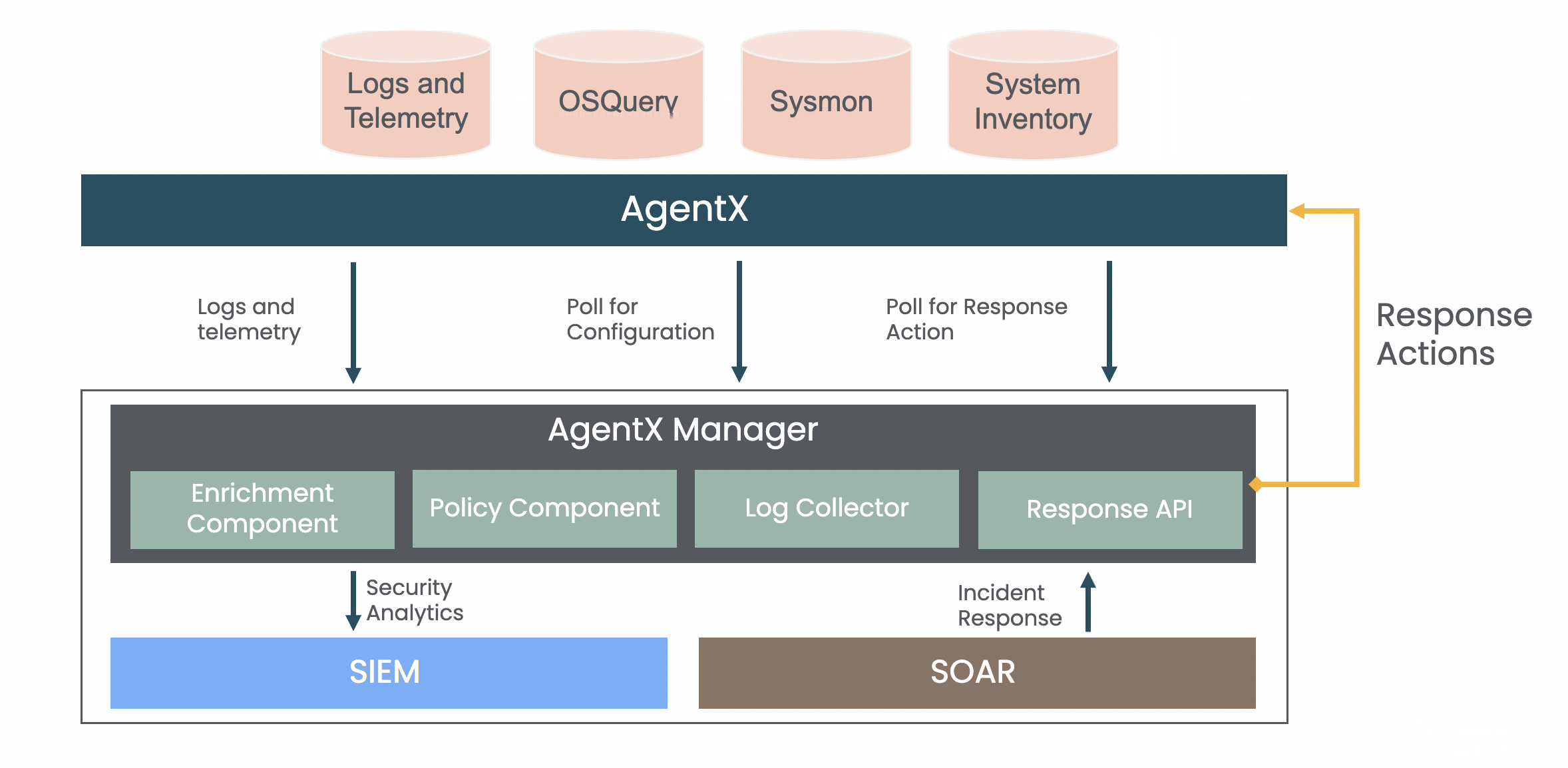
AgentX transfers logs and telemetry data from Windows or Debian Linux to Logpoint SIEM. It uses SOAR to investigate and resolve potential security threats in real-time and detect malicious software and respond to threats within Logpoint Converged SIEM.
AgentX
Collects and forwards operating system and application logs to Logpoint for analysis, addressing security and operational issues such as system errors, misconfigurations, policy violations, and malicious activities.
Accesses event logs stored as flat files by services such as IIS, DHCP and DNS on Windows or Linux, and transfers their data to Logpoint for analysis and monitoring.
Identifies the users and applications responsible for file creation or modification and detects changes made to its content, permissions ownership and attributes. Also, detects any integrity changes made to them and receives alert if critical files and systems are tampered.
Detects changes made to Windows Registry content, permissions, ownership, and attributes by unidentified events, and also identifies responsible users and applications.
Supports the CIS Critical Security Controls v8 and allows you to create custom policies and scan intervals. Also, detects policy and configuration violations and provides an assessment report with remediation steps to resolve issues.
Supports compliance security controls and regulations such as GDPR, NIST 800-53 and PCI-DSS and enriches them using telemetry generated from Windows or Debian Linux. You can also define custom compliance rules according to your requirements.
Enriches incoming logs with attack category, attack ID, attack tag and other TTP details sourced from the MITRE ATT&CK framework.
AgentX Manager: Collects and analyzes logs from Windows or Debian Linux.
AgentX Client: There are two AgentX Clients: Windows Installer and Debian Installer. They collect and send Windows and Linux data to Logpoint AgentX Manager for analysis.
OSSEC and osquery: AgentX Client is bundled with osquery and OSSEC. osquery collects information about system events, processes and configuration, while OSSEC collects information about security events, alerts, and anomalies detected on the monitored systems. This data is valuable for security monitoring, analysis, and incident response across a network. The collected information is then sent to AgentX Server for further processing and normalization.
AgentX Server: Interacts with AgentX Clients and manages them.
AgentXKB: Includes compiled normalizers, dashboards and search templates to normalize and analyze logs, monitor security and ensure compliance such as Endpoint Compliance, File Integrity Management and Security Configuration Assessment. The compiled normalizers are compatible with CNDP.
Compiled Normalizers
AgentXUnixCompiledNormalizer: Normalizes logs from the following Linux sources:
UnixSysmon
UnixAuditLogs
Unix Generic
SecurityConfigurationAssessment
ActiveResponse
FileIntegrityManagement
OSQuery
NginX
AgentXWindowsCompiledNormalizer: Normalizes logs from the following Windows sources:
WindowsSecurityAuditing
MSSQL
WindowsSysmon
Generic
ActiveResponse
FileIntegrityManagement
SecurityConfigurationManagement
OSQuery
DNSServer
DHCP
PowerShell
IIS
ExchangeMT
Dashboards
LP_AgentX - Agents Overview
LP_AgentX - Endpoints Compliance - PCI DSS
LP_AgentX - Endpoints NIST Compliance
LP_AgentX - File Integrity Management
LP_AgentX - Rule Triggers Overview
LP_AgentX - Security Configuration Assessment
Search Templates
LP_AgentX
LP_Browser Extension Investigation
Playbooks: SOAR playbooks for incident response and SOAR workflows. The playbooks also automate workflows for tasks such as host isolation, file removal, running an osquery, disabling users, detecting malware and extracting network state. You can download the Playbooks .zip file from the Help Center. Go to Playbooks for details.