Sophos Analytics

Sophos Dashboards

LP_Sophos Central

This dashboard consists of the following widgets:

Widget Name

Description

Top 10 User in Control Violation

The top 10 web application violations by users.

Top 10 Event in Control Violation

The top 10 web application violations by event categories.

Top 10 Event Types

The top 10 Sophos Central event types.

Top 10 Event in Blocked Application

The top 10 blocked applications on the basis of the degree of risk by event category.

Top 10 User in Application Block

The top 10 applications blocked by users.

Top 10 Host in Blocked Application

The top 10 applications blocked by hosts.

Top 10 Host in Control Violation

The top 10 web application violations by hosts.

Top 10 User in Successful Update

The successful update of Sophos Central based on the top 10 users.

Top 10 Host in Successful Update

The successful update of Sophos Central based on the top 10 servers.

Top 10 Events in Update Failure

The failed update of Sophos Central based on the top 10 event categories.

Top 10 Host in Update Fail

The failed update of Sophos Central based on the top 10 servers.

Top 10 User in Update Fail

The failed update of Sophos Central based on the top 10 users.

LP_Sophos UTM Overview

This dashboard consists of the following widgets:

Widget Name

Description

Time Trend of All Logs

A time trend of the Sophos UTM events from THE past 24 hours.

Top 10 Senders by Datasize

The top 10 senders based on the size of data in MB.

Top 10 Recipients by Datasize

The top 10 recipients based on the size of data in MB.

Top 10 Dropped Sources by Packet Size

The network packets dropped by the top 10 source addresses.

Top 10 Dropped Destinations by Packet Size

The network packets dropped by the top 10 destination addresses.

Top 10 Recipients

The count of the top 10 recipients.

Top 10 Senders

The count of the top 10 senders.

Top 10 Dropped Sources

The network packets dropped by the top 10 source addresses.

Top 10 Dropped Destinations

The network packets dropped by the top 10 destination addresses.

Logs per Event Category

The count of Sophos UTM events by event category from the last 24 hours.

Top 10 Applications in Web Requests

The top 10 applications web requests sent to Sophos UTM Firewall.

Top 10 Categories in Web Requests

The top 10 application categories that sent web requests to Sophos UTM Firewall.

Logs per Event Type

The Sophos UTM events by event types from the last 24 hours.

LP_Sophos UTM Safeguarding

This dashboard consists of the following widgets:

Widget Name

Description

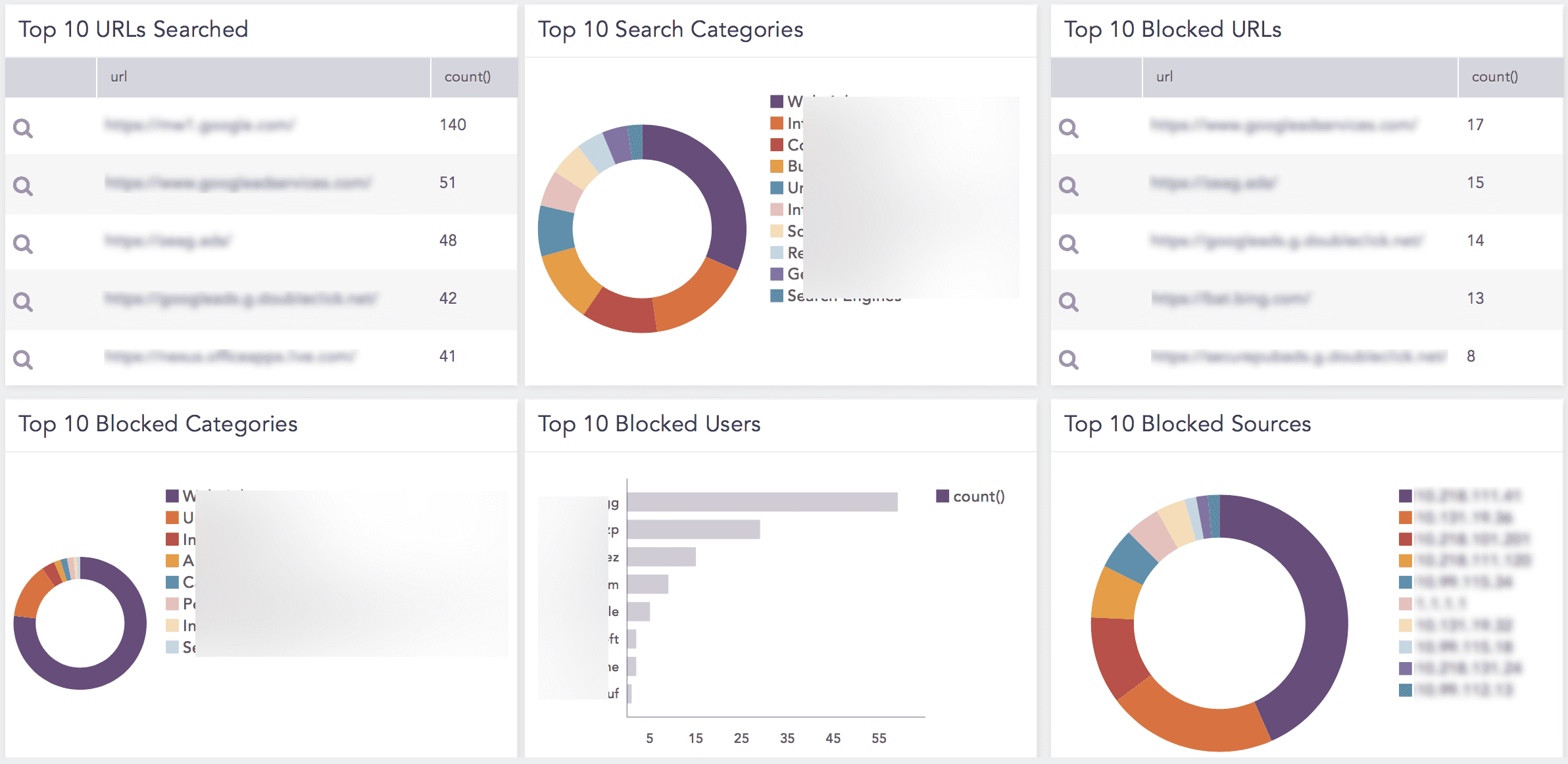
Top 10 URLs Searched

The top 10 URLs visited by users.

Top 10 Search Categories

The top 10 search categories.

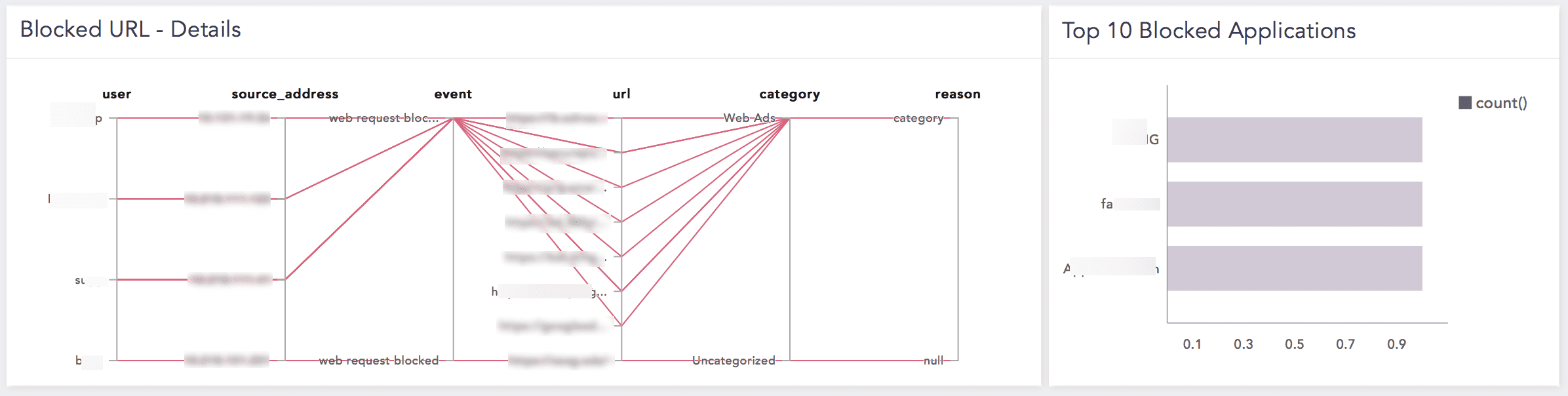
Blocked URL - Details

The URLs blocked or denied with reasons.

Top 10 Blocked URLs

The top 10 blocked URLs.

Recurrent Events

The recurrent Sophos UTM events by the source address and event type.

Top 10 Blocked Sources

The top 10 source addresses blocked or denied.

Top 10 Blocked Users

The top 10 users blocked or denied.

Top 10 Blocked Categories

The top 10 categories blocked or denied.

Top 10 Blocked Applications

The top 10 applications blocked or denied.

Top 20 Searched Terms

The top 10 terminologies or keywords searched by users.

LP_Sophos UTM Secure Mail

This dashboard consists of the following widgets:

Widget Name

Description

Mail Traffic over Past Week

The number of emails sent or received in the last 24 hours.

Rejected Emails: Top 10 Senders by Datasize

The rejected emails based on the data size sent by the top 10 senders.

Rejected Emails: Top 10 Senders

The rejected emails sent by the top 10 senders.

Quarantined Emails: Top 10 Senders by Datasize

The quarantined emails based on the data size sent by the top 10 senders.

Quarantined Emails: Top 10 Senders

The quarantined emails sent by the top 10 senders.

Rejected Emails: Top 10 Recipients by Datasize

The rejected emails received by the top 10 recipients based on the data size.

Rejected Emails: Top 10 Recipients

The rejected emails received by the top 10 recipients.

Quarantined Emails: Top 10 Recipients by Datasize

The quarantined emails received by the top 10 recipients based on the data size.

Quarantined Emails: Top 10 Recipients

The quarantined emails received by the top 10 recipients.

Rejected Emails: Top 10 Sources

The rejected emails based on the top 10 sources.

Quarantined Emails: Top 10 Sources

The quarantined emails based on the top 10 sources.

LP_Sophos UTM Secure Net

This dashboard consists of the following widgets:

Widget Name

Description

Top 10 Sources for Dropped Packets

The top 10 source addresses based on the dropped network packets.

Top 10 Destinations for Dropped Packets

The top 10 destination addresses based on the dropped network packets.

Top 10 Sources w.r.t Dropped Packets Size

The top 10 source addresses based on the dropped network packets.

Sources in IPS Alert (Daily)

The count of source addresses detected in the IPS alert.

Top 10 Destinations in IPS Alert (Daily)

The count of destination addresses detected in the IPS alert.

VPN Connections

The VPN connections by the user, events, source address, virtual address, and the timestamp.

Top 10 Users in VPN Connections

A detailed overview of VPN connections based on the users.

Top 10 Sources in VPN Connections

The top 10 source addresses that initiated VPN connections.

LP_Sophos UTM Secure Web

This dashboard consists of the following widgets:

Widget Name

Description

Top 10 Blocked URLs

The top 10 URLs blocked by Sophos UTM.

Top 10 Passed URLs

The top 10 secure URLs.

Top 10 Users in Web Requests

The top 10 users who sent website requests.

Top 10 Sources in Web Requests

The top 10 source addresses from which website requests were sent .

Top 10 Destinations in Web Requests

The destination address that asked for web requests.

Top 10 Passed Categories

The top 10 secure web categories (such as business or fashion).

Top 10 Passed Applications

The top 10 secure applications.

Top 10 Blocked Applications

The top 10 blocked applications.

Top 10 Blocked Categories

The top 10 blocked categories (such as pornography).

LP_Sophos UTM System

This dashboard consists of the following widgets:

Widget Name

Description

Top 10 Created Objects

The top 10 created objects.

Top 10 Deleted Objects

The top 10 deleted objects.

Top 10 Changed Objects

The top 10 changed objects.

Wifi Status

A detailed overview of the wifi status. The event ID 4101 represents Connected, the event ID 4102 represents Disconnected, the event ID 4103 represents Authentication, the event ID 4104 represents Association, and the event ID 4105 represents Failure.

Package Installation Status

A detailed overview of the status of installed packages. The event ID 3707 represents Synchronize, the event ID 3716 or 371Z represents Install, and the event ID 371D represents No_new_package.

Successful User Authentications

An overview of users who successfully authenticated in a system.

Failed User Authentications

The users who failed to authenticate successfully in a system.

Configuration Changes

The configuration changes (such as, object created, object changed, or object deleted).

LP_Sophos XG Firewall

This dashboard consists of the following widgets:

Widget Name

Description

Event Time Trend

Displays the time chart count of event types.

Top 10 Component responsible for logging

The top 10 log components responsible for the logging event.

Top 10 Log Sub Type assigned to Traffic

The top 10 sub-types assigned to the traffic.

Top 10 Source Address in Allowed Traffic

The top 10 source addresses allowed by Sophos XG Firewall.

Top 10 Destination Address in Allowed Traffic

The top 10 destination addresses allowed by Sophos XG Firewall.

Top 10 Destination Port in Allowed Traffic

The top 10 destination ports allowed by Sophos XG Firewall.

Top 10 Source Address in Denied/Blocked Traffic

The top 10 source addresses denied or blocked by Sophos XG Firewall.

Top 10 Destination Address in Denied/Blocked Traffic

The top 10 destination addresses denied or blocked.

Top 10 Destination Port on Denied/Blocked

The top 10 destination ports denied or blocked by Sophos XG Firewall.

Top 10 Source Address in Denied DoS Attack

The top 10 source addresses detected in the Denied DoS Attack.

Denied DoS Attack

The Denied DOS Attack by the source address, destination address, user, source interface, destination interface, source zone type, destination zone type, and priority.

Top 10 Detected Outbound Attack by Country

The top 10 outbound attacks by country.

Top 10 Detected Inbound Attack by Country

The top 10 inbound attacks by country.

Top 10 Dropped Outbound Attack by Country

The top 10 dropped outbound attacks by country.

Top 10 Dropped Inbound Attack by Country

The top 10 dropped inbound attacks by country.

Detected Attack

The attacks detected in your network.

Dropped Attack

The dropped attacks in your network.

Top 10 Blocked Malware Infected URL

The top 10 URLs infected by blocked malware.

Blocked Malware Infected URL

The URLs infected by blocked malware based on host, user, malware, URL, domain, source address, destination address, protocol, destination port, received data size, and priority.

Top 10 Blocked Malware Infected File

The top 10 files infected by blocked malware.

Top 10 Malicious Email Address

The top 10 malicious email addresses.

Email Infected with Malware

The emails infected by malware.

Rejected/Dropped Spam Mail

The dropped or rejected spam emails.

Accepted Spam Mail

The accepted spam emails.

Forwarded Spam Mail

The forwarded spam emails.

Adding the Sophos Dashboards

  1. Go to Settings >> Knowledge Base from the navigation bar and click Dashboards.

  2. Select VENDOR DASHBOARD from the drop-down.

  3. Click the Use icon from Actions of the required dashboard.

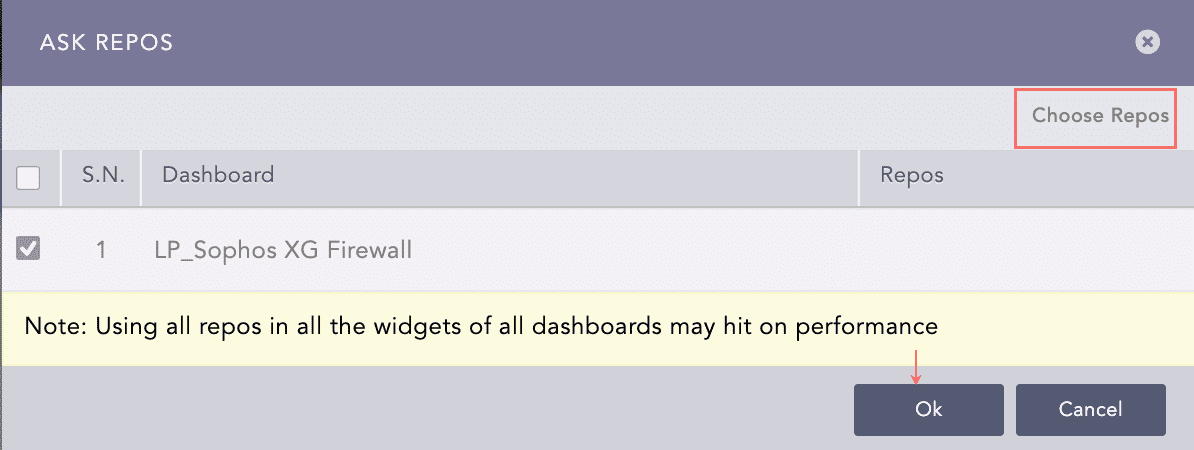
  4. Click Choose Repos.

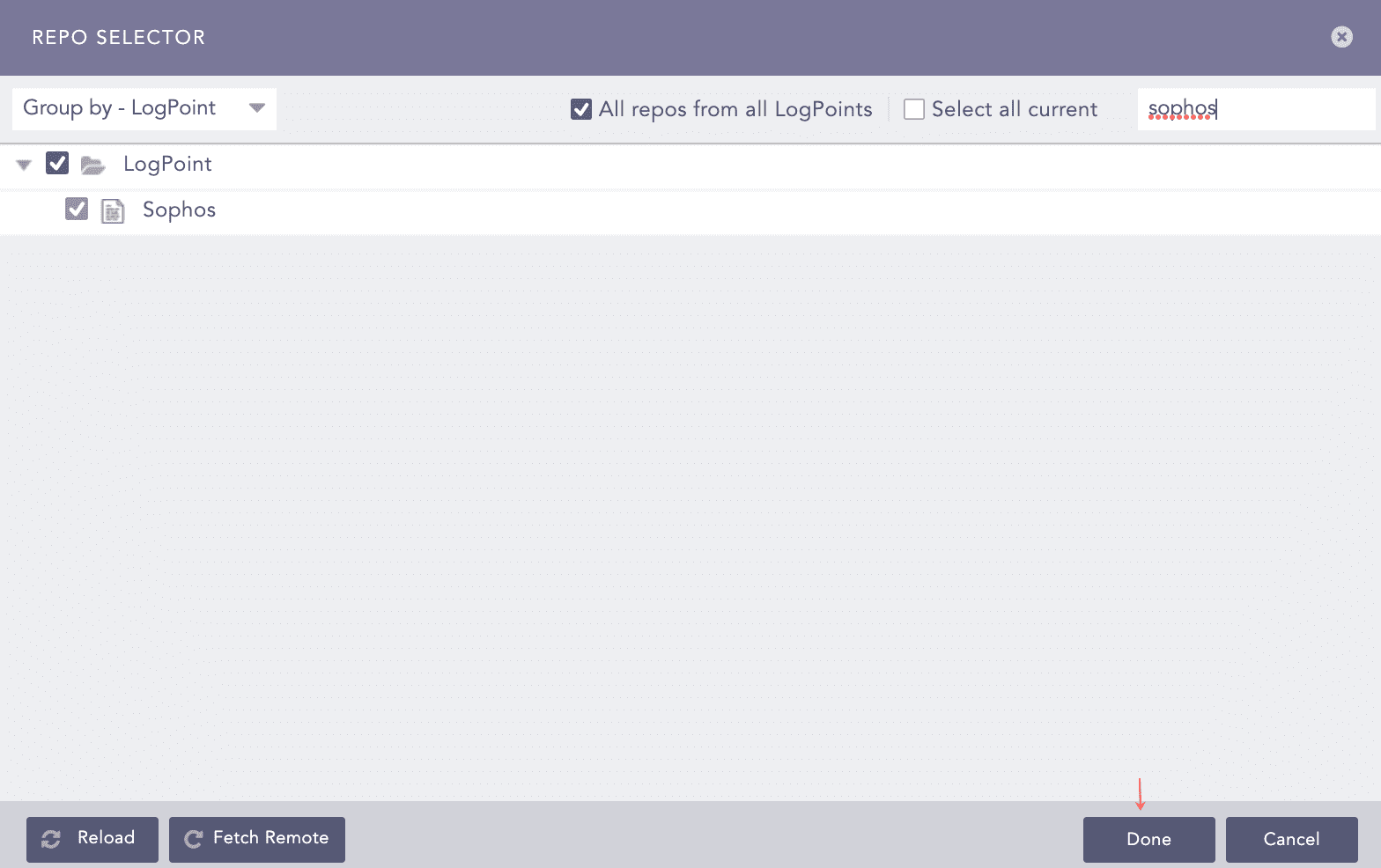
  5. Select the repo configured to store the Sophos logs and click Done.

Sophos Ask Repos Panel

Selecting a Repo

  1. Select the dashboard and click Ok.

Sophos Ask Repos Panel

Selecting Repos

You can find the Sophos dashboards under Dashboards.

Sophos Dashboard

Sophos Dashboard

Sophos Dashboard

Sophos Dashboard

Sophos Labels

LP_Sophos Central

Available labels are:

Labels

Description

Web, Block, Control, Violation

Events with the WebControlViolation event type.

Application, Block

Events with the Application::Blocked event type.

Update, Successful

Events with the UpdateSuccess event type.

Update, Fail

Events with the UpdateFailure event type.

LP_Sophos SSHD

Available labels are:

Labels

Description

Block

Events with the Blocked action detected by Sophos Endpoint Antivirus.

Unavailable

Events with the No longer present action detected by Sophos Endpoint Antivirus.

Unavailable

Events with the Cleaned up action detected by Sophos Endpoint Antivirus.

Malware

Events with the virus threat type detected by Sophos Endpoint Antivirus.

LP_Common Sophos Systems

Available labels are:

Labels

Description

Web, Request, Deliver

Events with the 0001 event ID.

Web, Request, Block

Events with the 0002 event ID.

Email, Pass

Events with the 1000 and 1100 event IDs.

Email, Quarantine

Events with the 1001 and 1101 event IDs.

Email, Blackhole

Events with the 1002 event ID.

Email, Deny

Events with the 1003 event ID.

Packet, Log

Events with the 2000 event ID.

Packet, Drop

Events with the 2001 event ID.

Packet, Accept

Events with the 2002 event ID.

Packet, Deny

Events with the 2003 event ID.

Invalid, Packet

Events with the 2004 event ID.

Spoof, Packet, Drop

Events with the 2005 event ID.

ICMP, Redirect

Events with the 2009 event ID.

TCP, Connection, Drop

Events with the 2012 event ID.

Ftp, Data

Events with the 2013 event ID.

DNS, Request

Events with the 2014 event ID.

GEOIP, Packet, Drop

Events with the 2015 event ID.

Port, Scan, Detect

Events with the 2012 event ID.

Flood, Detect

Events with the 2103, 2104, and 2105 event IDs.

Connection, Allow

Events with the 2201 or 2203 event ID.

Connection, Deny

Events with the 2202 or 2204 event ID.

Authentication, Successful

Events with the 3004 or 3701 event ID.

Authentication, Fail

Events with the 3005 event ID.

Process, Delete

Events with the 3006 event ID.

Package, Install

Events with the 3716, 3712, or 3707 event ID.

Report, Receive

Events with the 4211 event ID.

Acknowledge, Report

Events with the 4212 event ID.

Object, Create

Events with the 310 event ID and the created action.

Object, Change

Events with the 310 event ID and the changed action.

Object, Delete

Events with the 3111 event ID.

Snapshot, Download

Events with the 310x event ID.

Snapshot, Create

Events with the 310i event ID.

Password, Change

Events with the 310g event ID.

STA, Connection, Allow

Events with the 4101 event ID.

STA, Connection, Deny

Events with the 4102 or 4105 event ID.

STA, Authentication

Events with the 4103 event ID.

STA, Association

Events with the 4104 event ID.

Package, Install, Fail

Events with the 371D event ID.

LoadBalance, Online

Events with the 4000 ONLINE event ID.

LoadBalance, Offline

Events with the 4000 OFFLINE event ID.

Web, Request, Fail

Events with the 0104 event ID.

IPS, Alert

Events with the 2101 event ID.

Node, Change

Events with the 310c event ID.

Using Sophos Report Templates

The available report templates are:

  • LP_Sophos UTM Safeguarding: It is the incident summary report that provides statistical information on the searched URLs, search categories and terms, blocked URLs, sources, and users, detected by Sophos UTM in different formats, such as graphs and lists.

  • LP_Sophos XG Firewall: It is the incident summary report that provides statistical information on the blocked/malicious emails, blocked malware, outbound/inbound attacks, DoS attacks, allowed/denied destination and source addresses, detected by Sophos XG Firewall in different formats, such as graphs and lists.

Generating Sophos Report Templates

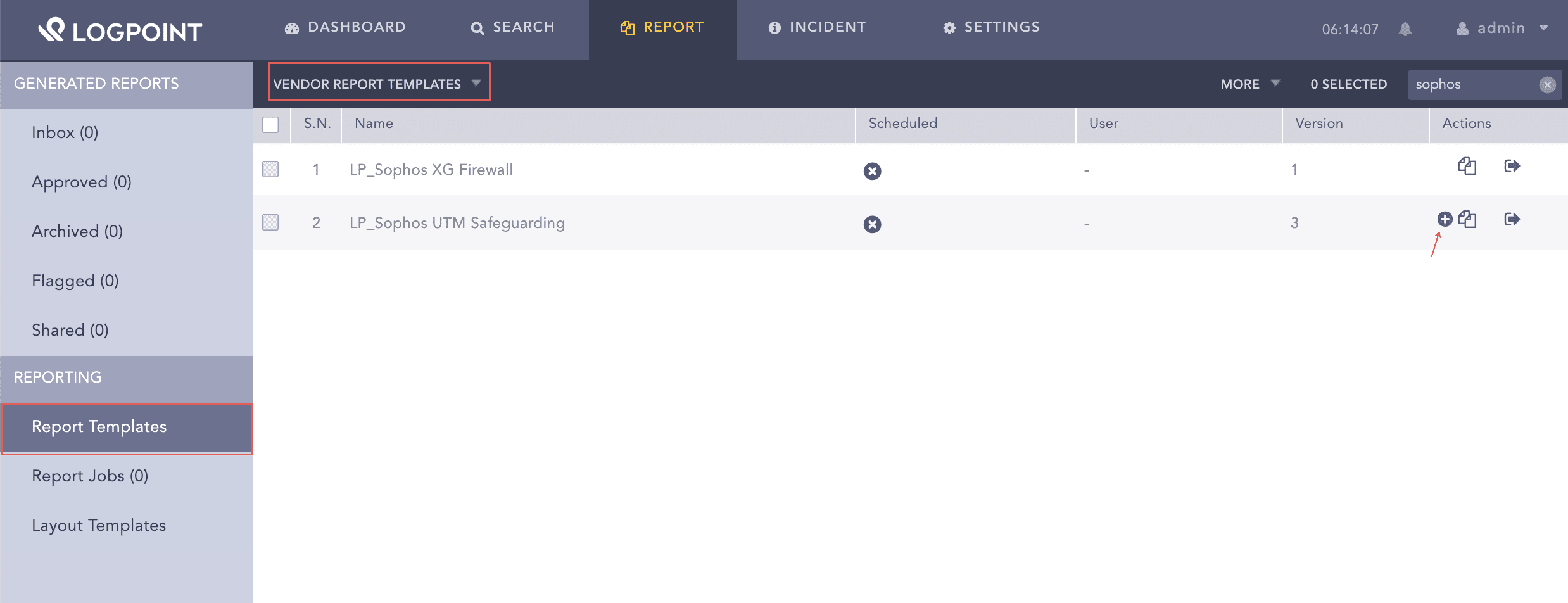
  1. Go to Report >> Reports Template.

  2. Select VENDOR REPORT TEMPLATES from the drop-down.

  3. Click the Use Vendor Report from Actions of the required template.

Using Sophos Report Template

Using Sophos Report Template

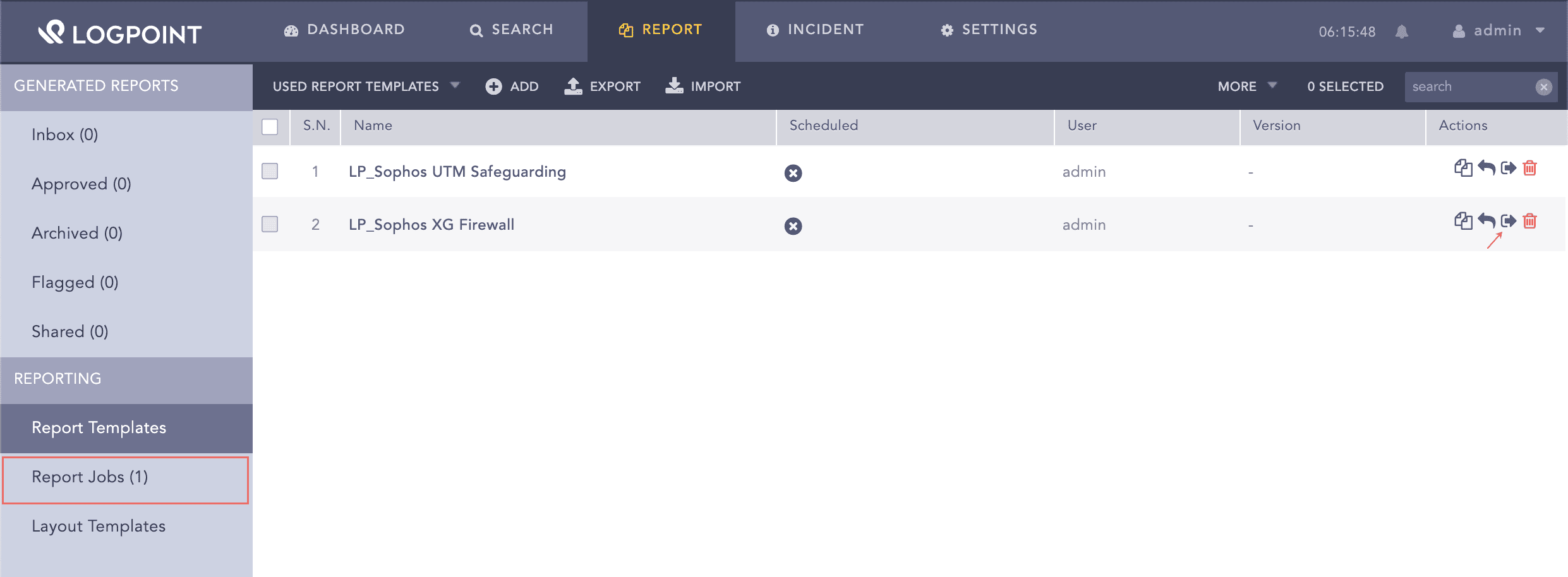
  1. Click the Run This Report from Actions.

Using Sophos Report Template

Using Sophos Report Template

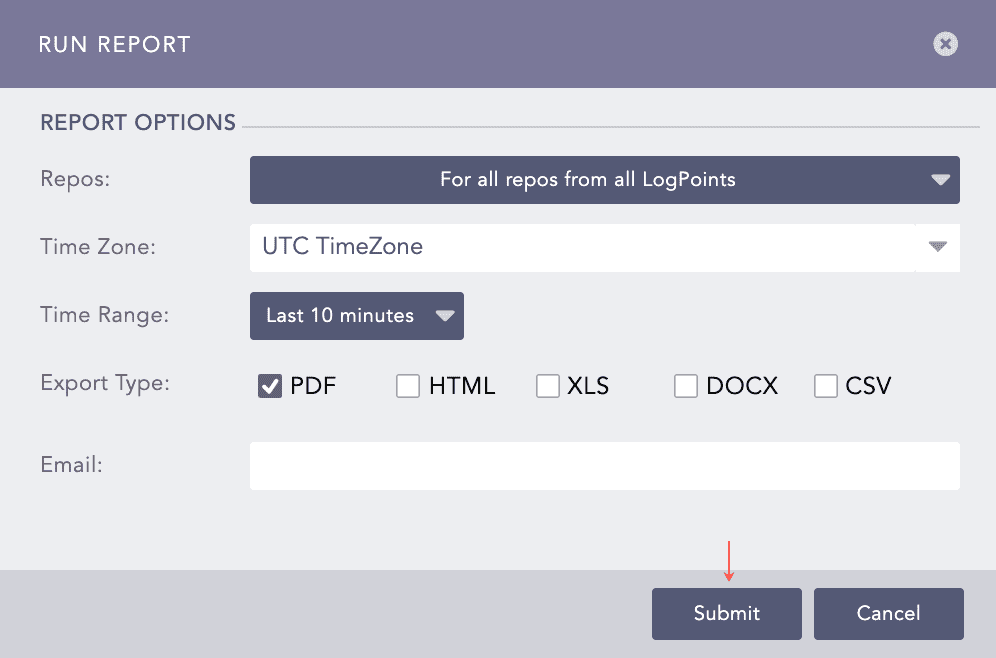
  1. Select Repos, Time Zone, Time Range, Export Type and enter Email.

  2. Click Submit.

Run the Sophos Activities Report Template

Running Sophos Report Template

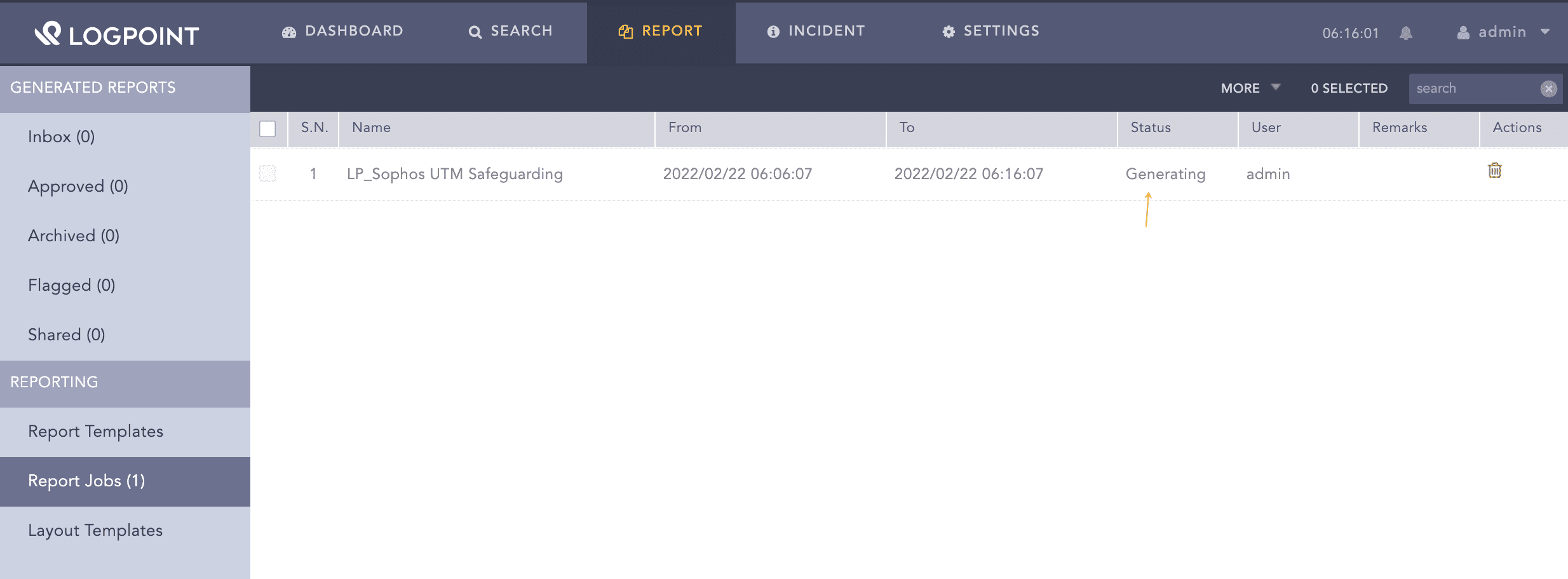
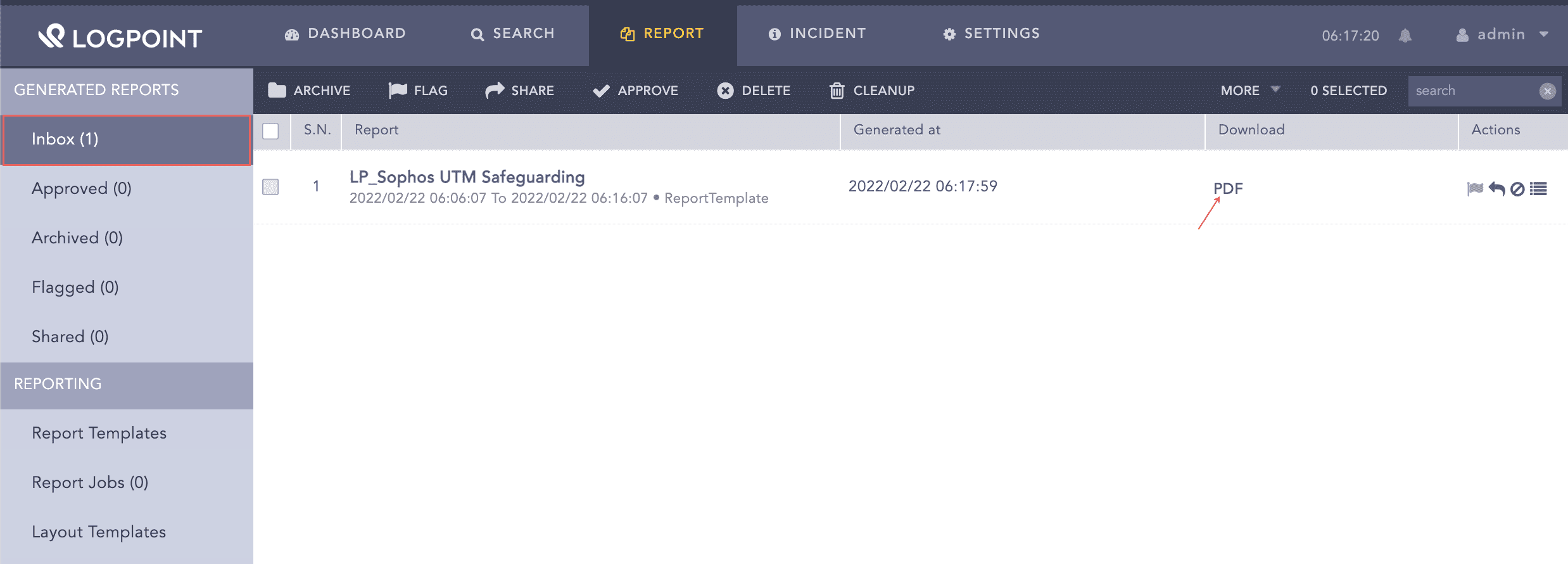
You can view the reports being generated under Report Jobs and download the generated reports from Inbox with .pdf extension by clicking PDF under the Download section.

Generating Report

Generating a Report

Generating Report

Generating a Report

You can view the reports being generated under Report Jobs and download them. Click PDF under Download to get .pdf formatted reports.

You can analyze the data using a report’s graphs, time trends, lists, and text. Report data summarizes incidents during a specific period, such as the past 24 hours or the past five minutes. While generating a report, you can customize the calendar period according to your needs. For more information on how to schedule reports, go to Scheduling.

Sophos Alerts

LP_Sophos XG Firewall - Detected Malware Infected Mail

  • Trigger condition: Logpoint detects malware-infected mail related to SMTP, POP3, and IMAP4.

  • ATT&CK Category: -

  • ATT&CK Tag: -

  • ATT&CK ID: -

  • Minimum Log Source Requirement: Sophos XG Firewall

  • Query:

    norm_id=SophosXGFirewall label=Mail label=Malware label=Infect label=Detect
    

LP_Sophos XG Firewall - Inbound Attack Detected by IDP

  • Trigger Condition: Logpoint detects the inbound attack defined in the IDP policy.

  • ATT&CK Category: Impact

  • ATT&CK Tag: Network Denial of Service, Endpoint Denial of Service

  • ATT&CK ID: T1498, T1499

  • Minimum Log Source Requirement: Sophos XG Firewall

  • Query:

    norm_id=SophosXGFirewall label=Attack label=Detect label=IDP destination_address=* -source_address in HOMENET | process geoip(source_address) as country
    

LP_Sophos XG Firewall - Outbound Attack Detected by IDP

  • Trigger Condition: Logpoint detects the outbound attack defined in the IDP policy.

  • ATT&CK Category: Impact

  • ATT&CK Tag: Network Denial of Service, Endpoint Denial of Service

  • ATT&CK ID: T1498, T1499

  • Minimum Log Source Requirement: Sophos XG Firewall

  • Query:

    norm_id=SophosXGFirewall label=Attack label=Detect label=IDP destination_address=* -destination_address in HOMENET | process geoip(destination_address) as country
    

LP_Sophos Central - Multiple Instances of Failed Update

  • Trigger Condition: Logpoint detects multiple instances of update failed on an endpoint.

  • ATT&CK Category: -

  • ATT&CK Tag: -

  • ATT&CK ID: -

  • Minimum Log Source Requirement: Sophos Central

  • Query:

norm_id=SophosCentral label=Fail label=Update destination_host=* |chart count() as hst_cnt by destination_host|search hst_cnt>10

LP_Sophos Central - User Application Blocked

  • Trigger Condition: An application is blocked for a user.

  • ATT&CK Category: -

  • ATT&CK Tag: -

  • ATT&CK ID: -

  • Minimum Log Source Requirement: Sophos Central

  • Query:

norm_id=SophosCentral group=APPLICATION_CONTROL action=Blocked user=* application=*

LP_Sophos Central - Multiple Host Affected by the Same Threat

  • Trigger Condition: Multiple hosts (greater than 10) are affected by the same threat.

  • ATT&CK Category: -

  • ATT&CK Tag: -

  • ATT&CK ID: -

  • Minimum Log Source Requirement: Sophos Central

  • Query:

norm_id=SophosCentral file=* destination_host=* threat=* |chart distinct_count(destination_host) as hst_cnt by threat|search hst_cnt>10

LP_Sophos Central - Multiple Host Affected by the Same Threat

  • Trigger Condition: Multiple hosts (greater than 10) are affected by the same threat.

  • ATT&CK Category: -

  • ATT&CK Tag: -

  • ATT&CK ID: -

  • Minimum Log Source Requirement: Sophos Central

  • Query:

norm_id=SophosCentral file=* destination_host=* threat=* |chart distinct_count(destination_host) as hst_cnt by threat|search hst_cnt>10

LP_Sophos Central - Endpoint Policy Non-Compliant

  • Trigger Condition: An endpoint is non-compliant with a policy.

  • ATT&CK Category: -

  • ATT&CK Tag: -

  • ATT&CK ID: -

  • Minimum Log Source Requirement: Sophos Central

  • Query:

norm_id=SophosCentral group="POLICY" compliance_status="non-compliance" user=* policy=*

LP_Sophos Central - Real-Time Protection Disabled

  • Trigger Condition: The real-time endpoint protection is disabled.

  • ATT&CK Category: -

  • ATT&CK Tag: -

  • ATT&CK ID: -

  • Minimum Log Source Requirement: Sophos Central

  • Query:

norm_id=SophosCentral label=AntiVirus label=Disable user=* destination_host=*

LP_Sophos Central - Same Domain Blocked for Multiple User

  • Trigger Condition: Multiple users visit the same blocked websites.

  • ATT&CK Category: -

  • ATT&CK Tag: -

  • ATT&CK ID: -

  • Minimum Log Source Requirement: Sophos Central

  • Query:

norm_id=SophosCentral group=WEB action=blocked domain=* user=* |chart distinct_count(user) as usr_cnt  by domain|search usr_cnt>10

LP_Sophos Central - Multiple Peripheral Devices Allowed

  • Trigger Condition: Multiple peripheral devices in the endpoint are allowed.

  • ATT&CK Category: -

  • ATT&CK Tag: -

  • ATT&CK ID: -

  • Minimum Log Source Requirement: Sophos Central

  • Query:

norm_id=SophosCentral label=Alert label=Device object=* user=* |chart distinct_count(object) as dvc_cnt by user|search dvc_cnt>2

LP_Sophos Central - Potential Threat Detected

  • Trigger Condition: A potential threat is detected in an endpoint.

  • ATT&CK Category: -

  • ATT&CK Tag: -

  • ATT&CK ID: -

  • Minimum Log Source Requirement: Sophos Central

  • Query:

norm_id=SophosCentral group=PUA file=* threat=* destination_host=*

LP_Sophos Central - User Browsing Blocked Sites

  • Trigger Condition: A website is blocked for a user.

  • ATT&CK Category: -

  • ATT&CK Tag: -

  • ATT&CK ID: -

  • Minimum Log Source Requirement: Sophos Central

  • Query:

norm_id=SophosCentral group=WEB action=blocked domain=*

LP_Sophos XG Firewall - Detected Malware Infected Mail

  • Trigger Condition: A malware-infected email related to SMTP, POP3, or IMAP4 is detected.

  • ATT&CK Category: -

  • ATT&CK Tag: -

  • ATT&CK ID: -

  • Minimum Log Source Requirement: Sophos XG Firewall

  • Query:

norm_id=SophosXGFirewall label=Mail label=Malware label=Infect label=Detect

LP_Sophos XG Firewall - Excess Amount of IP Spoof Denied

  • Trigger Condition: IP spoof is detected and denied.

  • ATT&CK Category: -

  • ATT&CK Tag: -

  • ATT&CK ID: -

  • Minimum Log Source Requirement: Sophos XG Firewall

  • Query:

norm_id=sophosXGF action="Denied" label="Spoof" | chart count() as spoof_count by destination_address,protocol  | search spoof_count > 10

LP_Sophos Central - Host is Out of Date

  • Trigger Condition: Logpoint detects an out-of-date host.

  • ATT&CK Category: -

  • ATT&CK Tag: -

  • ATT&CK ID: -

  • Minimum Log Source Requirement: Sophos XG Firewall

  • Query:

norm_id=SophosCentral label=Device label=Outdate destination_host=* user=*

LP_Sophos Central - Same Application Blocked for Multiple User

  • Trigger Condition: The same blocked application is used by several users in an organization.

  • ATT&CK Category: -

  • ATT&CK Tag: -

  • ATT&CK ID: -

  • Minimum Log Source Requirement: Sophos Central

  • Query:

norm_id=SophosCentral group=APPLICATION_CONTROL action=blocked application=* user=*|chart distinct_count(user) as usr_cnt by application|search usr_cnt>10

LP_Sophos Central - User Browsing Multiple Blocked Sites

  • Trigger Condition: Multiple (more than five) blocked websites are visited by a user.

  • ATT&CK Category: -

  • ATT&CK Tag: -

  • ATT&CK ID: -

  • Minimum Log Source Requirement: Sophos Central

  • Query:

norm_id=SophosCentral group=WEB action=blocked domain=* user=* |chart distinct_count(domain) as dmn_cnt  by user|search dmn_cnt>5

LP_Sophos XG Firewall - Spam Mail Detected and Accepted

  • Trigger Condition: A spam email or a probable spam email concerning SMTP, POP3, or IMAP4 is detected and accepted.

  • ATT&CK Category: -

  • ATT&CK Tag: -

  • ATT&CK ID: -

  • Minimum Log Source Requirement: Sophos XG Firewall

  • Query:

norm_id=SophosXGFirewall label=Accept label=Detect label=Mail label=Spam -label=Forward | chart distinct_count(log_id) as DC by sender | search DC>5

LP_Sophos Central - User Accessing Multiple Blocked Application

  • Trigger Condition: A user accesses many blocked applications.

  • ATT&CK Category: -

  • ATT&CK Tag: -

  • ATT&CK ID: -

  • Minimum Log Source Requirement: Sophos Central

  • Query:

norm_id=SophosCentral group=APPLICATION_CONTROL action=blocked application=* user=*|chart distinct_count(application) as app_cnt by user|search app_cnt>2

LP_Sophos Central - Multiple Threat Affected Host

  • Trigger Condition: Multiple threats (more than two) affecting a host.

  • ATT&CK Category: -

  • ATT&CK Tag: -

  • ATT&CK ID: -

  • Minimum Log Source Requirement: Sophos Central

  • Query:

norm_id=SophosCentral file=* destination_host=* threat=* |chart distinct_count(threat) as thrt_cnt by destination_host|search thrt_cnt>2

Helpful?

We are glad this guide helped.


Please don't include any personal information in your comment

Contact Support