
Pagination is used in API responses to divide a large dataset into smaller segments, like pages, for consistent navigation. API responses include pagination fields that specify details, including the current page, page size, limit, next page link, and next cursor.
Supported Pagination Types
Page-based pagination
Offset-based pagination
Link-based pagination
Cursor-based pagination
Page-based pagination divides a large dataset into small pages. To retrieve a specific page, you must mention the page number in the API request.
Response example containing page information
 {
   "items": [
       {
           "created_at": "2025-03-25T10:51:17.043463+00:00",
           "id": 73,
           "value": "Item 73"
       },
       {
           "created_at": "2025-03-26T10:51:17.043469+00:00",
           "id": 74,
           "value": "Item 74"
       },
       ....
   ],
   "pagination": {
       "hasPotentiallyAnotherPage": true,
       "page": 0,
       "pageSize": 20
   }
}
hasPotentiallyAnotherPage indicates if there is a next page. If hasPotentiallyAnotherPage is true, the next request adds 1 to the page query parameter for the subsequent fetch.
Page displays the current page number.
pageSize denotes the number of items per page.
Note
When configuring Query Parameter in URAF for the above response example, the Key is page and the Value is {% if pagination__hasPotentiallyAnotherPage %}{{ pagination__page + 1 }}{% endif %}.
Offset-based pagination uses an offset value that represents the number of pages to skip from the start before fetching items.
Response example containing next offset
   "items": [
       {
           "created_at": "2025-04-05T09:05:43.925874+00:00",
           "id": 84,
           "value": "Item 84"
       },
       {
           "created_at": "2025-04-06T09:05:43.925876+00:00",
           "id": 85,
           "value": "Item 85"
       },
       .....
   ],
   "metadata": {
       "limit": 10,
       "next_offset": 10,
       "offset": 0,
       "total": 17
   }

}
limit refers to the number of items per page.
next_offset value is the numerical value you must use in the query parameter offset to fetch the next set of pages.
total is the total number of items in a dataset.
Note
When configuring Query Parameter in URAF for the above response example, the Key is offset and the Value is {{ metadata__next_offset }}.
Link-based pagination uses complete URLs or URI paths in API response to access paginated logs. These links refer to the next, previous, and first or last pages in a dataset.
Response example containing complete URLs
 "data": [...],
 "metadata": {
   "links": {
     "next": "https://example.com/v1/audit_logs?limit=10&offset=10",
     "prev": null
   },
}
Response example containing URI path
 "data": [...],
 "metadata": {
   "links": {
     "next": "v1/audit_logs?limit=10&offset=10",
     "prev": null
   },
}
Response example containing next page URL in response header link
Link: <http://ip_address:port/logs?page=2>; rel="next",
     <http://ip_address:port/logs?page=1>; rel="prev"

Representated as json below

headers = {
   'Link': '<http://ip_address:port/logs?page=2>; rel="next", <http://ip_address:port/logs?page=1>; rel="prev"'
}
Response example containing next page URI in response header link
Link: <logs?page=2>; rel="next",
     <logs?page=1>; rel="prev"

Represented as json below

headers = {
   'Link': '<logs?page=2>; rel="next", <logs?page=1>; rel="prev"'
}
Response example of next page URL in a separate header key other than header link
NextPageUri: https://ip:port/items?page=2&limit=10

Represented as json below

headers = {
   'NextPageUri': 'https://ip:port/items?page=2&limit=10'
}
Response example of next page URI in a separate header key other than header link
NextPageUri: /items?page=2&limit=10

Represented as json below

headers = {
   'NextPageUri': '/items?page=2&limit=10'
}
Cursor-based pagination fetches the next page of results starting from the last item of the previous page, referenced as a cursor. The cursor is a field such as a timestamp or database ID.
Response example containing next_cursor
   "items": [
       {
           "id": 1,
           "value": "Item 1"
       },
       {
           "id": 2,
           "value": "Item 2"
       },
       ......
   ],
   "metadata": {
       "next_cursor": 10
   }
}
next_cursor is used to fetch the next page of results.
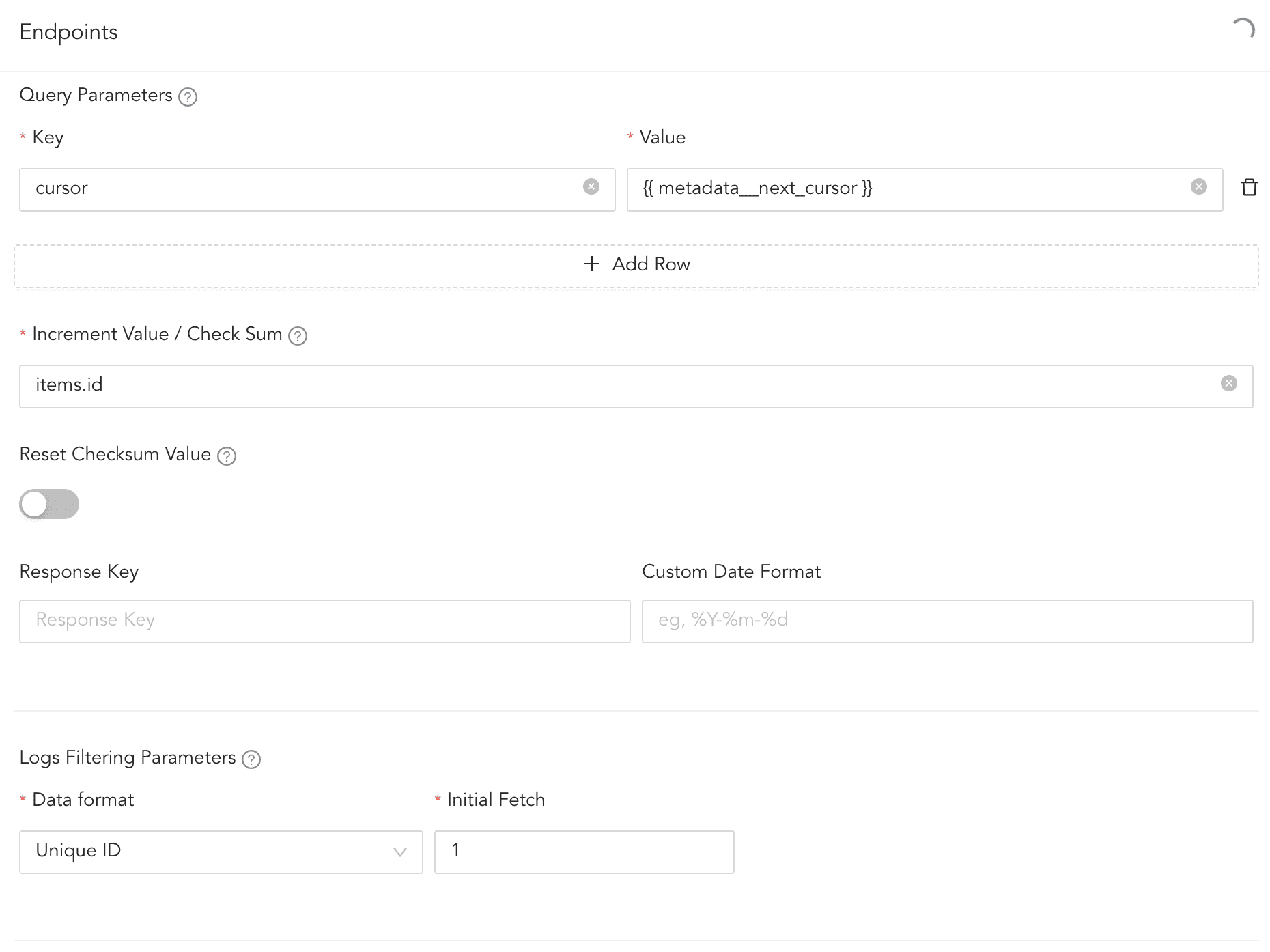
Cursor-based Pagination
Response example containing boolean field indicating there is next cursor
   "items": [
       {
           "created_at": "2025-04-05T06:10:11.319668+00:00",
           "id": 84,
           "value": "Item 84"
       },
       {
           "created_at": "2025-04-06T06:10:11.319671+00:00",
           "id": 85,
           "value": "Item 85"
       },
       .....
   ],
   "metadata": {
       "has_more": true,
       "next_cursor": 93
   }
}
The field has_more contains a boolean value, such as true or false. If it is true, the next_cursor is used to request the next page. If it is false, no additional page is requested.
Note
When configuring Query Parameter in URAF for the above response example, the Key is cursor and the Value is {% if metadata__has_more %}{{ metadata__next_cursor }}{% endif %}.