
To configure VPCFlowLog in Director Console, you must first obtain access key ID and secret access key from AWS.
Note
While we provide AWS-specific instructions in this guide, it’s important to be aware that the AWS interface may change over time. To ensure you have the most up-to-date information and to navigate any potential changes in the AWS interface, we recommend referring to the official AWS documentation or AWS Support resources.
Go to the AWS login page and enter your credentials. Sign in using the root account or Identity and Access Management (IAM) user credentials.
Click your username and click My Security Credentials in the drop-down.
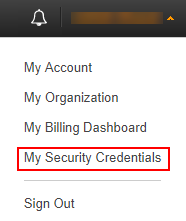
AWS Account’s Dropdown Menu
Click Continue to Security Credentials.
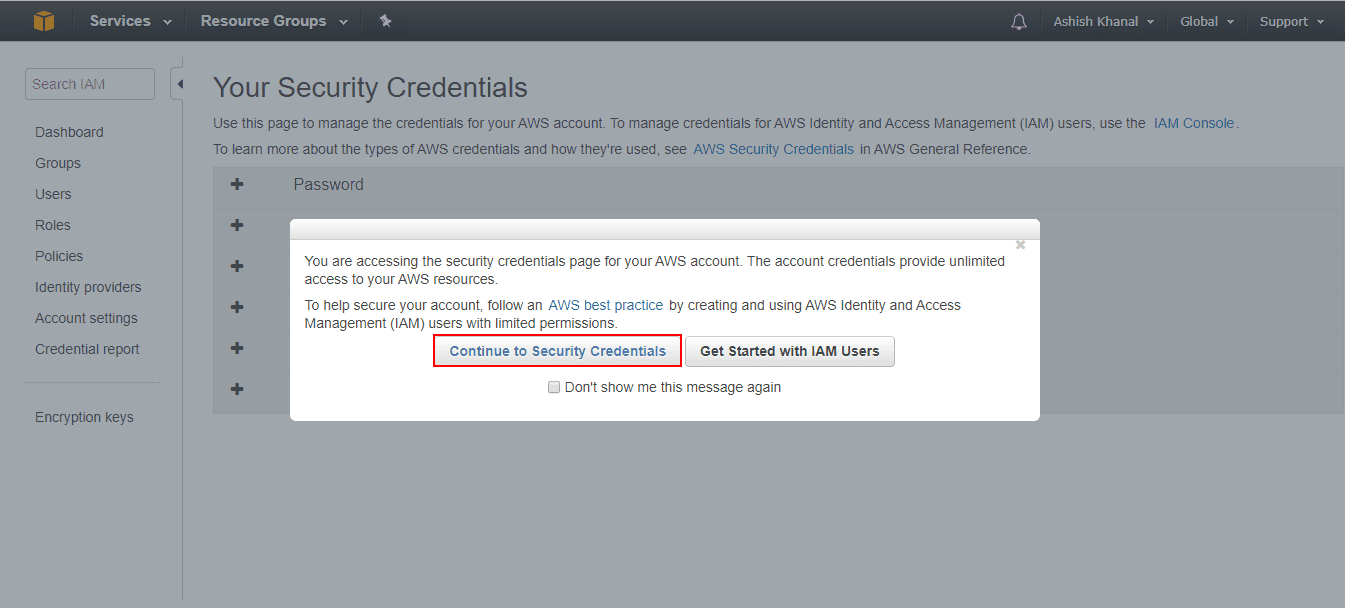
Security Credentials Confirmation
Expand the Access Keys (Access Key ID and Secret Access Key) and click Create New Access Key.
Select Show Access Key to find the access key ID and secret access key, or select Download Key File to download a CSV file containing them.
Write down the access key ID and secret access key or download the file containing them, as they can’t be retrieved later. If you close the window without saving them, create new ones.
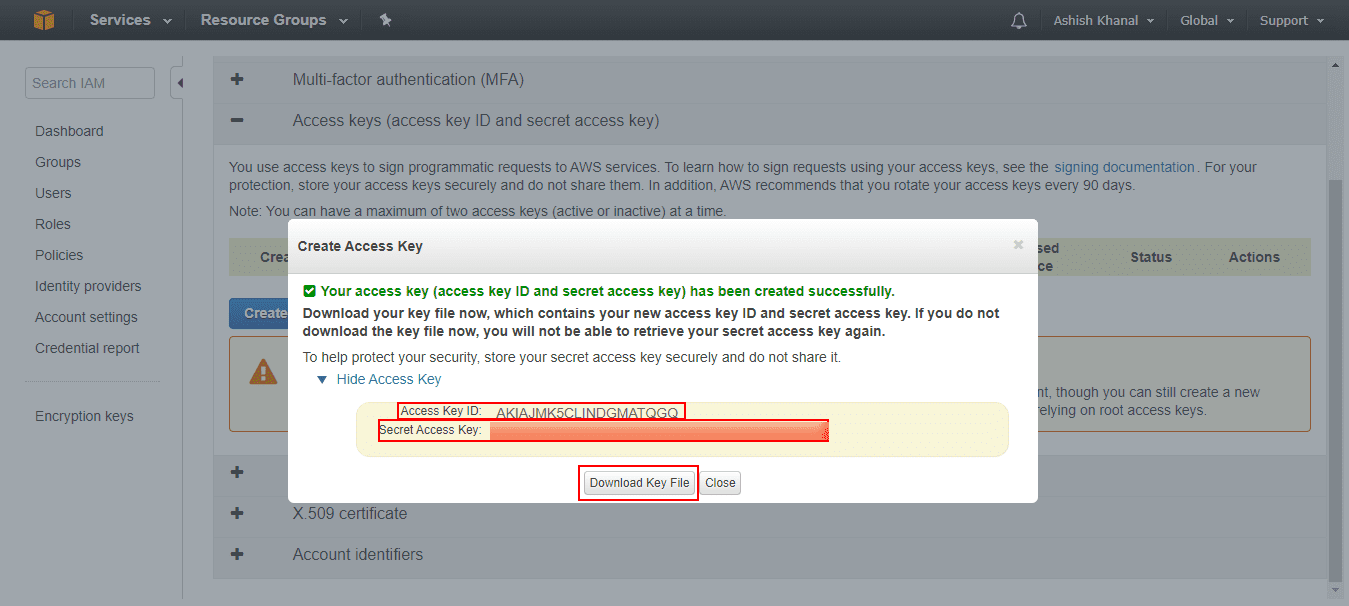
Access and Secret Keys
You can configure VPCFlowLog in a Fabric-enabled Logpoint using the LogSources - Create API.
Endpoint URL:
https://api-server-host-name/configapi/{pool_UUID}/{logpoint_identifier}/LogSources
Method:
POST
Parameters:
Field |
Label in UI |
Type |
Description |
|---|---|---|---|
dc_metadata |
- |
json |
Information related to VPCFlowLog template created in the Director Console. Optional Field. |
description |
Description |
String |
Additional information about the VPCFlowLog. Optional Field. |
documentation_link |
Documentation Link |
String |
URL or hyperlink that points to external documentation or reference materials associated to VPCFlowLog. Optional Field. |
logo |
Logo |
String |
Base64 encoded logo image. Optional Field. |
name |
Name |
String |
Name of the VPCFlowLog log source in Logpoint. Mandatory Field. |
type |
- |
String |
Type or category of VPCFlowLog. Mandatory Field. |
vendor_name |
Vendor Name |
String |
Name of vendor where the log data originates. Optional Field. |
config |
- |
json |
Configuration of VPCFlowLog. Source, connector, routing, normalization and enrichment must be configured for VPCFlowLog to fetch logs. Mandatory Field. |
In source, you can add details about AWS VPCFlowLog from where the VPCFlowLog fetches logs.
Parameters:
Field |
Label in UI |
Type |
Description |
|---|---|---|---|
name |
Name |
String |
Name for the VPCFlowLog Log Source. Mandatory Field. |
interval |
Fetch Interval (min) |
Integer |
The frequency at which data is retrieved in minutes. Mandatory Field. |
charset |
Charset |
String |
Existing Logpoint charset. Obtain it using the Charsets - List API. Mandatory Field. |
timezone |
Time Zone |
String |
AWS VPCFlowLog timezone. Mandatory Field. |
In connector, you can configure how VPCFlowLog and AWS VPCFlowLog communicate with each other.
Field |
Label in UI |
Type |
Description |
|---|---|---|---|
endpoint_url |
Endpoint URL |
String |
Endpoint URL for AWS. If you use Amazon S3’s services, the URL is https://s3.amazonaws.com by default. If you are using a third-party service that stores logs in the Amazon S3 bucket, enter the URL of the service that you are using. |
access_key |
Access Key ID |
String |
AWS VPCFlowLog Access Key ID. Mandatory Field. |
secret_key |
Secret Key ID |
String |
AWS VPCFlowLog Secret Key ID. Mandatory Field. |
bucket_name |
Bucket Name |
String |
Name of the Bucket from where logs are fetched. Mandatory Field. |
region_name |
Region |
String |
AWS Region. Mandatory Field. |
filter_date |
Logs From |
String |
The date from which VPCFlowLog starts fetching logs. Mandatory Field. |
enable_proxy |
Proxy Configuration |
json |
Proxy configuration of the VPCFlowLog server:
|
In routing, you can create repos and routing criteria for VPCFlowLog. Repos are locations where incoming logs are stored and routing criteria are created to determine the conditions under which these logs are sent to repos.
Parameters:
Field |
Label in UI |
Type |
Description |
|---|---|---|---|
repo_name |
Repo name |
String |
Name of the repo where incoming logs are stored. Mandatory Field. |
path |
Path |
String |
Location to store incoming logs. Mandatory Field. |
retention |
Retention (Days) |
String |
Number of days logs are kept in a repository before they are automatically deleted. Mandatory Field. |
remote_logpoint |
Remote logpoint |
String |
Remote Logpoint where you can replicate the repo as a backup or for high availability. Optional Field. |
key and value |
Key and Value |
String |
The key-value pair is used to apply routing criteria to logs. Optional Field. |
operation |
Operation |
String |
Operation for logs that have the key-value pair. Optional Field. |
repository |
Repository |
String |
Repo to store logs. Optional Field. |
In normalization, you can select normalizers for the incoming logs. Normalizers transform incoming logs into a standardized format for consistent and efficient analysis.
Parameters:
Field |
Label in UI |
Type |
Description |
|---|---|---|---|
normalizers |
Normalizer |
String |
Enter the name of the normalizer for the incoming logs. Mandatory Field. |
type |
Type |
String |
Type of the normalizer. Mandatory Field. |
In enrichment, you can select an enrichment policy for the incoming logs. Enrichment policies are used to add additional information to a log, such as user information, device type or geolocation, before analyzing it.
Parameters:
Field |
Label in UI |
Type |
Description |
|---|---|---|---|
EnrichmentPolicy |
Enrichment Policy |
String |
Enter the name of the enrichment policy for the incoming logs. Optional Field. |
Request Example:
{
"data": {
    "name": "VPCFlowLog",
    "type": "S3Fetcher",
    "vendor_name": "AWS",
    "logo": "",
    "description": "Fetches AWS VPC Flow Logs from Amazon S3 buckets, including information about the IP traffic to and from your Virtual Private Cloud (VPC) network interfaces from Amazon S3 buckets or third-party services using Amazon S3 storage.",
    "config": {
        "Source": {
            "name": "VPCFlowLog",
            "interval": 60,
            "charset": "utf_8",
            "timezone": "UTC"
        },
        "Connector": {
            "endpoint_url": "https://s3.amazonaws.com",
            "access_key": "AKIAIOSFODNN7EXAMPLE",
            "secret_key": "wJalrXUtnFEMI/K7MDENG/bPxRfiCYEXAMPLEKEY",
            "bucket_name": "Krupa",
            "region_name": "af-south-1",
            "filter_date": "2024-07-18T07:12:02.536Z",
            "parser": "LineParser",
            "enable_proxy": false,
            "protocol": "http"
        },
        "RoutingPolicy": {
            "routing_criterion": [
                {
                    "id": "7deb03cc-1b5c-401d-9e6a-c80041c06965",
                    "key": "KEY",
                    "drop": "store",
                    "repo": "_logpoint",
                    "value": "VALUE",
                    "type": "KeyPresentValueMatches"
                }
            ],
            "catch_all": "_logpoint"
        },
        "NormalizationPolicy": {
            "normalizers": [
                {
                    "name": "VPCFlowLogCompiledNormalizer",
                    "type": "compiled"
                }
            ]
        }
    },
    "documentation_link": "https://docs.logpoint.com/docs/vpcflowlog/en/release-5.0.1/index.html",
    "template_vid": "LOGSOURCE_93",
    "dc_metadata": {
        "template": "da8986ab-1cdb-47d9-813b-04197efdbcd2",
        "templateVersion": "1"
    }
}
}
Success Response:
{
  "status": "Success",
  "message": "monitorapi/{pool_UUID}/{logpoint_identifier}/orders/{request_id}"
}
You can edit a VPCFlowLog configuration in a Fabric-enabled Logpoint using the PluginConfiguration - Edit API.
Endpoint URL:
https://api-server-host-name/configapi/{pool_UUID}/{logpoint_identifier}/LogSources/{id}
Method:
PUT
Parameters:
Field |
Label in UI |
Type |
Description |
|---|---|---|---|
id |
– |
String |
VPCFlowLog UUID. Obtain it using the Devices - List API. Mandatory |
Request Example:
{
"data": {
    "name": "VPCFlowLog",
    "type": "S3Fetcher",
    "vendor_name": "AWS",
    "logo": "",
    "description": "Fetches AWS VPC Flow Logs from Amazon S3 buckets, including information about the IP traffic to and from your Virtual Private Cloud (VPC) network interfaces from Amazon S3 buckets or third-party services using Amazon S3 storage.",
    "config": {
        "Source": {
            "name": "VPCFlowLog",
            "interval": 60,
            "charset": "utf_8",
            "timezone": "UTC"
        },
        "Connector": {
            "endpoint_url": "https://s3.amazonaws.com",
            "access_key": "AKIAIOSFODNN7EXAMPLE",
            "secret_key": "wJalrXUtnFEMI/K7MDENG/bPxRfiCYEXAMPLEKEY",
            "bucket_name": "Krupa",
            "region_name": "af-south-1",
            "filter_date": "2024-07-18T07:12:02.536Z",
            "parser": "LineParser",
            "enable_proxy": false,
            "protocol": "http"
        },
        "RoutingPolicy": {
            "routing_criterion": [
                {
                    "id": "7deb03cc-1b5c-401d-9e6a-c80041c06965",
                    "key": "KEY",
                    "drop": "store",
                    "repo": "_logpoint",
                    "value": "VALUE",
                    "type": "KeyPresentValueMatches"
                }
            ],
            "catch_all": "_logpoint"
        },
        "NormalizationPolicy": {
            "normalizers": [
                {
                    "name": "VPCFlowLogCompiledNormalizer",
                    "type": "compiled"
                }
            ]
        }
    },
    "documentation_link": "https://docs.logpoint.com/docs/vpcflowlog/en/release-5.0.1/index.html",
    "id": "LogSources/76231f3b-1903-41d8-88ad-a3bbf0a9302d"
    }
}
}
Success Response:
 {
   "status": "Success",
   "message": "monitorapi/{pool_UUID}/{logpoint_identifier}/orders/{request_id}"
}
You can delete a VPCFlowLog configuration in a Fabric-enabled Logpoint using the PluginConfiguration - Trash API.
Endpoint URL:
https://api-server-host-name/configapi/{pool_UUID}/{logpoint_identifier}/LogSources/{id}
Method:
Delete
Parameters:
FIELD |
LABEL IN UI |
TYPE |
DESCRIPTION |
REQUIRED |
|---|---|---|---|---|
id |
– |
String |
VPCFlowLog UUID. Obtain it using the Devices - List API. |
Mandatory |
Success Response:
 {
   "status": "Success",
   "message": "monitorapi/{pool_UUID}/{logpoint_identifier}/orders/{request_id}"
}