Palo Alto Network Firewall Analytics

Palo Alto Network Firewall Dashboards

LP_PaloAlto:User Activities

This dashboard consists of the following widgets:

Widget Name

Description

Users Action

The actions performed by users on your network such as allow or block.

Top 10 Users in Action

The top 10 most active users on your network.

Top Event Categories

The top event categories such as security events, policies events, monitor events, or settings events.

Top 10 Web Categories

The top 10 URL categories such as web advertisements, social networking, or news.

Top 10 Domain Accessed

The top 10 URLs searched by users.

Application not using Default Port

An overview of applications with its traffic on a non-standard destination port.

Top 10 Content Types

The top 10 content types such as insufficient content.

Potential Data Leakage

The potential data leakage based on applications, users, files, and source addresses.

Rare Application

Applications that are rarely used by users along with their sub-category such as virus, spyware, or vulnerability.

Multiple Failed User Authentication

A failed authentications that occurred within an hour for the same user.

Longest Sessions by User

Web sessions that lasted longer than usual for a user.

LP_PaloAlto:File Activities

This dashboard consists of the following widgets:

Widget Name

Description

Actions on File

The actions performed on a file such as continue or block.

Top 10 Files in Action

The top 10 files where large set of actions have been performed.

Data Volume Transferred

The amount of File transferred in MB.

File Activities

All the activities performed on files based on the size of file transferred or received, user, action, application, source address, destination address, source zone and destination zone.

Top 10 Files With Unique Hash Executed

The top 10 files with unique hash value ordered by their execution count.

LP_PaloAlto:Firewall

This dashboard consists of the following widgets:

Widget Name

Description

Actions - Timetrend

A time trend for actions performed on firewall such as default, drop, or reset.

Top 10 Threats by Source Location

The top 10 threats based on the source location.

Top 10 Threats by Applications

The top 10 applications that were blocked from entering the network.

Top 10 Security Event Activity

The threat IDs, URLs and actions that were denied access into your network.

Threat Data Events by User

The events user created which are labeled as threat.

Top 10 Applications by FW Events

The top 10 applications that were blocked, allowed, or denied by the firewall.

Top 10 Firewall Rules Fired and Action Taken

The top 10 actions taken against triggered firewall rules.

LP_PaloAlto:Config Overview

This dashboard consists of the following widgets:

Widget Name

Description

Top 10 Blocked Applications by Bandwidth

The top 10 applications blocked by firewalls as they require a substantial amount of bandwidth.

Top 10 Allowed Applications by Bandwidth

The top 10 applications that consume less or moderate bandwidth.

Top 10 Blocked Applications

The top 10 vulnerable applications blocked.

Top 10 Denied Connections by Country

The top 10 countries with denied connections.

Heaviest Usage of Skype

An overview of source addresses with high usage of Skype.

Heaviest usage of Dropbox

An overview of source addresses with high usage of Dropbox.

Traffic Over Time

The flow of traffic in a network over time.

Severity by Protocol

The protocols applied based on their severity.

Multiple Failed Authentication From Source

The source address with multiple failed user authentication.

LP_PaloAlto: General

This dashboard consists of the following widgets:

Widget Name

Description

Config overview - List

A detailed list of changes made to the firewall configuration.

Admin User Activities - Timetrend

A time trend of admin performing the configuration.

Top 10 Clients

The top 10 clients such as web or CLI.

Top 10 Results

The top 10 results after changes are made to the firewall such as submitted, succeeded, failed, or unauthorized.

LP_PaloAlto:Content Overview

This dashboard consists of the following widgets:

Widget Name

Description

Web Activity - List

A detailed list of web activities based on applications, URL IDs, categories, IP addresses and actions.

LP_PaloAlto:Threats

This dashboard consists of the following widgets:

Widget Name

Description

Threats by Category - Timetrend

A time trend of threats by their category such as malicious or benign.

Risk Values (High and Low)

The risk score obtained based on the threat severity.

Top 10 Actions

The top 10 threat actions such as alert, drop, or allow.

Top 10 Threat Applications

The top 10 applications that were denied on your network.

Top 10 Targeted Users

The users that were targeted by threats.

Top 10 Threat Sources

The top 10 source addresses that initiated activity on a network.

WildFire Submission

The submitted for WildFire submission as Malicious, Phishing, Graywire, or Benign.

Top 10 Threat Categories

The top 10 threat categories such as malicious, benign, or phishing.

Top 10 Threat Destinations

The top 10 destination IP addresses accessed by threat.

Top 10 Vulnerable Files

The top 10 files that are vulnerable to threats.

Email Threats

Emails recevied from potential threats.

WildFire Details

The files or applications that generated the WildFire submission and information on a user, IP address, ports, application, file and hash.

Top 10 Source Countries

The top 10 countries that are most used for allowing traffic into the network.

Top 10 Destination Countries

The top 10 countries that are most used by traffic going outside the network.

LP_PaloAlto:Traffic

This dashboard consists of the following widgets:

Widget Name

Description

Traffic Through PaloAlto Network

The traffic passed from Palo Alto Network Firewall.

Top 10 Protocols

The top 10 protocols associated with the session such as TCP or UDP.

Top 10 Applications by Bandwidth

The top 10 applications based on their bandwidth usage.

Top 10 Applications by Request

The top 10 applications that allowed the most traffic on their network.

Top 10 Destination Ports

The top 10 destination ports with high traffic volumes.

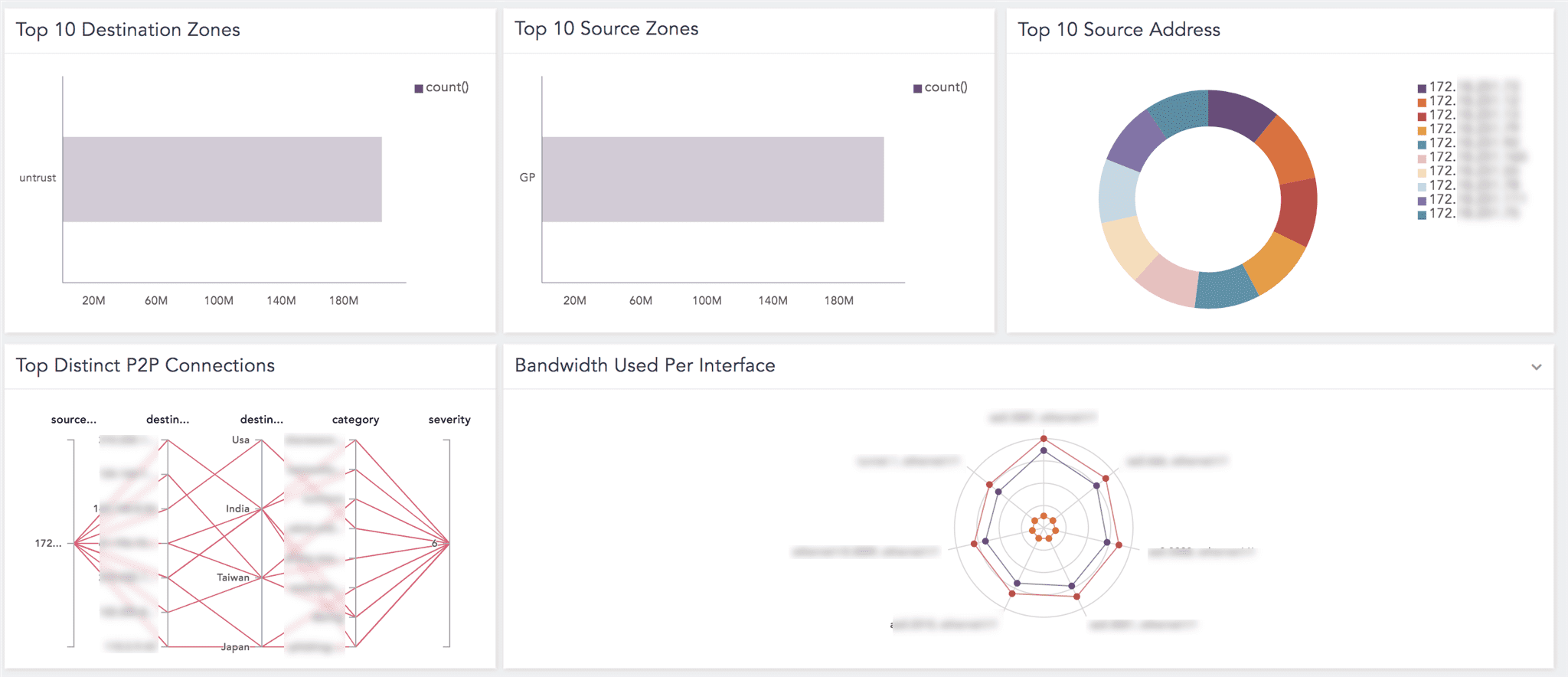
Top 10 Destination Zones

The top 10 zones that allowed the most traffic into their networks.

Top 10 Source Zones

The top 10 zones that are most used by traffic going outside the network.

Top 10 Source Address

The top 10 source addresses with the high rate of traffic flow.

Top Distinct P2P Connections

The leading distinct Peer to Peer (P2P) connections between server to client based on source address, location, and severity.

Bandwidth Used Per Interface

Bandwidth usage dedicated for different network-related functions such as SSL or SMTP.

Top 10 Connections

The top 10 connections established.

Most Repeated Connection Profiles

Connections with the same profile within five seconds interval.

Top 10 Session End Reasons

The top 10 reasons for sessions to end.

LP_PaloAlto: System Overview

This dashboard consists of the following widgets:

Widget Name

Description

Count by Hosts - Timetrend

A time trend of hosts count information.

Severity - Timetrend

A time trend of severity. The severity ranges from 0 to 7, where 0 represents emergency, 1 represents alert, 2 represents critical, 3 represents error, 4 represents warning, 5 represents notification, 6 represents informational and 7 represents debugging.

Top 10 Sub-categories

The top 10 sub-categories such as dnsproxy, userid or vpn.

Top 10 Event_IDs

The top 10 event IDs; string with the name of the event.

Successful Users Login - List

The list of successful user logins with valid credentials.

Users Login Failed - List

The failed user logins.

Top Actions - List

The top actions such as default, alert, or allow.

Top Actions or Status of Objects - List

The top actions or status of objects such as drop with a success status.

Top 10 HIP Match

The top 10 Host Information Profile (HIP) matches upon successful connection of the GlobalProtect gateway with the host. The GlobalProtect HIP feature can collect information about the endpoints’ security status, such as installing the latest security patches or disk encryption enabled.

Adding the Palo Alto Network Firewall Dashboards

  1. Go to Settings >> Knowledge Base from the navigation bar and click Dashboards.

  2. Select VENDOR DASHBOARD from the drop-down.

  3. Click the Use icon from Actions of the required dashboard.

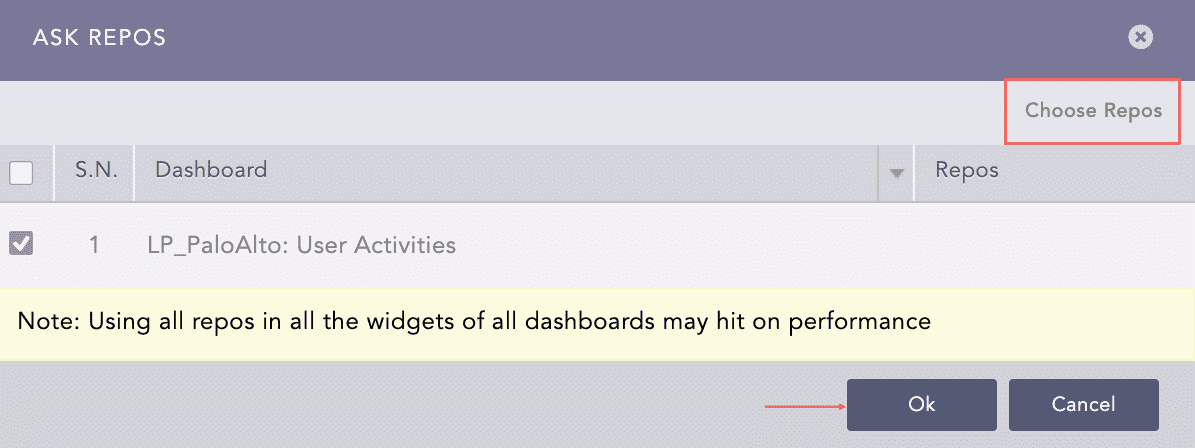
  4. Click Choose Repos.

  5. Select the repo configured to store the Palo Alto Network Firewall logs and click Done.

  6. Select the dashboard and click Ok.

Palo Alto Network Firewall Ask Repos Panel

Confirmation for Repo

You can find the Palo Alto Network Firewall dashboards under Dashboards.

Palo Alto Network Firewall Dashboard

Palo Alto Network Firewall Dashboard

Palo Alto Network Firewall Dashboard

Palo Alto Network Firewall Dashboard

Adding the Palo Alto Network Firewall Label

LP_PaloAltoNetworkFirewall

Available labels are:

Label

Description

Allow

Events with the action Allow.

Deny

Events with the action Deny.

Reset

Events with the action Reset.

System

Events with the event category System.

Configuration

Events with the event category Config.

Correlation

Events with the event category Correlation.

Connection

Events with the event category Traffic.

Firewall

Events related to firewall.

Using the Palo Alto Network Firewall Report Templates

A report contains widgets enabling you to analyze the data in different formats like graphs, time trends, lists and text. Reports are time-bound, which means they are incident summaries over a period of time, for example, the last 24 hours or last five minutes. While generating a report, you can customize the calendar period according to your needs.

The available report templates are:

  • LP_PaloAlto:Firewall is the incident summary report that provides statistical data information on actions performed on firewall and firewall events in different formats such as graphs, time trend, and lists.

  • LP_PaloAlto:Config Overview is the incident summary report that provides statistical data information on applications allowed or blocked based on bandwidth, their usage, and severity based on the protocol in different formats such as graphs, time trend, and lists.

  • LP_PaloAlto:General is the incident summary report that provides statistical data information on admin user activities, clients, and configuration overview in different formats such as graphs, time trend, and lists.

  • LP_PaloAlto:Content Overview is the incident summary report that provides statistical data information on web activities in different formats such as graph and list.

  • LP_PaloAlto:Threats is the incident summary report that provides statistical data information on files, sources, applications, or IP addresses vulnerable to threats in different formats such as graphs, time trend, and lists.

  • LP_PaloAlto:Traffic is the incident summary report that provides statistical data information on the flow of traffic through protocols, ports, address, zones, and connections in different formats such as graphs, time trend, and lists.

  • LP_PaloAlto:System Overview is the incident summary report that provides statistical data information on the status of an object, security status of endpoints, or actions performed on a system in different formats such as graphs, time trend, and lists.

Generating Palo Alto Network Firewall Report Templates

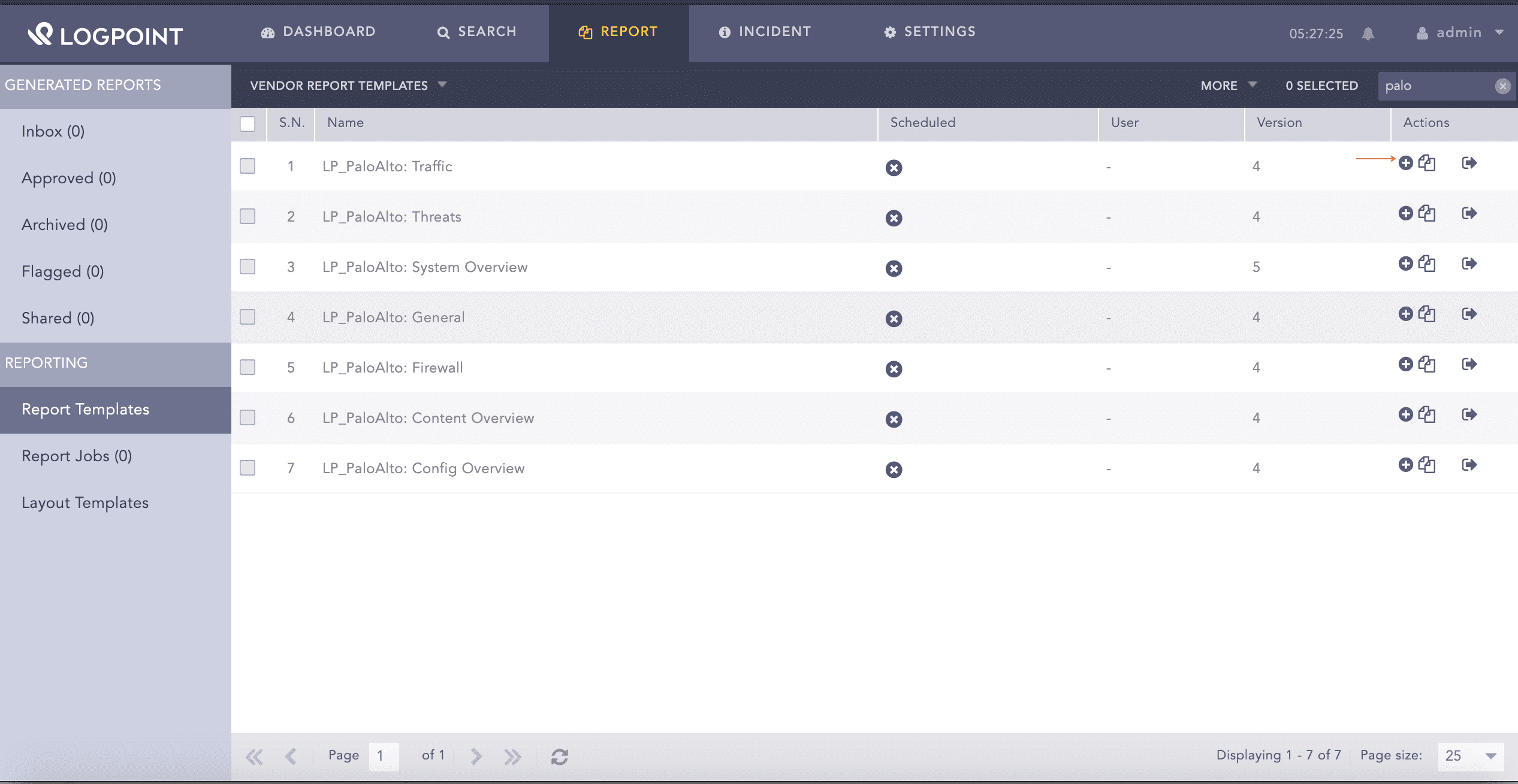
  1. Go to Report >> Reports Template.

  2. Select VENDOR REPORT TEMPLATES from the drop-down.

  3. Click the Use Vendor Report from Actions of the required template.

Using LP_Salesforce User Activities Report Template

Using the Palo Alto Network Firewall Report Template

  1. Click the Run This Report from Actions.

Run the LP_Salesforce User Activities Report Template

Running the the Palo Alto Network Firewall Report Template

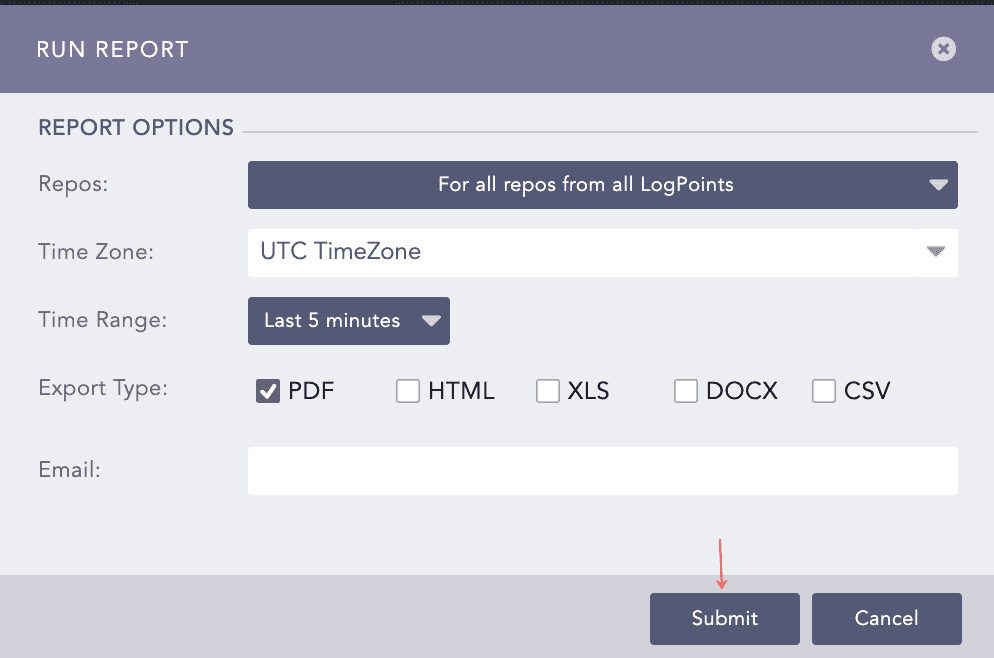
  1. Select Repos, Time Zone, Time Range, Export Type and enter Email.

  2. Click Submit.

Run Report Wizard

Report Options

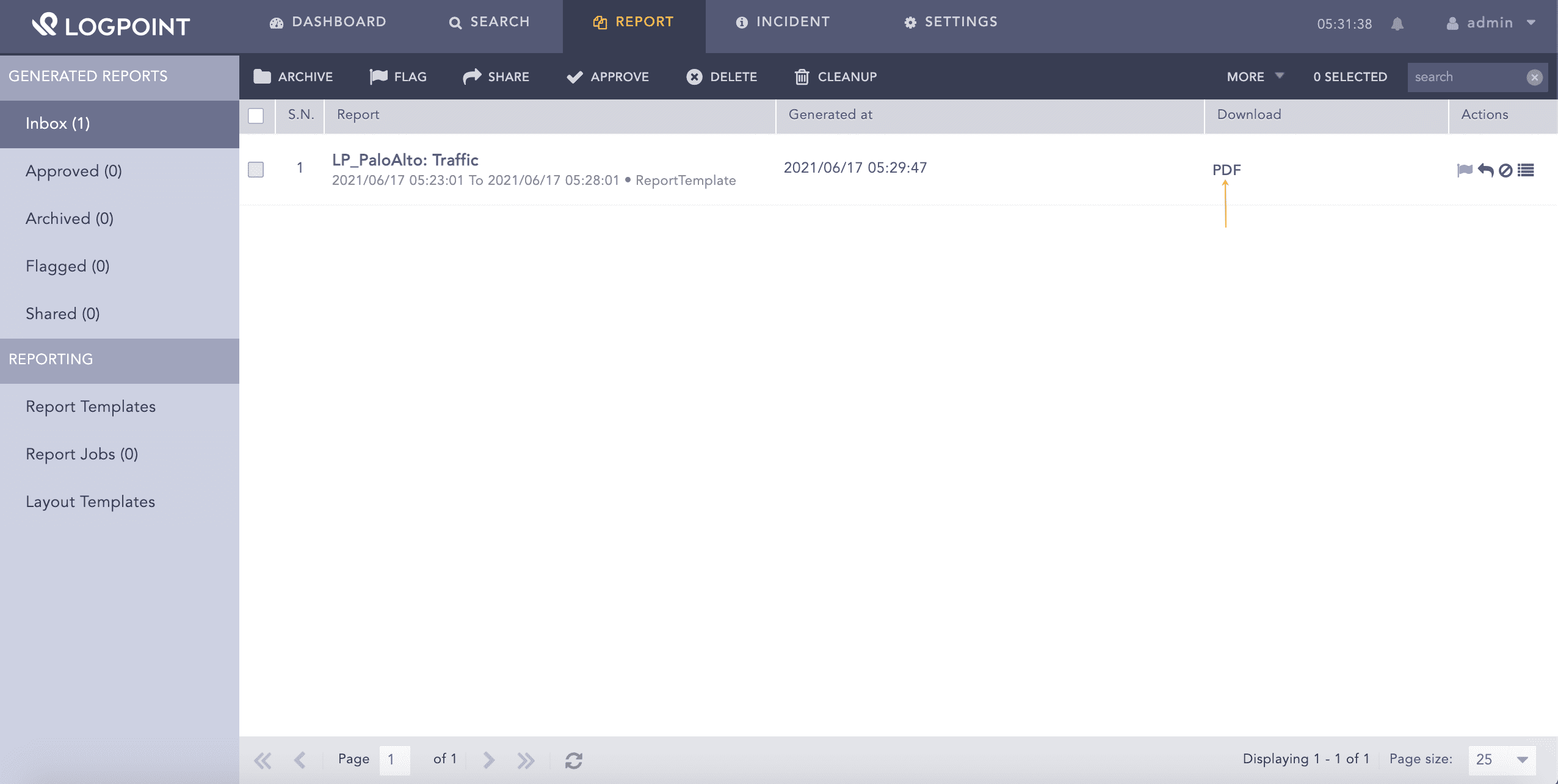
Go to Report Jobs to view the generating reports. Go to Inbox, to view the generated reports and click PDF from Download to download the generated report.

Run Report Wizard

Downloading a report

Palo Alto Network Firewall Alerts

LP_PaloAlto Multiple Failed Login

  • Trigger Condition: Multiple failed login attempts are detected.

  • ATT&CK Category: -

  • ATT&CK Tag: -

  • ATT&CK ID: -

  • Minimum Log Source Requirement: -

  • Query:

    [5 norm_id=PaloAltoNetworkFirewall label=User label=Authentication label=fail label=System having same user within 1 minutes]
    

LP_PaloAlto Session Drop

  • Trigger Condition: The firewall drops the session before or after the application is identified.

  • ATT&CK Category: -

  • ATT&CK Tag: -

  • ATT&CK ID: -

  • Minimum Log Source Requirement: -

  • Query:

    norm_id=PaloAltoNetworkFirewall label=Traffic (sub_category=drop or sub_category=deny)
    

LP_PaloAlto Potential Risk Activity

  • Trigger Condition: Malicious URL categories like Grayware, Hacking, Parked and Phishing are detected.

  • ATT&CK Category: -

  • ATT&CK Tag: -

  • ATT&CK ID: -

  • Minimum Log Source Requirement: -

  • Query:

    norm_id = PaloAltoNetworkFirewall label = Traffic category in ['Grayware','Hacking','Parked','Phishing']
    

LP_PaloAlto Risk Events Allowed

  • Trigger Condition: The firewall allowed the events or actions of medium, high or critical risk.

  • ATT&CK Category: -

  • ATT&CK Tag: -

  • ATT&CK ID: -

  • Minimum Log Source Requirement: -

  • Query:

    norm_id=PaloAltoNetworkFirewall label=Threat action=allow log_level in ['medium','high','critical']
    

LP_PaloAlto Potential C2 Connection

  • Trigger Condition: Command and Control URLs or domains dynamically assigns IP addresses or newly registered domain sites are visited, which are often used to deliver malware payloads for C2 traffic, malicious commands, or exfiltrate data.

  • ATT&CK Category: Command And Control

  • ATT&CK Tag: Dynamic Resolution

  • ATT&CK ID: T1568

  • Minimum Log Source Requirement: -

  • Query:

    norm_id = PaloAltoNetworkFirewall label = Traffic category in ['Command and Control','Dynamic DNS','Malware','Newly Registered Domain']
    

LP_PaloAlto Illegal Content Download

  • Trigger Condition: The download of any illegal content like content that allows illegal download of software or other intellectual property, which poses a potential liability risk is detected.

  • ATT&CK Category: -

  • ATT&CK Tag: -

  • ATT&CK ID: -

  • Minimum Log Source Requirement: -

  • Query:

    norm_id = PaloAltoNetworkFirewall label = Traffic category='Copyright Infringement'
    

LP_PaloAlto HTTP Request Block

  • Trigger Condition: The firewall blocked access to a website, allows a user to access the blocked content by clicking continue, or allows a user to access the blocked page after entering the password, also known as block override.

  • ATT&CK Category: -

  • ATT&CK Tag: -

  • ATT&CK ID: -

  • Minimum Log Source Requirement: -

  • Query:

    norm_id = PaloAltoNetworkFirewall label=Threat label=Url action in ['block-continue','block-override']
    

LP_PaloAlto Flooding Packet Drop

  • Trigger Condition: Connection per second (CPS) activates the flood protection mechanism and begins dropping new connections. The firewall gauges the amount of flood type entering the zone in the new CPS and compares the total to the thresholds you had configured.

  • ATT&CK Category: -

  • ATT&CK Tag: -

  • ATT&CK ID: -

  • Minimum Log Source Requirement: -

  • Query:

    norm_id = PaloAltoNetworkFirewall label=Threat action="random-drop"
    

LP_PaloAlto DNS SinkHole Activate

  • Trigger Condition: DNS Sinkholing is activated in the firewall. DNS Sinkholing helps to rectify the infected hosts on a protected network using DNS traffic when the firewall cannot see the infected client’s DNS query. In other words, the firewall cannot see the originator of the DNS query.

  • ATT&CK Category: -

  • ATT&CK Tag: -

  • ATT&CK ID: -

  • Minimum Log Source Requirement: -

  • Query:

    norm_id = PaloAltoNetworkFirewall label=Threat action="sinkhole"
    

LP_PaloAlto Cortex Risk Events Unrestricted

  • Trigger Condition: Cortex XDR agent terminates an executable file with malware, phishing, or malware is not restricted by termination or blocking verdict.

  • ATT&CK Category: -

  • ATT&CK Tag: -

  • ATT&CK ID: -

  • Minimum Log Source Requirement: -

  • Query:

    norm_id = PaloAltoNetworkFirewall verdict in ['1','2','3'] block=0 terminate=0
    

LP_PaloAlto Bypass Content Filter

  • Trigger Condition: The firewall collects information on traffic coming from URLs or any services used to bypass the content filtering product for threat prevention.

  • ATT&CK Category: -

  • ATT&CK Tag: -

  • ATT&CK ID: -

  • Minimum Log Source Requirement: -

  • Query:

    norm_id = PaloAltoNetworkFirewall label = Traffic category="Proxy Avoidance and Anonymizers"
    

LP_PaloAlto Brute Force on Block Override

  • Trigger Condition: Brute force attacks on URLs or domains are perfomed in an override list are detected.

  • ATT&CK Category: Credential Access

  • ATT&CK Tag: Brute Force

  • ATT&CK ID: T1110

  • Minimum Log Source Requirement: -

  • Query:

    norm_id = PaloAltoNetworkFirewall label=Threat label=Url action="override-lockout"
    

LP_PaloAlto Brute Force Attempts
  • Trigger Condition: Any brute force signature is detected. You can learn more about brute force signature and their trigger conditions from Palo Alto Network Firewall’s website.

  • ATT&CK Category: Credential Access

  • ATT&CK Tag: Brute Force

  • ATT&CK ID: T1110

  • Minimum Log Source Requirement: -

  • Query:

    norm_id = PaloAltoNetworkFirewall label = Threat threat_id IN PALOALTO_BRUTE_FORCE_THREAT_ID
    

Helpful?

We are glad this guide helped.


Please don't include any personal information in your comment

Contact Support