
System monitor tracks what programs are running, how resources are used, and system status information. It also regularly tests services meant to be running and automatically generates alerts for problems so you can address them quickly.
Go to Settings >> System Settings from the navigation bar and click System Monitor.
It lists all running services and their status. You can stop, start, or restart them if you need to.
Starting Services
Click the Start Service icon from Actions.
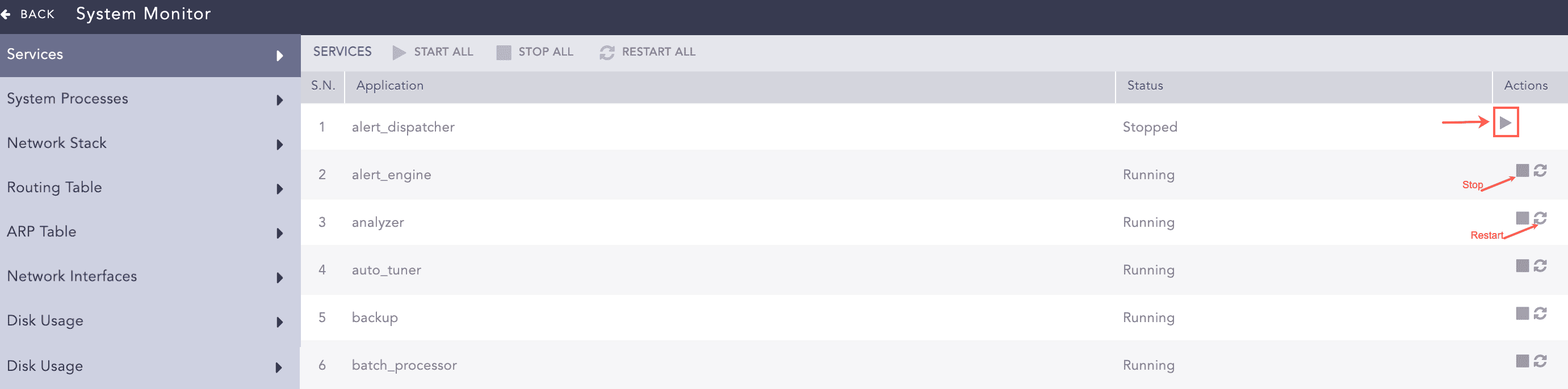
Services
To start all the services, click Start All.
Stopping Services
Click the Stop Service icon from Actions.
To stop all the services, click Stop All.
Restarting Services
Click the Restart Service icon from Actions.
To restart all the services, click Restart All.
It shows all the processes currently running on the operating system where Logpoint is installed. The process list shows users, memory used by processes, commands on run, and process ids.
You can reload the page by clicking Reload.
The Network Stacks are used in communication networks.
Displays the routes to particular network destinations.
A protocol for mapping an Internet Protocol address (IP address) to a physical machine address that is recognized in the local network. This item data lists all the connection status under this protocol.
Displays Logpoint’s network status. It shows the state of all active interfaces such as eth0, l0, he-ipv6, tun0, tun1 and tun10000.
Displays the total file system disk usage. It lists available disk space, disk usage and location of the file system. Logpoint generates disk notifications when disk usage reaches 80% and again when the disk usage reaches 90%.
When available disk space falls to less than 2 GB, Logpoint stops collecting or fetching any logs and resumes only when there is at least 4 GB of available space. When the available space for a partition containing a repo path is less than 250 MB, Logpoint stops storing log messages in that partition and generates an audit log specifying that there is insufficient disk space available to store logs. Logpoint resumes data storage when enough space is available.
In addition to the Logpoint UI, you can also monitor the status of your Logpoint using SNMP walk. Use the base OID 1.3.6.1.4.1.54322.1 with the provided community string to get a list of all the exposed OIDs and their corresponding details.
Note
You can also use enterprises.54322.1 as the base OID.
An MIB file with the OIDs is on the Help Center.
Syntax to monitor Logpoint using SNMP walk:
snmpwalk -v2c -c <Community String> <IP address of Logpoint>:161 <OID>
Logpoint exposes the following OIDs:
SN |
OID |
Information |
|---|---|---|
1 |
1.3.6.1.4.1.54322.1.1 |
Last recorded messages per second in the normalizer |
2 |
1.3.6.1.4.1.54322.1.2 |
Average messages per second in the last 5 minutes in the normalizer |
3 |
1.3.6.1.4.1.54322.1.3 |
Last recorded messages per second in the store handler |
4 |
1.3.6.1.4.1.54322.1.4 |
Average messages per second in the last 5 minutes in the store handler |
5 |
1.3.6.1.4.1.54322.1.5 |
Services that are currently down |
6 |
1.3.6.1.4.1.54322.1.6 |
Logpoint version |
7 |
1.3.6.1.4.1.54322.1.7 |
Status of the log collection services |
8 |
1.3.6.1.4.1.54322.1.7.1 |
CPU consumption in collection (in %) |
9 |
1.3.6.1.4.1.54322.1.7.2 |
Memory consumption in collection (in %) |
10 |
1.3.6.1.4.1.54322.1.7.3 |
Queue in collection (in MB) |
11 |
1.3.6.1.4.1.54322.1.8 |
Status of the normalization services |
12 |
1.3.6.1.4.1.54322.1.8.1 |
CPU consumption in normalization (in %) |
13 |
1.3.6.1.4.1.54322.1.8.2 |
Memory consumption in normalization (in %) |
14 |
1.3.6.1.4.1.54322.1.8.3 |
Queue in normalization (in MB) |
15 |
1.3.6.1.4.1.54322.1.9 |
Status of enrichment services |
16 |
1.3.6.1.4.1.54322.1.9.1 |
CPU consumption in enrichment (in %) |
17 |
1.3.6.1.4.1.54322.1.9.2 |
Memory consumption in enrichment (in %) |
18 |
1.3.6.1.4.1.54322.1.9.3 |
Queue in enrichment (in MB) |
19 |
1.3.6.1.4.1.54322.1.10 |
Status of indexing services |
20 |
1.3.6.1.4.1.54322.1.10.1 |
CPU consumption in indexing (in %) |
21 |
1.3.6.1.4.1.54322.1.10.2 |
Memory consumption in indexing (in %) |
22 |
1.3.6.1.4.1.54322.1.10.3 |
Queue in indexing (in MB) |
23 |
1.3.6.1.4.1.54322.1.11 |
Status of the dashboard and alerting service |
24 |
1.3.6.1.4.1.54322.1.11.1 |
CPU consumption for dashboards and alerts (in %) |
25 |
1.3.6.1.4.1.54322.1.11.2 |
Memory consumption for dashboards and alerts (in %) |
26 |
1.3.6.1.4.1.54322.1.11.4 |
Disk usage by dashboards and alerts |
27 |
1.3.6.1.4.1.54322.1.11.5 |
Number of active search processes (live searches) |
28 |
1.3.6.1.4.1.54322.1.12 |
ZFS pool statistics |
29 |
1.3.6.1.4.1.54322.1.12.1 |
Names of the ZFS pools |
30 |
1.3.6.1.4.1.54322.1.12.2 |
Status of the ZFS pools |
31 |
1.3.6.1.4.1.54322.1.12.3 |
Disk allocation for the ZFS pools |
32 |
1.3.6.1.4.1.54322.1.12.4 |
Free disk space in the ZFS pools |
33 |
1.3.6.1.4.1.54322.1.12.5 |
Read operations in the ZFS pools |
34 |
1.3.6.1.4.1.54322.1.12.6 |
Write operations in the ZFS pools |
35 |
1.3.6.1.4.1.54322.1.12.7 |
Read bandwidth in the ZFS pools |
36 |
1.3.6.1.4.1.54322.1.12.8 |
Write bandwidth in the ZFS pools |
37 |
1.3.6.1.4.1.54322.1.12.9 |
Failed disks in the pools (if any) |
38 |
1.3.6.1.4.1.54322.1.13 |
Statistics for the log size in repos |
39 |
1.3.6.1.4.1.54322.1.13.1 |
Names of the repos |
40 |
1.3.6.1.4.1.54322.1.13.2 |
Log size of repos in the previous day |
41 |
1.3.6.1.4.1.54322.1.13.3 |
Log size of repos in the previous month |
42 |
1.3.6.1.4.1.54322.1.14 |
Status of LUNs in systems with multipath devices |
43 |
1.3.6.1.4.1.54322.1.14.1 |
Name of the multipath |
44 |
1.3.6.1.4.1.54322.1.14.2 |
UUID of the multipath |
45 |
1.3.6.1.4.1.54322.1.14.3 |
SysFS device-mapper’s blocked device name of the multipath |
46 |
1.3.6.1.4.1.54322.1.14.4 |
Device vendor/product/revision information |
47 |
1.3.6.1.4.1.54322.1.14.5 |
Total number of detected paths of the multipath |
48 |
1.3.6.1.4.1.54322.1.14.6 |
Total active paths of the multipath |
49 |
1.3.6.1.4.1.54322.1.14.7 |
Product information |
50 |
1.3.6.1.4.1.54322.1.14.8 |
Status of the multipath |
51 |
1.3.6.1.4.1.54322.1.14.9 |
Size of the multipath |
52 |
1.3.6.1.4.1.54322.1.14.10 |
Automatic failback configuration of the multipath |
53 |
1.3.6.1.4.1.54322.1.30 |
Status of the Logpoint Collector buffer |
54 |
1.3.6.1.4.1.54322.1.30.1 |
The logs in the buffer not received by the main Logpoint |
55 |
1.3.6.1.4.1.54322.1.30.2 |
The time (in seconds) since the last message was received by the main Logpoint |
Note
The OIDs for ZFS pool statistics, statistics for the log size in repos, and LUN status provide information for all these entities. To retrieve the information for a single one, add an extra number corresponding to the respective pool, repo, or LUN after the provided OID.
For example, you can use enterprises.54322.1.12.1 to retrieve the names of all the ZFS pools and enterprises.54322.1.12.1.1 to retrieve the name of the first ZFS pool.
Additionally, you can use the following default OIDs for a Linux-based system:
General Statistics
SN |
OID |
Information |
|---|---|---|
1 |
1.3.6.1.4.1.2021.11 |
CPU and swap information |
2 |
1.3.6.1.2.1.2.2.1 |
Network interfaces information |
3 |
1.3.6.1.2.1.25.2.3.1.6.2 |
Disk usage information |
4 |
1.3.6.1.2.1.25.1.1.0 |
Uptime information |
CPU load
SN |
OID |
Information |
|---|---|---|
1 |
1.3.6.1.4.1.2021.10.1.3.1 |
CPU load over the last minute |
2 |
1.3.6.1.4.1.2021.10.1.3.2 |
CPU load over the last 5 minutes |
3 |
1.3.6.1.4.1.2021.10.1.3.3 |
CPU load over the last 15 minutes |
4 |
1.3.6.1.4.1.2021.11.9.0 |
Percentage of CPU time consumed by user |
5 |
1.3.6.1.4.1.2021.11.50.0 |
Raw CPU time consumed by user |
6 |
1.3.6.1.4.1.2021.11.10.0 |
Percentage of CPU time used by system |
7 |
1.3.6.1.4.1.2021.11.52.0 |
Raw CPU time used by system |
8 |
1.3.6.1.4.1.2021.11.11.0 |
Percentage of idle CPU time |
9 |
1.3.6.1.4.1.2021.11.53.0 |
Raw idle CPU time |
10 |
1.3.6.1.4.1.2021.11.51.0 |
Raw nice CPU time |
Memory statistics
SN |
OID |
Information |
|---|---|---|
1 |
1.3.6.1.4.1.2021.4.3.0 |
Total swap size |
2 |
1.3.6.1.4.1.2021.4.4.0 |
Available swap space |
3 |
1.3.6.1.4.1.2021.4.5.0 |
Total RAM in the machine |
4 |
1.3.6.1.4.1.2021.4.6.0 |
Total RAM used |
5 |
1.3.6.1.4.1.2021.4.11.0 |
Total free RAM |
6 |
1.3.6.1.4.1.2021.4.13.0 |
Total shared RAM |
7 |
1.3.6.1.4.1.2021.4.14.0 |
Total RAM buffered |
8 |
1.3.6.1.4.1.2021.4.15.0 |
Total cached memory |
Disk statistics
SN |
OID |
Information |
|---|---|---|
1 |
1.3.6.1.4.1.2021.9.1.6.1 |
Total size of the disk or partition (in KB) |
2 |
1.3.6.1.4.1.2021.9.1.7.1 |
Available space on the disk |
3 |
1.3.6.1.4.1.2021.9.1.8.1 |
Used space on the disk |
4 |
1.3.6.1.4.1.2021.9.1.9.1 |
Percentage of used space on the disk |
5 |
1.3.6.1.4.1.2021.9.1.10.1 |
Percentage of inodes used on the disk |
6 |
1.3.6.1.2.1.1.3.0 |
System uptime |