Trend Micro Analytics

Trend Micro Dashboards

LP_CEF: Trend Micro Deep Discovery - Virtual Analyser

Widget Name

Description

Virtual Analyzer Overview

The Virtual Analyzer that performs content simulation and analysis of virtual environments to identify the common properties associated with malware by source address, destination address, translated address by source, and hostname.

Virtual Analyzer - Top 10 Suspicious Files

The Virtual Analyzer’s top ten suspicious files analyzed.

Virtual Analyzer - Suspicious File - List

A detailed list of suspicious files based on threat type and attack phase (Point of Entry). Threat types can be direct, indirect, veiled, and conditional.

Virtual Analyzer- Top 10 Malicious Site

The top ten malicious websites.

Virtual Analyzer - Top Affected Host

The top hosts affected by threats.

LP_Trend Micro Deep Security - Firewall

Widget Name

Description

Firewall Actions - Time-trend

A time-trend of the Deep Security Firewall actions.

Top 10 Sources

The top ten source addresses allowed by the Deep Security Firewall.

Top 10 Destinations

The top ten destination addresses allowed by the Deep Security Firewall.

Top 10 Sources in Denied Connections

The top ten source addresses in denied incoming connections.

Top 10 Ports in Denied Connections

The top ten ports from where the Deep Security Firewall denied connection to the internal network.

Top 10 Source Locations

The top ten countries from where the Deep Security Firewall detected connection to the internal network.

Top 10 Destinations in Denied Connections

The top ten destination addresses from where the Deep Security Firewall denied connection from the internal network.

Data Usage - Time-trend

A time trend of network data sent and received in MB detected by the Deep Security Firewall.

Firewall Connection Details

The network connection details based on IP address, ports, and country detected by the Deep Security Firewall.

LP_CEF: Trend Micro Deep Discovery - Threat

Widget Name

Description

Top 10 Infected Files

The top ten malware-infected files or archived files.

Top 10 Malware Infected Host

The top ten malware-infected hosts.

Top 10 Malicious Sites

The top ten websites infected by malware.

Top 10 Exploited Source Address

The top ten vulnerable source addresses.

Top 10 Malware

The top ten malware.

Top 10 Disruptive Application

The top ten application files infected by malware.

Top Web Reputation Detected

An overview URLs reputation determines whether the Deep Security Firewall considers it a Web threat.

Threat Type Overview with Time Trend

The threat type. The threat types include Send a file to Sandbox (threat type 99), DAE event (threat type 6), TMUFE event (threat type 5), Grayware (threat type 4), Exploit (threat type 3), Suspicious Behaviour (threat type 2), Malicious Behaviour (threat type 1), and Malicious Content (threat type 6).

Top 10 Host IP with Events Detected

The top ten host IPs or source addresses.

Top 10 Exploited Host

The top ten exploited hosts (threat type 3).

Suspicious Behavior Detected - List

The suspicious behavior (threat type 2).

Grayware Application - List

The Grayware applications that are likely to trouble users but are not malicious.

LP_Trend Micro Control Manager

Widget Name

Description

Logs Count - Time Trend

The Trend Micro Control Manager event count from the last 24 hours.

Top 10 Endpoints - Virus Removed

The top ten endpoints from where malware was cleaned, deleted, or quarantined.

Top 10 Endpoints - Failed Actions

The top ten failed actions on endpoints.

AntiMalware Actions - Time Trend

Displays the spyware or Antimalware actions from last 24 hours.

Malware Removed

The removed malware.

Top 10 C&C Destination URLs

The top ten C&C destination URLs used by the attackers to communicate, i.e., command and control the compromised system.

C&C Callback actions Time Trend

Displays Command and Control (CnC) actions from last 24 hours.

Top 10 Email Sender IP Address

The top ten source addresses from where emails were received.

Top 10 Senders in Content Security Violation

The top ten senders or hosts who violated the content security protocols.

Top 10 Threats from Network Content Inspection

The top ten threats detected from network content inspection.

LP_Trend Micro DB

Widget Name

Description

Top 10 Virus

The top ten viruses.

Top 10 Action Results

The top action results based on status code.

Top 10 Infection Sources

The top ten sources prone to infection.

Details - List

A detailed list of files infected by the malware based on file, infection destination, source address, threat type, virus, server, and status code.

Top 10 Threat Types

The top ten threat types.

User Logged In From Infected Sources - List

A detailed list of users logged into your network from infected source.

Sources Connecting Infected Destinations - List

A detailed list of sources connected to infected destination addresses.

Users Logged into Infected Workstations - List

A detailed list of users who logged into remote workstation infected by malware.

LP_CEF: Trend Micro Deep Discovery - Overview

Widget Name

Description

Suspicious Files Overview

A detailed overview of the malware-infected files detected by Trend Micro Deep Discovery based on the file name, malware, source address, and destination address.

Callback Events - List

A detailed list of callback events from/to which a compromised host attempted a callback based on a compromised host, source address, host, attack phase, and list sources.

LP_Trend Micro Deep Discovery - Virtual Analyser

Widget Name

Description

Virtual Analyzer Overview

An overview of Virtual Analyzer that performs content simulation and analysis in an isolated virtual environment to identify common properties associated with different types of malware by source address, destination address, target address, and hostname.

Virtual Analyzer - Top 10 Suspicious Files

The top ten files infected by threats analyzed by the Virtual Analyzer event source.

Virtual Analyzer - Suspicious File - List

A detailed list of suspicious files infected by threats analyzed by the Virtual Analyzer event source based on the file, attack phase, and message.

Virtual Analyzer - Top Affected Host

The hosts infected by threats analyzed by the Virtual Analyzer.

Virtual Analyzer- Top 10 Malicious Site

The top ten websites infected by threats analyzed by the Virtual Analyzer.

LP_Trend Micro Office Scan

Widget Name

Description

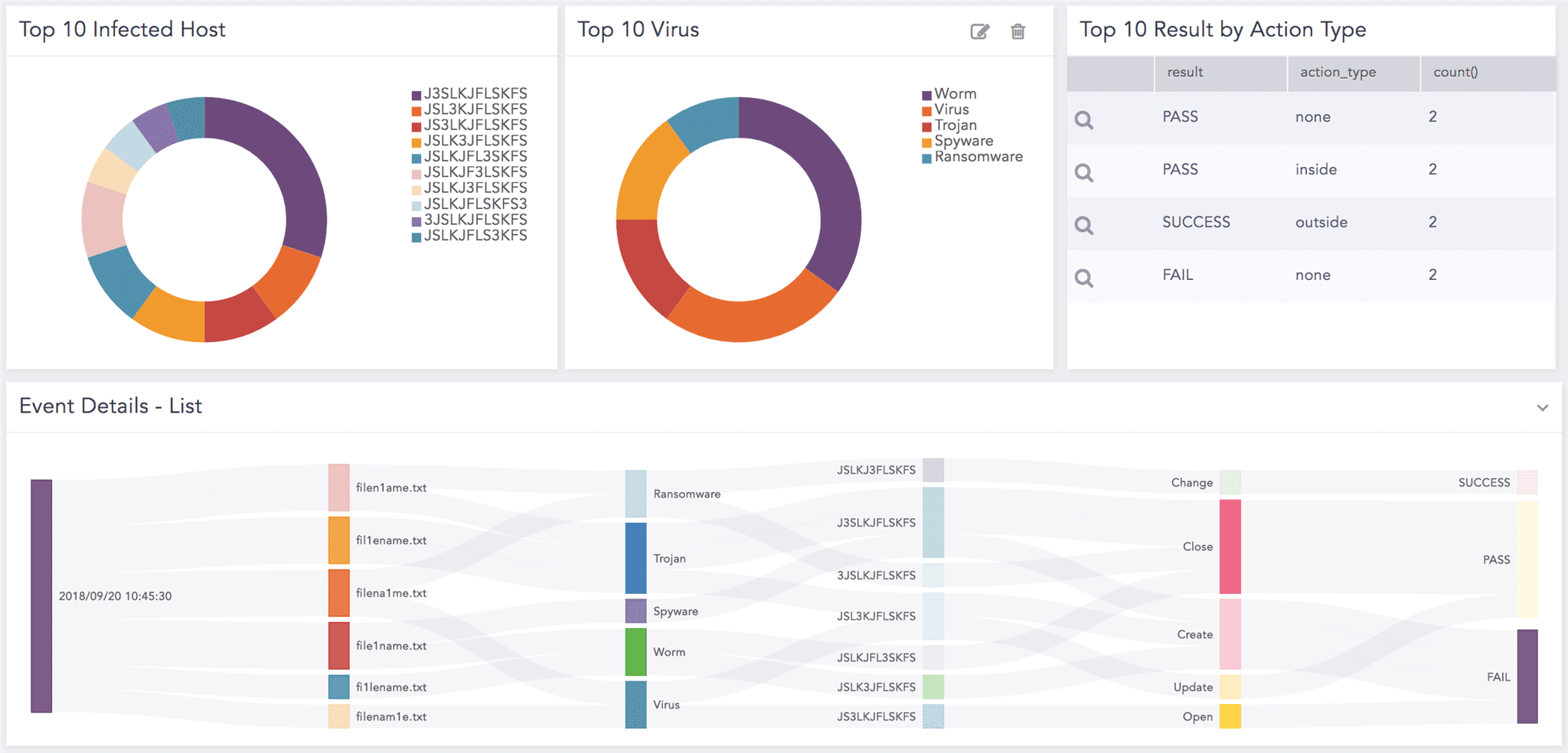
Top 10 Action

The top ten Trend Micro Office Scan actions, such as clean, rename, or pass.

Event Details - List

A detailed list of Trend Micro Office Scan events performed on file or hosts and actions are taken.

Top 10 Virus

The top ten viruses detected.

Top 10 Infected File

The top ten files infected by virus analyzed.

Top 10 Infected Host

The top ten hosts infected by virus analyzed.

Top 10 Results by Action Type

The top ten results by action types analyzed, such as Virus successfully detected but cannot perform Clean action (Quarantine).

LP_Trend Micro Deep Security - Overview

Widget Name

Description

Deep Security Events - Time-trend

A time-trend of the Deep Security events from last 24 hours.

Top 10 Names Integrity Monitor

The top ten integrity monitoring used for monitoring critical system files, directories, network devices to detect unauthorized changes analyzed by Trend Micro Deep Security.

Top 10 URL in Web Reputation

The top ten URLs and their reputation analyzed by Trend Micro Deep Security verifying whether the website is safe and legit.

Top 10 Names in Log Inspection

The top ten event categories in the log inspection event analyzed by Trend Micro Deep Security.

LP_Trend Micro Deep Security - Intrusion Prevention

Widget Name

Description

Top 10 Sources in IDS Activity

The source addresses from where Trend Micro Deep Security detects suspicious or unusual activities.

Top 10 Destinations in IDS activity

The destination addresses where Trend Micro Deep Security detects suspicious or unusual activities.

Top 10 Sources in IPS Activity

The top ten source addresses from which delivery of network packets have been altered or prevented entering into your network based on the security events in the IPS activity.

Top 10 Destinations in IPS Activity

The top ten destination addresses from where delivery of network packets have been altered or prevented entering into your network based on the security events in the IPS activity.

Top 10 Ports in IPS Activity

The top ten ports from which delivery of network packets have been altered or prevented entering into your network based on the security events in the IPS activity.

Top 10 Ports in IDS Activity

The top ten ports detected by Trend Micro Deep Security in the IDS activity.

Data Usage - Timetrend

A time-trend of data use in MB detected by Trend Micro Deep Security.

IDS/IPS Details

The IDS or IPS connection details by source address, country, destination address, destination port, and action.

IPS Actions - Timetrend

A time-trend of IPS actions from the last 24 hours.

LP_Trend Micro Deep Security

Widget Name

Description

Logs Count by Severity - Time Trend

Displays the event count by severity from last 24 hours.

Logs - Time Trend

Displays the Trend Micro Deep Security event count from the last 24 hours.

Virus Detected

Displays the list of viruses detected.

Files Quarantined - List

The quarantined files.

Total Quarantined Data Size - Time Trend

A data size of a quarantined file in MB from last 24 hours.

Top 10 Sources

The top ten source addresses.

Alert And Report Emails - List

The alert and report emails received by users.

Top 10 Alert And Report Email Receivers

The top ten alerts and report emails received by the users.

Top 10 Error Messages

The error messages by Trend Micro Deep Security.

Update Status Requests vs Success - Time Trend

Displays the update status requests vs update successful.

Failed Authentications

The users who failed to login to user account.

Top 10 Users in Failed Authentication

The top ten users who failed to authenticate successfully.

Top 10 Users in Successful Authentication

The top ten users who authenticated successfully.

Successful Authentication

The users who successfully log in to user account.

Failed Authentication - List

A detailed list of users who failed to log in to their user account successfully based on user and source address.

Successful Authentication - List

A detailed list of users who successfully log in to their user account based on user and source address.

LP_Trend Micro Deep Discovery - Threat

Widget Name

Description

Top 10 Infected Files

The infected files detected by Trend Micro Deep Discovery.

Top 10 Malware Infested Host

The top ten hosts infested by malware.

Top 10 Malware

The top ten malware detected by Trend Micro Deep Discovery.

Malware Overview

An overview of malware detected on your network arsenal based on malware type, event category, event sub category, and infested file.

Top 10 Disruptive Application

The top ten applications detected by Trend Micro Deep Discovery likely to affect your system environment.

Top 10 Malicious Behaviour Message

The top ten engineered messages malicious in nature.

Top Web Reputation Detected

The website URLs with high or good reputation meaning, the URL is safe and legit.

Threat Type Overview with Time Trend

Threat type of content from last 24 hours analyzed by Trend Micro Deep Discovery. The threat types include Send a file to Sandbox (threat type 99), DAE event (threat type 6), TMUFE event (threat type 5), Grayware (threat type 4), Exploit (threat type 3), Suspicious Behaviour (threat type 2), Malicious Behaviour (threat type 1), and Malicious Content (threat type 6).

Top 10 Host IP with Events Detected

The top ten host IPs that exhibits suspicious behavior detected by Trend Micro Deep Discovery.

Top 10 Exploited Host

The top ten hosts exploited by threats.

Suspicious Behavior Detected - List

A detailed list of suspicious behavior based on the event category and message.

Grayware Application - List

A detailed list of Grayware applications or files that are not categorized as malware but can worsen the performance of your system.

LP_Trend Micro Deep Security - Antimalware

Widget Name

Description

Antimalware Actions - Timetrend

An overview of Antimalware actions such as cleaned, clean failed, deleted, delete failed, quarantined, quarantine failed, access denied, or passed.

Top 10 Names in Malware

The top ten malware and their event category.

Top 10 Hosts in Malware Detection

The top ten infected hosts detected.

Antimalware Details

An overview of Antimalware actions, event category, and actions.

LP_Trend Micro IWSVA

Widget Name

Description

Hits

The event count based on the rule hits when the local pattern matches with the event pattern detected by Trend Micro IWSVA.

Total Traffic

The data size of network traffic detected by Trend Micro IWSVA.

Top 10 Blocked URLs

The top ten URLs blocked by Trend Micro IWSVA.

Top 10 Visited Websites

The top ten most visited URLs analyzed by Trend Micro IWSVA.

Top 10 Bandwidth Consumer Users

The top ten users analyzed by Trend Micro IWSVA ranked based on bandwidth consumption in MB.

Top 10 Bandwidth Consumer Websites

The top ten websites ranked based on bandwidth consumption in MB by Trend Micro IWSVA.

Top 10 Users With Blocked Connections

The top ten users who blocked URLs containing a virus or spyware analyzed by Trend Micro IWSVA.

Top 10 Users

The top ten users ranked by Trend Micro IWSVA.

LP_TREND MICRO IMSVA

This dashboard consists of the following widgets:

Widget Name

Description

Top 10 Virus Infected Mailbox

The top ten mailboxes containing email virus with malicious code to infect your end devices.

Top 10 Spammed Mailbox

The top ten mailboxes with spam emails sent out in bulk to an indiscriminate recipient list. It allows administrators to analyze dangerous emails which can be part of a phishing scam.

Top 10 Quarantined Mails

The top ten emails that may contain spam or be dangerous. The quarantined emails are placed in a secure environment for you to view them without risk.

Top 10 Authentication Failures

The top ten authentication failures when your email server fails to identify or authenticate you correctly.

Top 10 In-complete Mail Receivers

Display the receivers whose server could not connect for receiving the mail.

Adding the Trend Micro Dashboards

  1. Go to Settings >> Knowledge Base from the navigation bar and click Dashboard.

  2. Select VENDOR DASHBOARD from the drop-down.

  3. Click the Use icon from Actions.

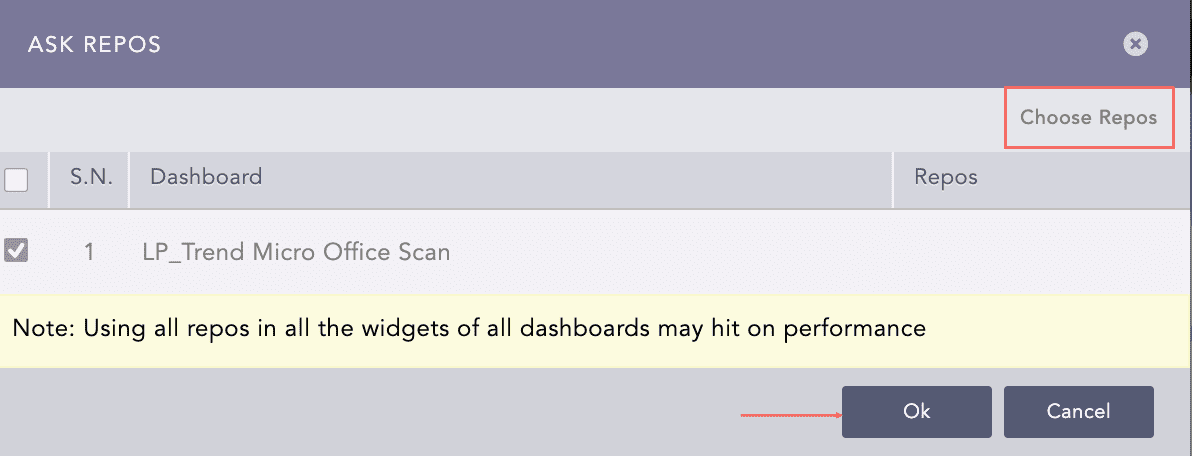
  4. Click Choose Repos.

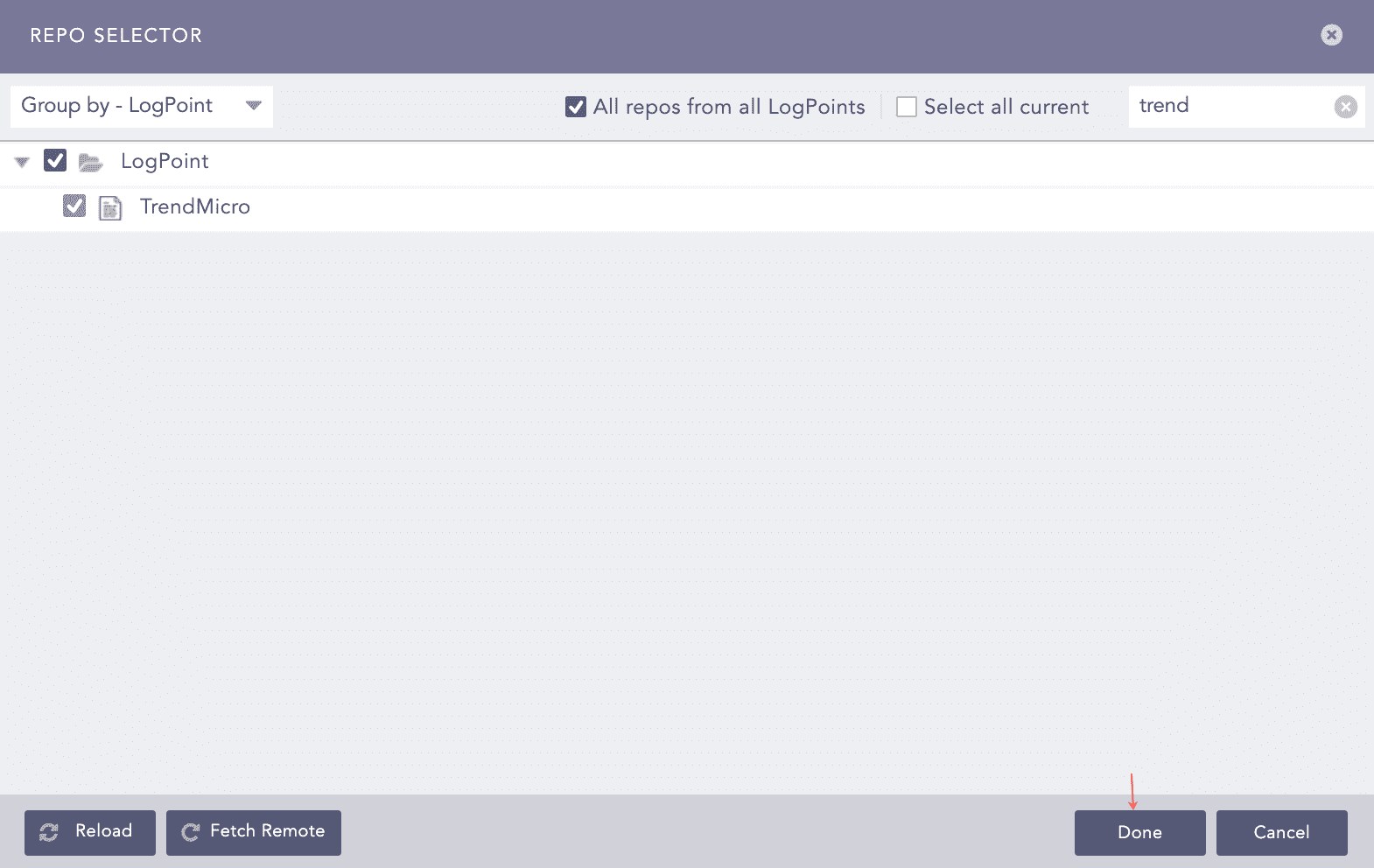
  5. Select the repo configured to store the Trend Micro logs and click Done.

Trend Micro Ask Repos Panel

Selecting Repos

  1. Select the dashboard and click Ok.

Trend Micro Ask Repos Panel

Selecting Repos

You can find Trend Micro dashboards under Dashboards.

Confirmation for Repo

Trend Micro Dashboards

Trend Micro Labels

Labels available in the LP_Trend Micro Control Manager are:

Labels

Description

Update, Successful

Trend Micro events with the UPDATE_SUCCESS event category.

Product, Service, Start

Trend Micro events with the PRODUCT_SERVICE_STARTED event category.

Product, Service, Stop

Trend Micro events with the PRODUCT_SERVICE_STOPPED event category.

Update, Fail

Trend Micro events with the UPDATE_FAIL event category.

Unknown

Trend Micro events with the UNKNOWN event category.

Spyware, Malware

Trend Micro events with the GRAYWARE event category.

Virus, Malware

Trend Micro events with the VIRUS event category.

Quarantine

Trend Micro events with the QUARANTINE event category.

Clean

Trend Micro events with the CLEAN event category.

Delete

Trend Micro events with the DELETE event category.

Successful

Trend Micro events with the SUCCESS event category.

Malware

Trend Micro events with the MALWARE event category.

Remove, Fail

Trend Micro events with the PASS_THRU event category.

Firewall

Trend Micro Deep Security event with the event ID 20.

Intrusion, Prevention

Trend Micro Deep Security event with the event ID 10.

Firewall, Rule, Deny

Trend Micro Deep Security event with the event ID 21.

Integrity, Monitor, Rule

Trend Micro Deep Security event with the event ID 30.

Log, Inspect, Rule

Trend Micro Deep Security event with the event ID 40.

Intrusion, Prevention, Internal, Error

Trend Micro Deep Security event with the event ID 2.

Intrusion, Prevention, Normalization

Trend Micro Deep Security event with the event IDs 5,6,7, or 8.

Intrusion, Prevention, Rule

Trend Micro Deep Security event with the event ID 1.

Log, Inspect, Rule

Trend Micro Deep Security event with the event ID 3.

SSL

Trend Micro Deep Security event with the event ID 3.

Firewall

Trend Micro Deep Security event with the event ID 1.

Antimalware

Trend Micro Deep Security event with the event ID 4.

Web, Reputation

Trend Micro Deep Security event with the event ID 5.

Application, Control

Trend Micro Deep Security event with the event ID 6.

Antimalware, Realtime, Scan

Trend Micro Deep Security event with the event ID 4000000.

Antimalware, Manual, Scan

Trend Micro Deep Security event with the event ID 4000001.

Antimalware, Schedule, Scan

Trend Micro Deep Security event with the event ID 4000002.

Antimalware, Quick, Scan

Trend Micro Deep Security event with the event ID 4000003.

Antispyware, Realtime, Scan

Trend Micro Deep Security event with the event ID 40000010.

Antispyware, Manual, Scan

Trend Micro Deep Security event with the event ID 40000011.

Antispyware, Schedule, Scan

Trend Micro Deep Security event with the event ID 40000012.

Antispyware, Quick, Scan

Trend Micro Deep Security event with the event ID 40000013.

Suspicious, Activity, Realtime, Scan

Trend Micro Deep Security event with the event ID 40000020.

Unauthorized, Change, Realtime, Scan

Trend Micro Deep Security event with the event ID 40000030.

Web, Reputation, Block

Trend Micro Deep Security event with the event ID 5000000.

Web, Reputation, Detect

Trend Micro Deep Security event with the event ID 5000001.

Application, Control, Detect, Blacklist

Trend Micro Deep Security event with the event ID 6001100.

Application, Control, Detect, Absent, Whitelist

Trend Micro Deep Security event with the event ID 6001200.

Application, Control, Block, Blacklist

Trend Micro Deep Security event with the event ID 6002100.

Application, Control, Block, Absent, Whitelist

Trend Micro Deep Security event with the event ID 6002200.

Firewall

Trend Micro events with the Log for TCP Port event category.

Intrusion, Prevention

Trend Micro events with the Intrusion Prevention Rule event category.

User, Successful, Login

Trend Micro events with the User Signed In event category.

Integrity, Monitor

Trend Micro events with the New Integrity Monitoring Rule event category.

Web, Reputation

Trend Micro events with the Web Reputation event category.

Appliance, Error

Trend Micro events with the Agent or Appliance Error event category.

Directory, Synchronize, Complete

Trend Micro events with the User Synchronization Finished event category.

Send, Report

Trend Micro events with the Sending Report event category.

Event, Retrieve

Trend Micro events with the Events Retrieved event category.

Alert, Email, Send

Trend Micro events with the Alert Emails Sent event category.

Agent, Offline

Trend Micro events with the Offline event category.

Internal, Error

Trend Micro events with the Internal Software Error event category.

Certificate, Accept

Trend Micro events with the Certificate Accepted event category.

Session, Authentication, Fail

Trend Micro events with the User Session Validation Failed event category.

Relay, Update, Successful

Trend Micro events with the Relay Group Update Success event category.

Relay, Update, Request

Trend Micro events with the Relay Group Update Requested event category.

Check, Status, Fail

Trend Micro events with the Check Status Failed event category.

Server, Prepare

Trend Micro events with the Server Prepared event category.

Synchronize, Complete

Trend Micro events with the Synchronization Finished event category.

Synchronization, Request

Trend Micro events with the Synchronization Requested event category.

User, Authentication, Fail

Trend Micro events with the Authentication Failed event category.

Interface, Synchronize, Fail

Trend Micro events with the Interfaces Out of Sync event category.

Virtual, Appliance, Deploy

Trend Micro events with the Virtual Appliance Deployed event category.

Interface, Synchronize

Trend Micro events with the Interfaces in Sync event category.

Virtual, Machine, Unprotect

Trend Micro events with the Virtual Machine Unprotected event category.

Filter, Driver, Upgrade

Trend Micro events with the Filter Driver Upgraded event category.

Filter, Driver, Upgrade, Request

Trend Micro events with the Filter Driver Upgrade Requested event category.

User, Synchronization, Fail

Trend Micro events with the User Synchronization Failed event category.

Alert, Start

Trend Micro events with the Alert Started event category.

Antimalware, Engine, Offline

Trend Micro events with the Antimalware Engine Offline event category.

Alert, End

Trend Micro events with the Alert Ended event category.

SQL, Injection, Prevention

Trend Micro events with the Generic SQL Injection Prevention event category.

Out, Allow, Policy

Trend Micro events with the Out of Allowed Policy event category.

Trend Micro Reports

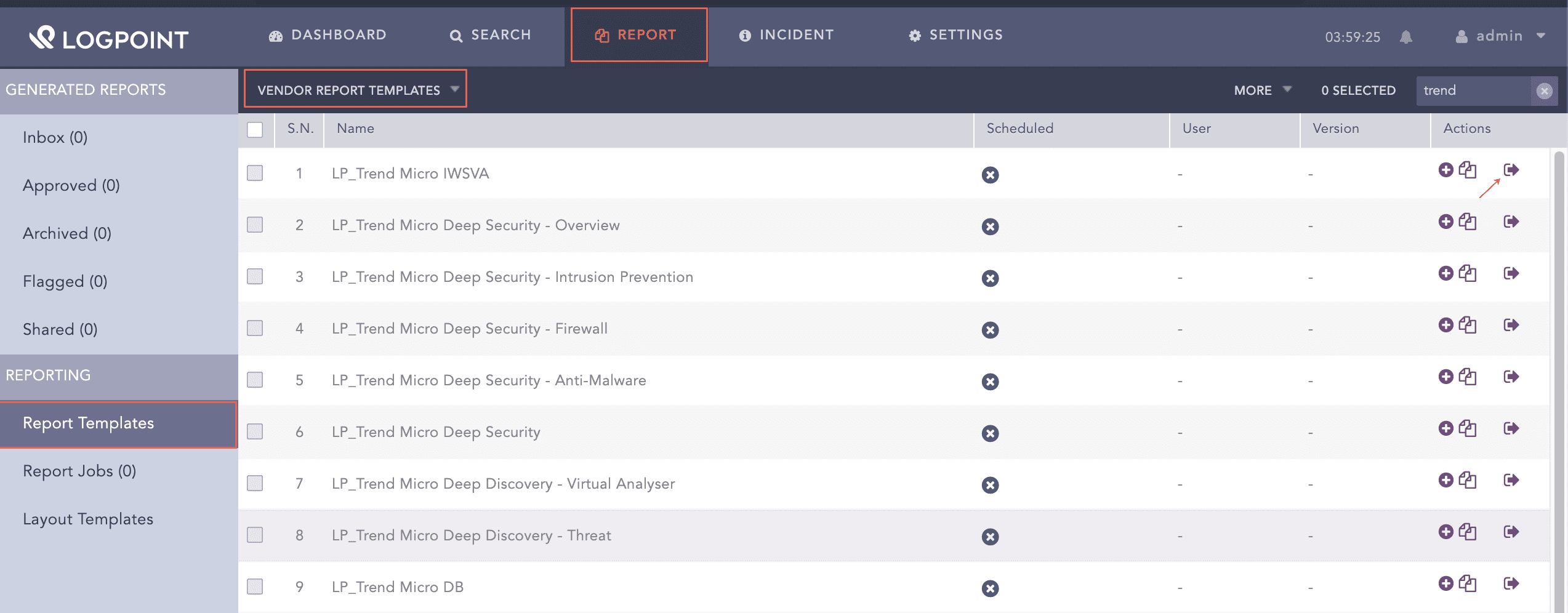
  1. Go to Reports >> Report Templates >> VENDOR REPORT TEMPLATES.

Using Trend Micro Report Template

Using the Trend Micro Report Template

  1. Click Add from Actions.

Using Trend Micro Report Template

Using Trend Micro Report Template

  1. Click Run This Report from Actions.

Run the Trend Micro Activities Report Template

Running Trend Micro Report Template

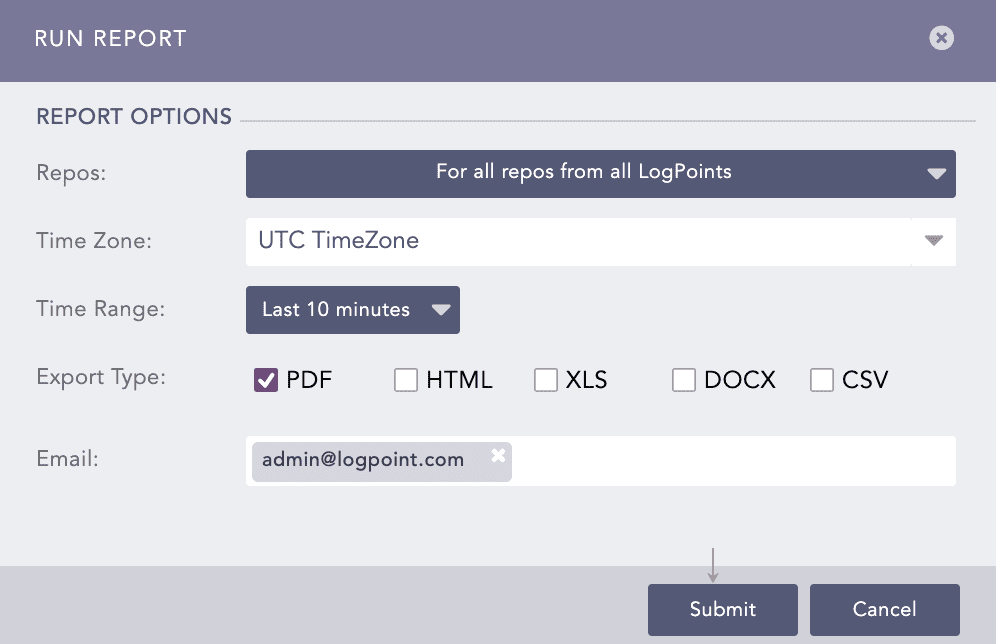
  1. Select Repos, Time Zone, Time Range, Export Type, and enter the Email address.

  2. Click Submit.

Run Report Wizard

Report Options

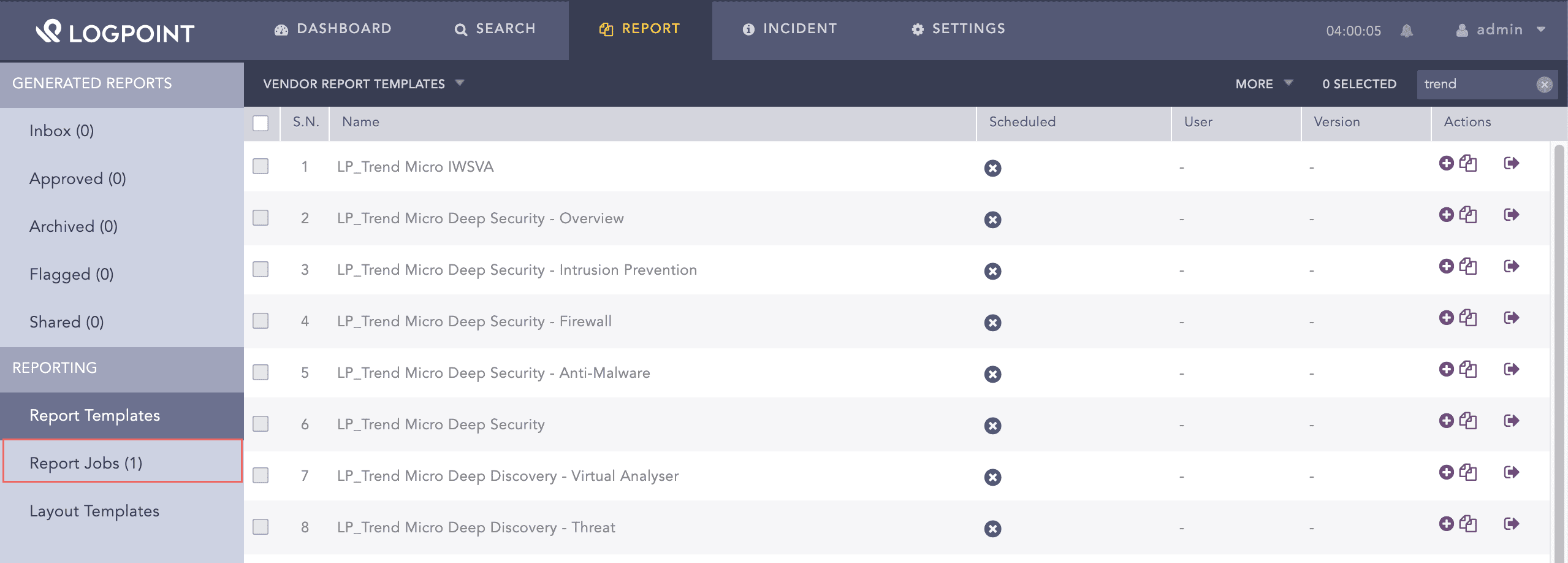
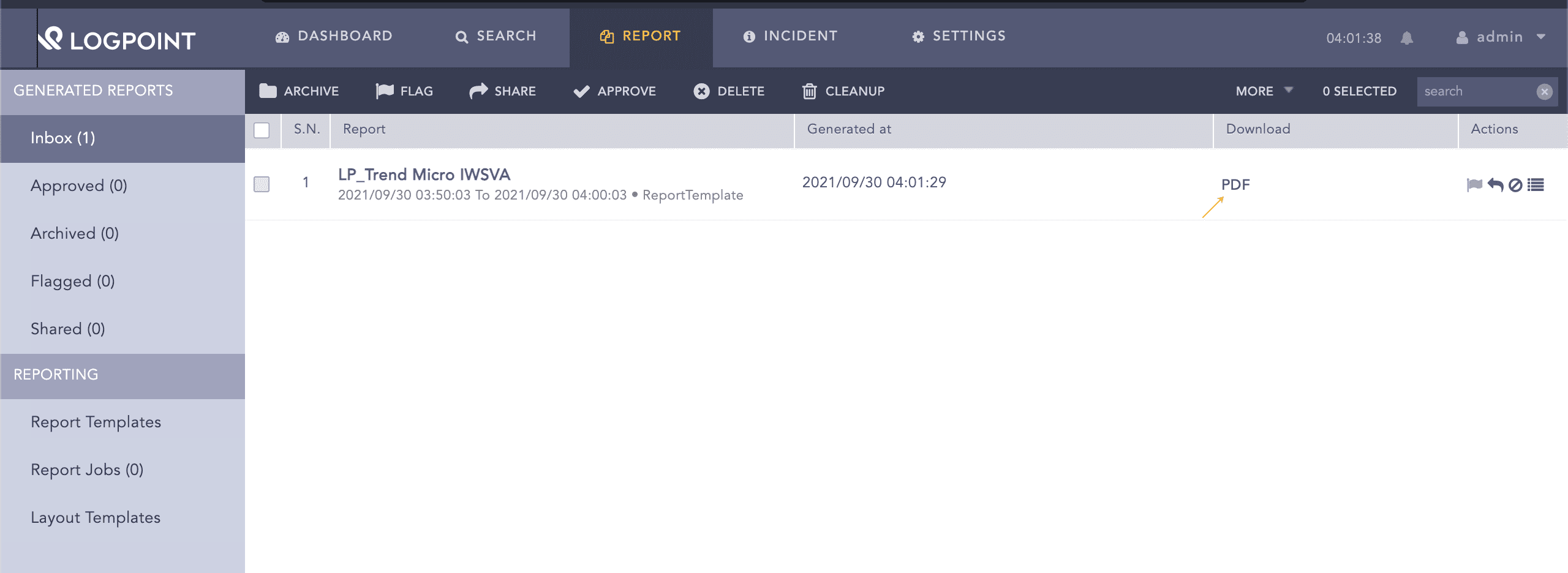
You can view the reports being generated under Report Jobs and download the generated reports from Inbox with .pdf or .html extension by clicking PDF or HTML from Download of Inbox.

A report contains widgets enabling you to analyze the data in different forms like graphs, time trends, lists, and text. Reports are time-bound, which means they are incident summaries over a period of time, for example, the last 24 hours or last five minutes. While generating a report, you can customize the calendar period according to your needs.

Incident Summary reports available in Trend Micro are:

  • LP_CEF: Trend Micro Deep Discovery - Virtual Analyser provides statistical information on the Trend Micro Virtual Analyser actions, suspicious files, and malicious hosts in different formats like graphs and lists.

  • LP_Trend Micro Deep Security - Firewall provides statistical information on the Trend Micro Firewall actions, connection details, and data use (in MB) in different formats like graphs, and time trends, and lists.

  • LP_CEF: Trend Micro Deep Discovery - Threat provides statistical information on the infected files, websites, Grayware applications, and website reputation in different formats such as graphs, time trends, and lists.

  • LP_Trend Micro Control Manager provides statistical information on the Antimalware actions, network content inspection, content security violation, and malware and endpoints details in different formats like graphs, time trends, and lists.

  • LP_Trend Micro DB provides statistical information on the virus, malware, infection source and destination, threat types, and user action details in different formats like graphs, time trends, and lists.

  • LP_CEF: Trend Micro Deep Discovery - Overview provides statistical information on the suspicious files and callback events in different formats like graphs, time trends, and lists.

  • LP_Trend Micro Deep Discovery - Virtual Analyser provides statistical information on the Virtual Analyzer that performs content simulation and analysis in an isolated virtual environment to identify common properties associated with different types of malware in different formats like graphs, time trends, and lists.

  • LP_Trend Micro Deep Security - Overview provides statistical information on the Trend Micro Deep Security events, Integrity Monitor, and web reputation of URL in different formats like graphs, time trends, and lists.

  • LP_Trend Micro Deep Security - Intrusion Prevention provides statistical information on the IDS and IPS activities, actions, and data use detected by IDS and IPS (in MB) in different formats like graphs, time trends, and lists.

  • LP_Trend Micro Deep Security provides statistical information on the virus detected, quarantined files, alert and report emails, authentication details, and error messages in different formats like graphs, time trends, and lists.

  • LP_Trend Micro Deep Discovery - Threat provides statistical information on threat and malware details, disruptive applications, suspicious behavior, Grayware applications, and website reputation detected by the Trend Micro Deep Discovery in different formats like graphs, time trends, and lists.

  • LP_Trend Micro Deep Security - Antimalware provides statistical information on the Antimalware actions, malware details, and hosts infected by malware detected by the Trend Micro Deep Discovery in different formats like graphs, time trends, and lists.

  • LP_Trend Micro IWSVA provides statistical information on the blocked URLs and connections, total network traffic, and the number of rule hits detected by Trend Micro IWSVA in different formats like graphs, time trends, and lists.

Trend Micro Search Package

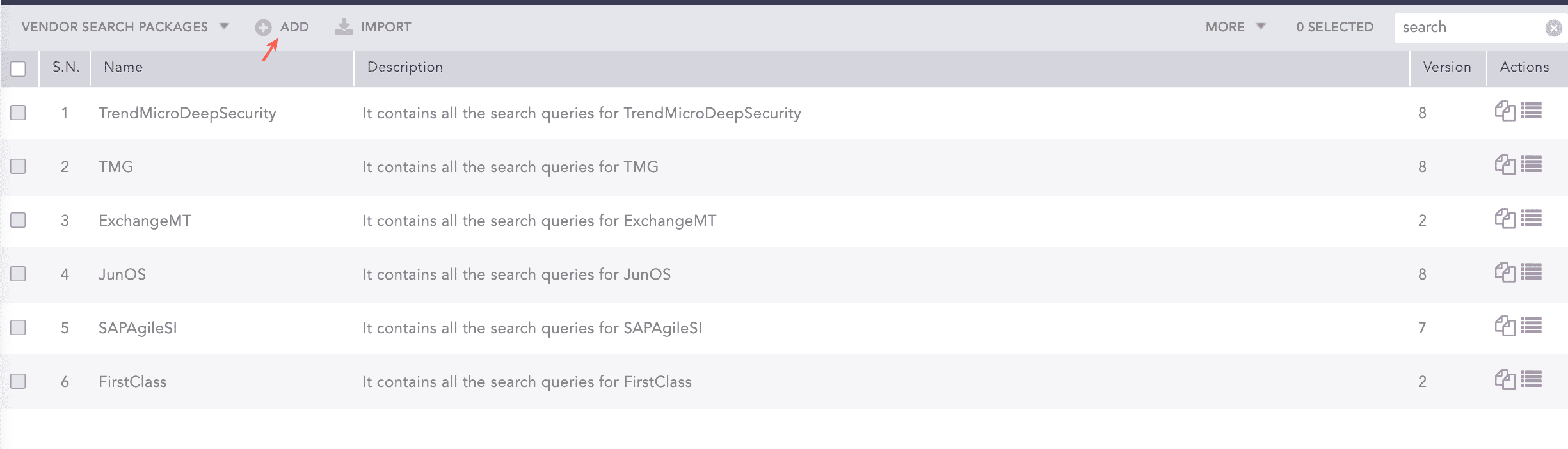
The TrendMicroDeepSecurity search package is the collection of saved searches that contains search queries for Trend Micro Deep Security. You can save a frequently used search query to use it in the future without entering it manually.

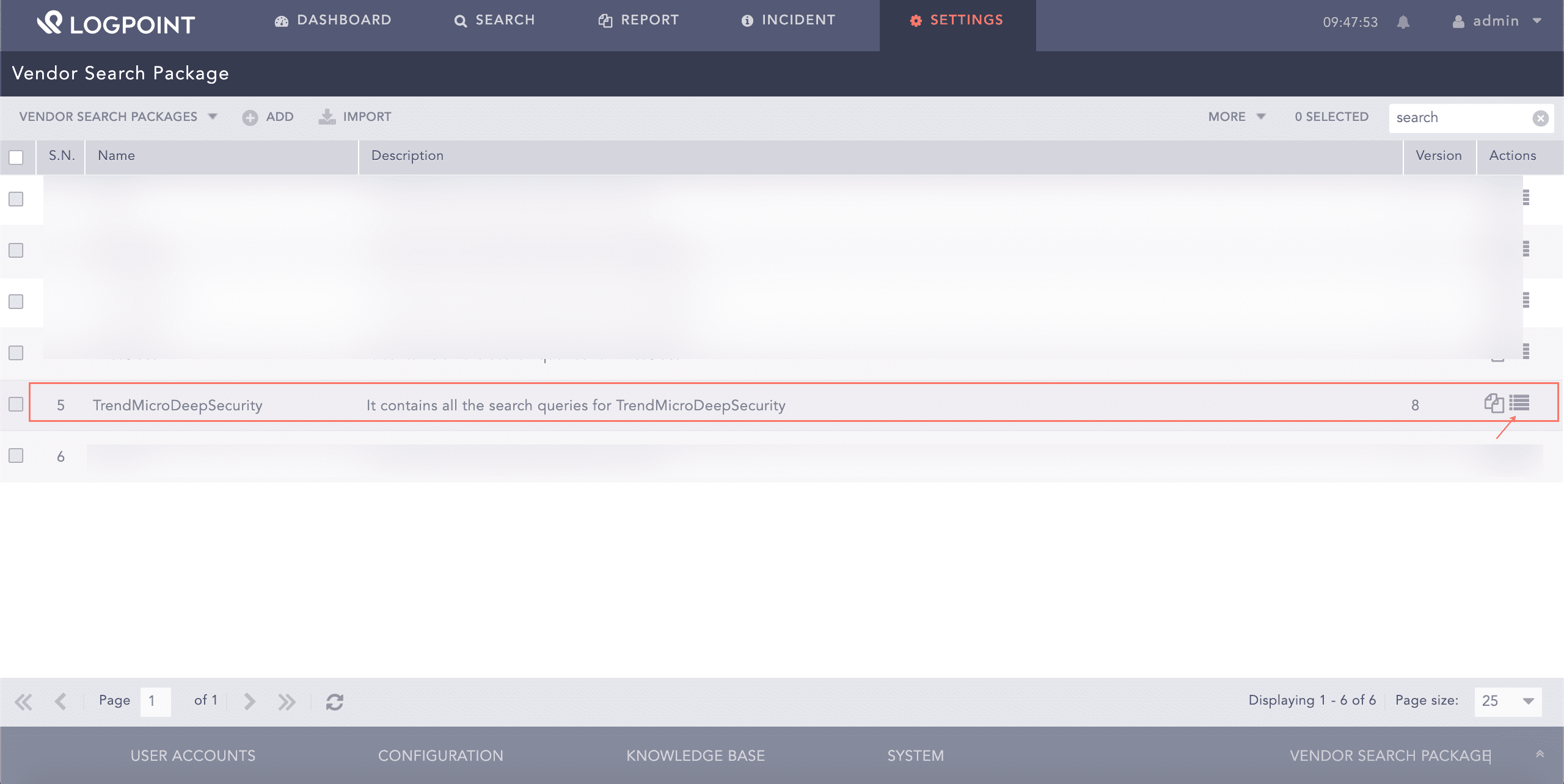
  1. Go to Settings >> Knowledge Base >> Search Packages.

  2. Select VENDOR SEARCH PACKAGES from the drop-down.

  3. You can view the existing query from Manage Saved Searches from Actions.

Viewing Search Package

Trend Micro Search Package

To add a new Trend Micro Deep Security search query:

  1. At the top left, click Add.

Viewing Search Package

Adding Search Package

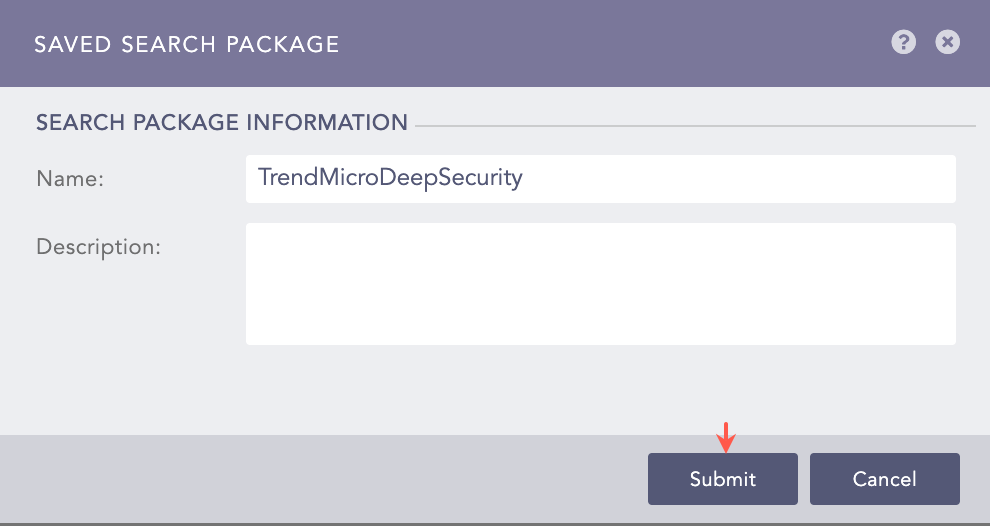
  1. Enter Name and Description of the search package and click Submit.

Viewing Search Package

Trend Micro Saved Search Package

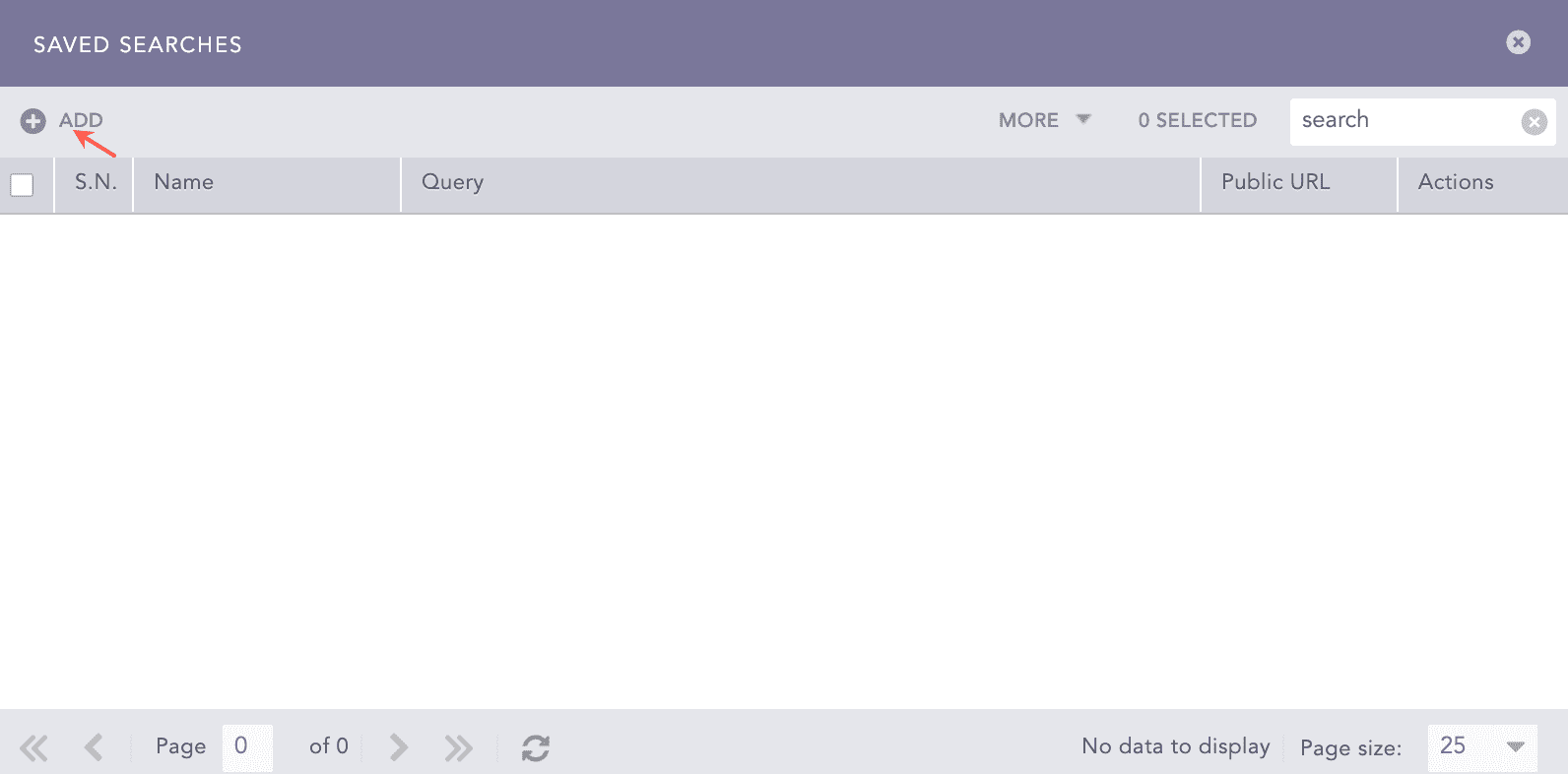
  1. At the top left of the SAVED SEARCHES panel, click Add.

Viewing Search Package

Trend Micro Saved Search Package

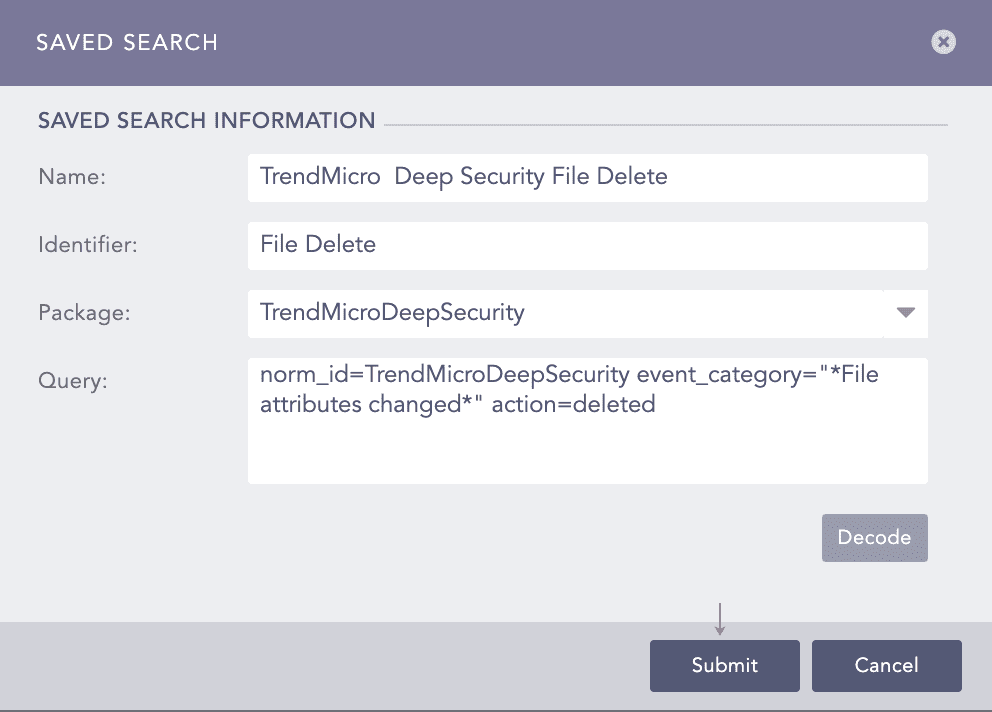
  1. Enter Name. For example, Trend Micro Deep Security File Delete.

  2. Enter Identifier to identify the saved query (Optional).

  3. Select TrendMicroDeepSecurity Package from the drop-down.

  4. Enter the search Query.

Note

Click Decode to convert the URL encoded search string to Logpoint search query format.

  1. Click Submit.

Viewing Search Package

Adding Search Query

Trend Micro Alerts

  • Trigger condition: An infected file is quarantined.

  • ATT&CK Category: N/A

  • ATT&CK Tag: N/A

  • ATT&CK ID: N/A

  • Minimum Log Source Requirement: TrendMicro Deep Security

  • Query:

    norm_id=TrendMicroDeepSecurity label=Infection label=File label=Quarantine
    
  • Trigger Condition: A virus-infected file is quarantined.

  • ATT&CK Category: Defense Evasion, Discovery

  • ATT&CK Tag: Obfuscated Files or Information, Indicator Removal from Tools, Network Service Scanning

  • ATT&CK ID: T1027, T1027.005, T1046

  • Minimum Log Source Requirement: Trend Micro Deep Security

  • Query:

    norm_id=TrendMicroDeepSecurity label=Virus OR label=Malware label=File label=Quarantine
    
  • Trigger Condition: Trend Micro Deep Security detects Botnet infected host.

  • ATT&CK Category: -

  • ATT&CK Tag: -

  • ATT&CK ID: -

  • Minimum Log Source Requirement: Trend Micro Deep Security

  • Query:

    norm_id=TrendMicroDeepSecurity label=Botnet label=Detect
    
  • Trigger Condition: Trend Micro Deep Security detects ransomware infected host.

  • ATT&CK Category: -

  • ATT&CK Tag: -

  • ATT&CK ID: -

  • Minimum Log Source Requirement: Trend Micro Deep Security

  • Query:

    norm_id=TrendMicroDeepSecurity label=Detect label=Malware label=Infection malware="*Ransom*"
    
  • Trigger Condition: Antimalware engine is offline.

  • ATT&CK Category: Defense Evasion, Discovery

  • ATT&CK Tag: T1046 - Network Service Scanning, T1070 - Indicator Removal on Host

  • Minimum Log Source Requirement: Trend Micro Deep Security

  • Query:

    label=AntiMalware label=Engine label=Offline
    

Helpful?

We are glad this guide helped.


Please don't include any personal information in your comment

Contact Support