Windows Analytics

Windows Dashboards

LP_AD: Computer Account Management

Widgets available in the LP_AD: Computer Account Management dashboard provide details of Audit Computer Account Management events. When a computer account is established, modified, or deleted, Audit Computer Account Management tells you if the operating system creates audit events.

Widget Name

Description

Top 10 Users in Computer Account Management

The top 10 users or computers, including domain controllers, member servers or workstations in the Computer Account Management.

Computer Account Management Overview

Details of events generated when a computer account is created, changed or deleted based on user, domain, actions and computer.

Top 10 Computers in Computer Account Management

The top 10 computer accounts that were created, modified or deleted in Computer Account Management.

Top 10 Actions by Users in Computer Account Management

An overview of the top 10 user actions, such as when a computer account was created, deleted, or changed.

Top 10 Actions in Computer Account Management - Time Trend

A time trend of top 10 Computer Account Management actions from the last 24 hours, involving computer account created, changed or deleted.

Computer Account Management

A detailed overview of account-related actions to computers that are a member of domains. The computer account related actions include computer account created, deleted, or changed.

LP_AD: Critical User Activities

Widgets available in the LP_AD: Critical User Activities dashboard provide details of users added, removed, enabled, disabled, or created in the Active Directory Security Groups. Active Directory includes security groups (Administrators), who are provided permission to shared resources. Members of the Administrators group have total and unrestricted access to the resources.

Widget Name

Description

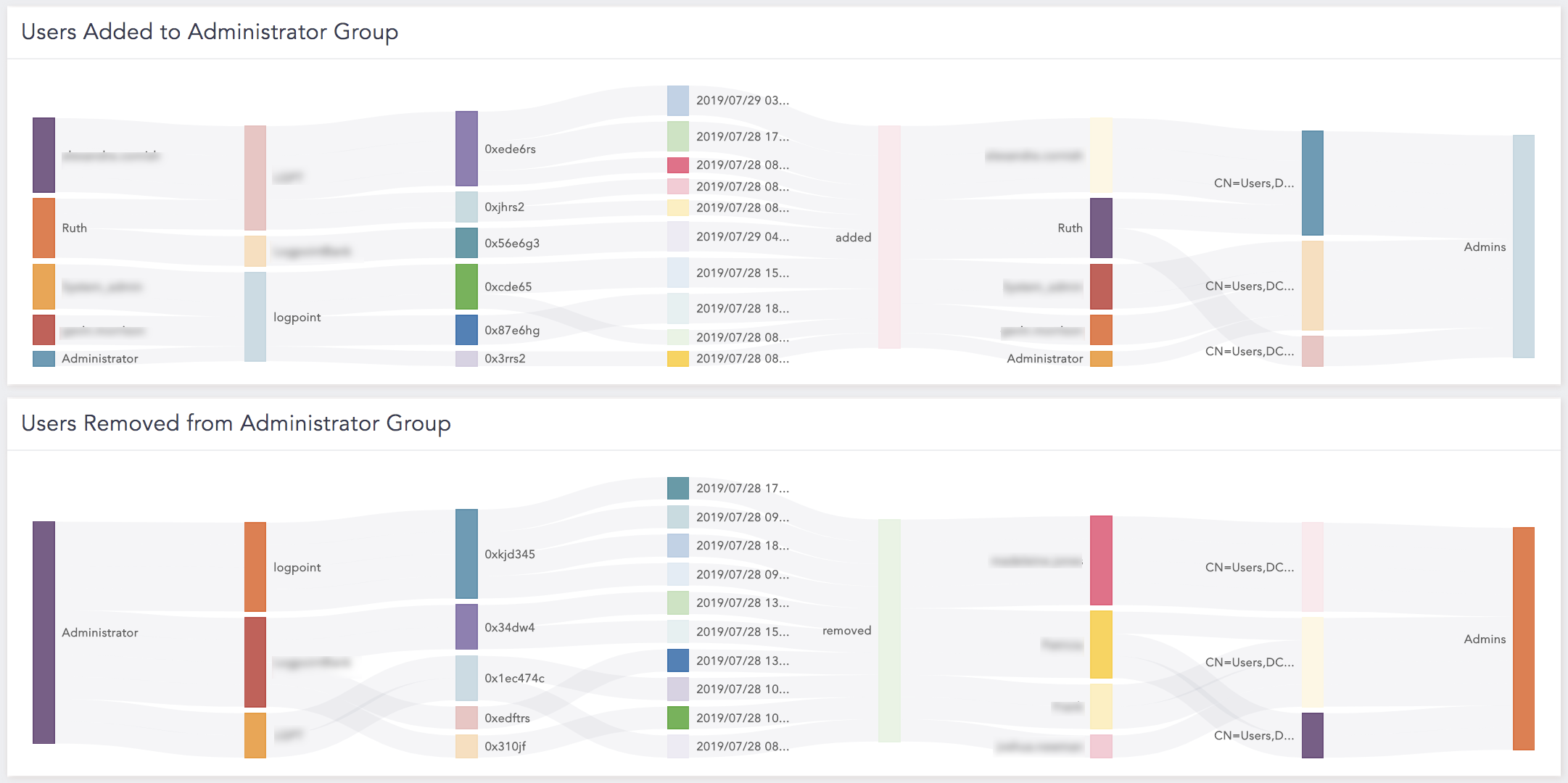
Users Added to Administrator Group

Users added to the Windows administrative group. The administrative groups are Domain Admins, Enterprise Admin Groups, Schema Admins, and DNSAdmins. The Microsoft event ID for this event is 4728 (User Added from Security Enabled Global Group). We recommend you verify the added user.

Users Removed from Administrator Group

A detailed overview of users removed from the Windows administrative group. The administrative groups are Domain Admins, Enterprise Admins, Schema Admins, and DNSAdmins. The Microsoft event ID for this event is 4729 (User Removed from Security-Enabled Global Group). We recommend you verify the removed user.

Users Disabled

Users disabled in Windows administrative group. The Microsoft event ID for the event is 4725. We recommend you verify the disabled users.

Users Enabled

Users enabled in the Windows administrative group. The Microsoft event ID for the event is 4722. We recommend you verify the enabled users.

Password Never Expires

A user checked in the Password Never Expires event. The Microsoft event ID for the event is 4738. We recommend you verify the event when used by the system accounts.

Users Created with a $

Usernames created starting with a dollar sign ($) in Azure Directory.

Users Changed to End with $

Usernames changed to end with a dollar sign ($) in Azure Directory.

User Added to a LogPoint Group in Active Directory

Users added to the LogPoint group in Active Directory.

User Removed from a LogPoint Group in Active Directory

Users removed from the LogPoint group in Active Directory.

LP_AD: Distribution Group Management

Widgets available in the LP_AD: Distribution Group Management dashboard provide details of users or groups in Active Directory Distribution Group Management. Distribution Groups are created to distribute messages in your organization.

Widget Name

Description

Top 10 Users in Distribution Group Management

The top 10 users in the Distribution Groups Lists.

Top 10 Groups in Distribution Group Management

The top 10 groups in the Distribution Groups Lists.

Top 10 Actions by Users in Distribution Group Management

The top 10 actions, such as added, removed, created, changed or deleted in the Distribution Groups.

Distribution Group Management Overview

The Distribution Groups based on group members, actions, objects and users.

Distribution Group Management

The Distribution Groups based on log timestamp, path, group members, actions, objects and users.

Actions in Distribution Group Management - Time Trend

A time trend of actions performed on users or devices in the Distribution Group within the last 24 hours. Actions include user or group added, removed, created, changed or deleted in the Distribution Group.

LP_AD: Machine Authentication Requests

Widgets available in the LP_AD: Machine Authentication Requests dashboard provide details of machines or services authenticated by Kerberos authentication protocol. Kerberos is a protocol to authenticate service requests between trustworthy hosts over an untrusted network, such as the internet. All popular computer operating systems, including Microsoft Windows, Apple macOS, FreeBSD and Linux, provide built-in Kerberos compatibility.

Widget Name

Description

Top 10 Machines in Successful Kerberos Authentication

The top ten machines or services that were successfully authenticated by Kerberos authentication protocol.

Top 10 Machines in Failed Kerberos Authentication

The top ten machines or services that were not successfully authenticated by Kerberos authentication protocol.

Machines in Successful Kerberos Authentication

The machines or services that were successfully authenticated by Kerberos authentication protocol based on user, source address and pre-authentication type.

Machines in Failed Kerberos Authentication

The machines or services that were not successfully authenticated by Kerberos authentication protocol based on user, source address, reason and pre-authentication type.

Attempts by Machine per IP: Revoked Credentials

Clients whose credentials have been revoked. In other words, accounts disabled, expired, locked and logon hours.

Attempts by Machine per IP: Expired Password

Kerberos pre-authentication failed event due to an expired password.

Attempts by Machine per IP: Client Not Found in Krb DB

Kerberos pre-authentication failed event as the client was not found in the Kerberos database due to a bad username, a new computer or a user account has not replicated to DC yet.

LP_AD: OU and GPO

Widgets available in LP_AD: OU and GPO provide details of Organizational Unit (OU) and Group Policy Object (GPO). In Active Directory, OUs are the containers where users, groups, and machines are stored. Group Policy Objects (GPOs) are a set of guidelines that regulate how user and computer accounts operate. The lowest scope or unit to which you may assign Group Policy settings or delegate administrative responsibility is an organizational unit.

Widget Name

Description

Group Policy Object Creation

The Group Policy Object (GPO) created. The Microsoft event ID for the event is 5137. We recommend you always verify the created GPO.

Group Policy Object Deletion

Group Policy Object (GPO) deleted. The Microsoft event ID for the event is 5141. We recommend you always verify the deleted GPO.

Group Policy Object Linked/Unlinked or Enforced/Unenforced or Link Enabled/Disabled to OU’s

GPO linked or unlinked, enforced or unenforced, or a link enabled or disabled for the OU. The Microsoft event ID for this event is 5136. We recommend you validate the GPO settings for the OU affected in the log event.

Group Policies Updated

Group Policy Object (GPO) deleted. The Microsoft event ID for the event is 5136. We recommend you validate the GPO settings for the domain affected in the log event.

Block Inheritance on an OU

Inheritance set to block or unblock on an OU. The Microsoft event ID for the event is 5136. We recommend you validate the settings for the OU affected in the log event.

Group Policy Updated on Computers

The computer running gpupdate internally. We recommend you verify the server settings affected in the log event in case an update failed. The Microsoft event ID for the event is 1704.

Group Policy Object Linked/Unlinked or Enforced/Unenforced or Link Enabled/Disabled for the Domain

GPO linked or unlinked to a domain or a GPO enforced or unenforced on a domain. The Mircosoft event ID for the event is 5136. We recommend you verify the GPO settings for the domain affected in the log event.

Block Inheritance on the Domain

Inheritance set to block or unblock on the domain. We recommend you verify the settings for the domain affected in the log event. The Microsoft event ID for the event is 5136.

Delegation of Authority or ACL Change on an OU

ACL changed on an OU. The change happens when a user or group is given authority rights by using the Delegation of Control Wizard. We recommend you verify the ACL of the OU affected in the log event. The Microsoft event ID for the event is 5136.

Delegation of Control or ACL Change on the Domain

ACL changed on the domain. The change happens when a user or group is given authority rights by using the Delegation of Control Wizard. We recommend you verify the ACL of the domain affected in the log event. The Microsoft event ID for the event is 5136.

OU Deletion

The OU deleted. We recommend you verify the deletion immediately. The Microsoft event ID for the event is 5141.

OU Creation

The OU created. We recommend you verify the creation immediately. The Microsoft event ID for the event is 5137.

Failed Group Policy Update on Computers

A computer running gpupdate internally that later failed. We recommend you verify the settings for the server affected in the log event if the update failed. The Microsoft event ID for the event is 1704.

LP_AD: Policy Changes

Widgets available in the LP_AD: Policy Changes dashboard provide details on Active Directory audit policy, user rights, logon rights and domain policy.

Widget Name

Description

Audit Policy Changes

Changed audit policies. Account restrictions are imposed by an audit policy for a group of users of one or more resources. The Microsoft event ID for the event is 4719. We recommend you verify the changed settings.

User Rights Changes

Changed user rights access control and permission using Active Directory. The Microsoft event IDs for the event are 4704 and 4705. We recommend you verify the changed settings.

Logon Rights Changes

Changed logon rights. The ability of accounts to utilize particular login methods, such as Interactive logon or Network logon, is controlled by logon permissions. The Microsoft event IDs for the event are 4717 and 4718. We recommend you verify the changed settings.

Domain Policy Change - List

Changed default domain policy. The widget displays the changes to the domain functional level or other characteristic. The Microsoft event ID for the event is 4739. We recommend you verify the changed settings.

LP_AD: Security Group Management

Widgets available in the LP_AD: Security Group Management dashboard provide details on Security Group Management that keeps track of activities like the creation, deletion, or modification of security-enabled groups, as well as any changes to the membership of the groups. Security-enabled groups are used for permissions, rights and as distribution lists.

Widget Name

Description

Top 10 Users in Security Group Management

The top 10 users in a security-enabled group.

Top 10 Groups in Security Group Management

The top 10 security-enabled groups.

Top 10 Actions by Users in Security Group Management

The top 10 actions, such as added, removed, changed, created, or deleted performed by users in a security-enabled group.

Security Group Management

A security-enabled group based on log timestamp, users, domains, actions, objects, and groups.

Actions in Security Group Management

Actions performed in a security-enabled group.

Security Group Creation

Created security groups.

Security Group Deletion

Deleted security-enabled groups.

Users Added to Security Groups

Users added to a security-enabled group.

Users Removed from Security Groups

Users removed from a security-enabled group.

Top 10 Users in Group Creation

The top 10 users in security group creation.

Top 10 Users in Group Deletion

The top 10 users in a security group deletion.

Top 10 Users in Adding Users to Groups

The top 10 users that added users to security-enabled groups.

Top 10 Users in Removing Users from Groups

The top 10 users that removed users from security-enabled groups.

LP_AD: Service

Widgets available in the LP_AD: Service dashboard provide details on changes made in Domain Policy, System Audit Policy or Kerberos Policy.

Widget Name

Description

Directory Service Changes - Time Trend

A time trend of changes made to objects in Active Directory Domain Services (AD DS).

Top 10 Categories in Audit Policy Changes

The top 10 categories, such as Audit Authentication Policy Change in audit policy change.

Audit Policy Changes - Time Trend

A time trend of the overall audit policy changes in a system. When modifications are made to the audit policy, the operating system creates audit events.

Overall Policy Changes - Time Trend

A time trend of overall policy changes in a system. The count is divided for Audit, Authentication and Authorization Policy Changes.

Top 10 Active Directory Objects

The top 10 Active Directory objects, such as domain controllers, users, or computers in a network.

Top 10 Trust Domain Modifications

Events generated when the trusted domain information is modified. The Microsoft event IDs for the event are 620 and 4716.

Significant Policy Changes

Significant policy changes, such as Domain Policy, System Audit Policy, or Kerberos Policy. The Microsoft event IDs for the Domain Policy events are 4719, 612, 4739, 643, or 4817, the event IDs for the Kerberos Policy are 4713 or 617, and the event ID for Auditing Settings On Object is 4817.

LP_AD: User Account Management

Widgets available in LP_AD: User Account Management provide:

Widget Name

Description

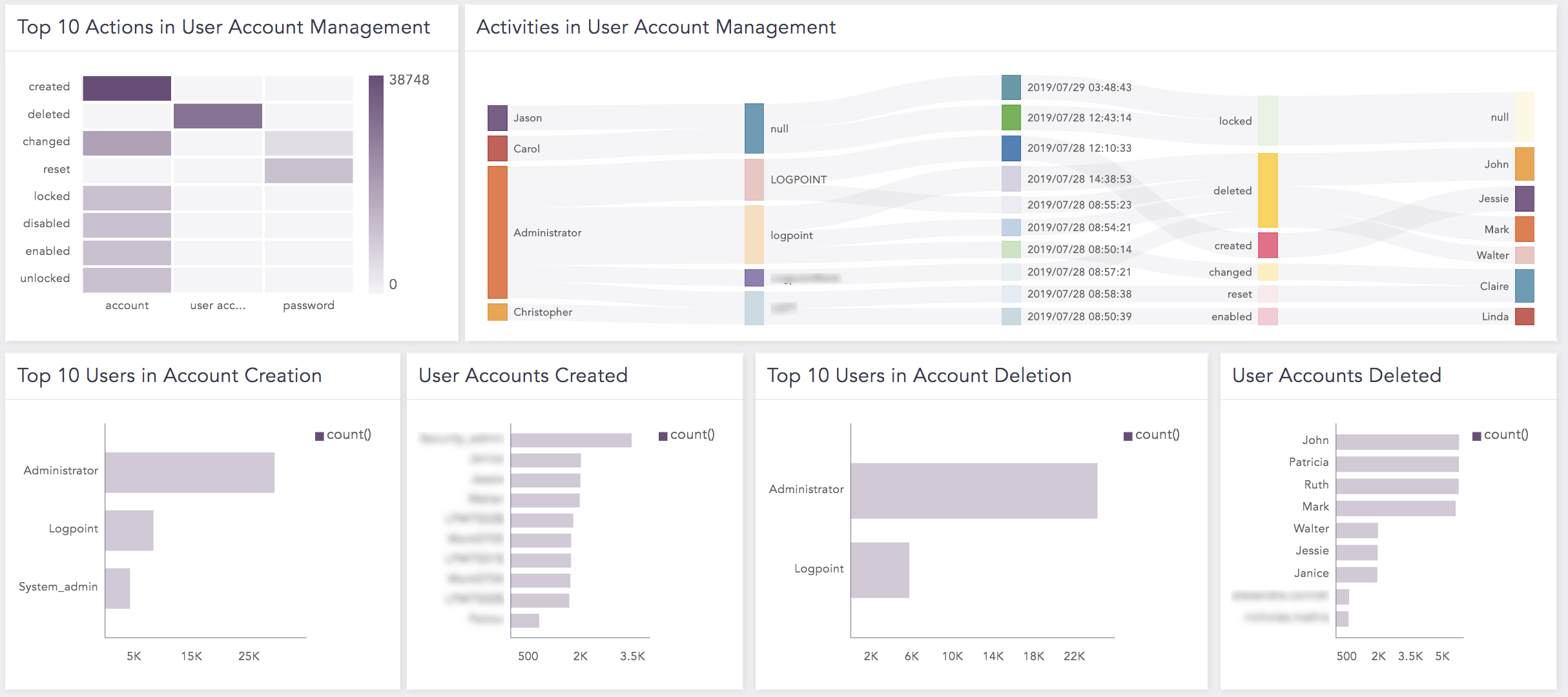
Top 10 Users in Account Creation

An overview of the top 10 users involved in account creation.

Top 10 Users in Account Deletion

An overview of the top 10 users involved in account deletion.

Top 10 Users in Accounts Changed

An overview of the top 10 users involved in account change.

Created Accounts

A detailed overview of created accounts.

Deleted Accounts

A detailed overview of deleted accounts.

Changed Accounts

A detailed overview of changed accounts.

Top 10 Accounts Changed

An overview of the top 10 accounts that were changed.

Activities in User Account Management

An overview of activities in user account management.

Activities in User Account Management

A detailed overview of activities in user account management based on user, domain, action, and target user.

User Accounts Locked

An overview of locked user accounts.

Locked vs Unlocked Actions

A detailed overview of locked or unlocked actions attempted on user accounts.

User Accounts Unlocked

An overview of unlocked user accounts.

Top 10 Actions in User Account Management

An overview of the top 10 actions, such as resetting a password in user accounts.

Success vs Failure Password Change Attempts

A detailed overview of successful and failed password change attempts on user accounts.

Password Change Attempts

An overview of password change attempts on user accounts.

Success vs Failure Password Set or Reset Attempts

A detailed overview of successful and failed password set or reset attempts on user accounts.

Password Set or Reset Attempts

An overview of password set or reset attempts on user accounts.

More than 3 Failed Password Change Attempts

An overview of password change attempts that failed more than three times.

User Accounts Created

An overview of created user accounts.

User Accounts Deleted

An overview of deleted user accounts.

Top 10 User Accounts Locked

An overview of the top 10 user accounts locked.

LP_AD: User Authentication Requests

Widgets available in LP_AD: User Authentication Requests provide:

Widget Name

Description

Top 10 Users in Successful Kerberos Authentication

An overview of the top 10 users with successfully validated credentials, upon which Kerberos Ticket Granting Ticket (TGT) was granted by the Domain Controller. (DC).

Top 10 Users in Failed Kerberos Authentication

An overview of the top 10 users whose credentials were not successfully validated by the Domain Controller.

Users in Successful Kerberos Authentication

An overview of users successfully authenticated by the Kerberos authentication protocol based on source address, pre-authentication type, and reason.

Users in Failed Kerberos Authentication

An overview of users who were not successfully authenticated by the Kerberos authentication protocol based on source address, pre-authentication type, and reason.

Attempts by User per IP: Revoked Credentials

An overview of users whose credentials have been revoked. In other words, accounts disabled, expired, locked, and logon hours. The status code is 0x12.

Attempts by User per IP: Expired Password

An overview of Kerberos authentication failed events due to expired password. The status code is 0x17.

Attempts by User per IP: Client Not Found in Krb DB

An overview of Kerberos authentication failed event as the client was not found in the Kerberos database due to a bad username, a new computer, or a user account has not been replicated to DC yet. The status code is 0x6.

LP_Windows Antimalware

Widgets available in LP_Windows Antimalware provide:

Widget Name

Description

Top 10 Antimalware Events

The top 10 antimalware events, such as antimalware service stopped.

Top 10 Users in Action

The top 10 users who have taken antimalware actions against malware activity.

Endpoint Protection Client Status

The status of antimalware policies, Windows Defender Firewall settings, Microsoft Defender for Endpoint to keep clients computer up-to-date and protected against an unidentified malware by downloading the latest definitions from the Malware Protection Center.

Antimalware Signature Version Update

The antimalware signature including the old signature version, updated signature, and signature type.

History of Malware Removed

A detected malware and action taken against the malware.

Antimalware Events - Timetrend

A hourly time trend of antimalware events.

Antimalware Configuration Change

Changes on antimalware configuration based on its old value, new values, and message.

LP_Windows Authentication

Widgets available in LP_Windows Authentication provide:

Widget Name

Description

Top 10 Administrative Logins

The top 10 administrative logins. For this widget to populate, the list ADMINS should be updated.

Top 10 Successful User Logins

The top 10 successful user logins when NT authority is passed by server network.

Successful User Logins - List

A list of successful user logins.

Top 10 Failed User Logins

The top 10 failed user logins when NT authority is denied by server network.

Failed User Logins - List

A list of failed user logins based on user, source_address, workstation, action, domain, and reason .

Top 10 Failed Administrative Logins

The top 10 failed administrative logins.

Top 10 Users Logged in from more than 3 Multiple Locations

The top 10 anonymous users with successful login from more than three devices.

Top 10 Failed User Logins from Multiple Locations

The top 10 anonymous users with failed login from multiple locations.

Administrative Logins from Multiple Locations

Administrative logins from multiple locations to reduce the times that an attacker can compromise the logon session.

Top 10 User Login Activities

The top 10 user login activities in user and computer accounts.

Top 10 Failed Workstation Authentication

The top 10 failed workstation authentications.

Remote Interactive Logins - List

A list of the remote interactive logins based on user, domain, action, source_address, and workstation.

Failed Administrative Logins from Specific Workstations

The failed administrative logins from the specific workstations.

Failure Reasons for Administrative Logins

Reasons why an administrative login failed, such as a bad password.

Failed Workstation Authentications

The failed workstation authentications based on user, source_address, action, object, and reason.

Reasons or Failure Codes for Failed Workstation Authentication

Reasons or failure codes, such as 0xC0000064 (Username does not exist) for the failed workstation authentications.

Failed Authentication Process

The failed authentication process when users logged with incorrect username and/or password.

Top 10 Users in Failed Login - User Not Present

The top 10 users with failed logins due to the unavailability of the user. The sub-status code of this event is 0xc0000064.

Top 10 Users in Failed Login - Wrong Password

The top 10 users with failed logins due to wrong passwords. The sub-status code of this event is 0xc000006A.

Latest User Logins - List

A list of the latest user logins.

Users Logged in to Multiple Domains

A user logged into multiple domains.

Logon Duration

The total duration taken by logon to complete for the session.

Session Disconnected - List

A list of sessions abruptly disconnected.

Interactive Login Failure - List

A list of interactive login failures.

LP_Windows Configuration

Widgets available in LP_Windows Configuration provide:

Widget Name

Description

Top 10 Applications

The top 10 applications or products based on their installation and uninstallation.

Top 10 Applications per Action per Status

The top 10 applications installed, removed, or deleted successfully.

Applications - List

A list of applications installed, removed, or deleted successfully.

Applications Installed

The applications successfully installed.

Applications Removed

The applications removed or uninstalled.

Installation Status - List

A list of the installation status of an application based on file, action, and process ID.

LP_Windows DHCP

Widgets available in LP_Windows DHCP provide:

Widget Name

Description

DHCP Renewed - List

The DHCP lease renewed, which allows you to pull a new IP from the DHCP host and in many cases will resolve connection issues.

Top 10 Lease Address in Renewed DHCP

The top 10 lease addresses in renewed DHCP.

Top 10 Lease Address in Denied Lease

The top 10 lease addresses for which renewal was denied.

DHCP Lease Denied - List

A list of the DHCP lease denied based on lease addresses, transaction ID, and hardware address.

DNS Update Successful - List

A list of hosts, status, and their lease addresses for which DNS was successfully updated.

DNS Update Failed - List

A list of hosts, status, and lease addresses for which DNS was not successfully updated.

Top 10 Hosts in Successful DNS Update

The top 10 hosts with successful DNS update.

Top 10 Hosts in Failed DNS Update

The top 10 hosts with failed DNS update.

DHCP Event Time trend

A time trend for overall DHCP events to analyze performance of devices over a period of time.

LP_Windows DNS

Widgets available in LP_Windows DNS provide:

Widget Name

Description

Top 10 Protocols

The top 10 most used protocols, such as TCP/IP by the DNS server and DNS client services.

Top 10 Source Addresses

The top 10 source addresses.

Top 10 Request Types

The top 10 request types such as PTR, SIG, or TXT.

Top 10 Domain

The top 10 domains.

Top 10 Successful Event Details

The top 10 successful DNS events with the NOERROR DNS return message. In other words, DNS query was completed successfully.

Top 10 Failed Event Details

The top 10 failed DNS events with the NOERROR DNS return message. In other words, DNS query was completed successfully.

Top 10 Non-Existent Domain Name Requests

The top 10 non-existent domain names requests made to the DNS server.

DNS Event Status Timetrend

A time trend of the DNS event status.

Top 10 Countries

The GEO-IP information of the top 10 countries.

DNS Action Timetrend

A time trend of DNS queries and response actions.

Top 10 Status Codes

The top 10 DNS status codes based on status_code, and description.

Response From Windows DNS

The responses, such as NXRRSET, YXDOMAIN, YXRRSET, FORMERR, SERVFAIL, NOTIMP, REFUSED, NOTAUTH, NOTZONE, or NOERROR from the DNS.

Top 10 Names Not Present (Expected to Exist)

the top 10 names for which DNS has no listing. The DNS status code is NXDOMAIN.

Top 10 Successful Name Response

The top 10 successful name response send by the DNS. The DNS status code is NOERROR.

Top 10 Failed Updates in Name Response

The top 10 failed updates in name response send by the DNS. The DNS status code is NOERROR.

LP_Windows File Auditing

Widgets available in LP_Windows File Audit provide:

Widget Name

Description

Object Deleted - List

A list of deleted objects from a file. The status code for the event is 1537.

File Access Overview - List

A list of file access based on domain, user, action, access, object, and path.

File Access - Time Trend

A time trend of an attempt to access a file.

Data Read - List

A list of data read events of a file. The file status code for the event is 4416.

Data Write - List

A list of data write events in a file. The file status code for the event is 4417.

Data Append - List

A list data append events. The file status code for the event is 4418.

File Access Overview

An attempt to access a file by a user.

LP_Windows Overview

Widgets available in LP_Windows Overview provide:

Widget Name

Description

Process Activity

The process activities, such as created or exited.

Object Access

An access granted to existing objects, such as file, folder, and registry that have their own system access control list specified.

Account Status

The status of an administrator account such as enabled, disabled, or not defined.

Member Status

The status of members, such as enabled or disabled.

All Windows Logs - Time Trend

A time trend of all Windows logs.

Computer and Account Management

A management of computer and user accounts.

Logon Types

An overview of how a user can log on to a system. Different types of logon are Interactive (logon 2), Network (logon 3), Batch (logon 4), Service (logon 5), Unlock (logon 7), Network Clear Text (logon 8), New Credentials (logon 9), Remote Interactive (logon 10), and CachedInteractive (logon 11).

Objects Removed

A removal of objects by users based on object, user, and handle_id.

Password Reset Attempts - List

A list of the password reset attempts made by a user.

Remote Interactive Session Status - List

A list of the remote interactive logon sessions through terminal services, remote desktop, or remote assistance.

LP_Windows Sysmon Overview

Widgets available in the LP_Windows Sysmon Overview dashboard provide details of the Windows Sysmon events.

Widget Name

Description

Windows Sysmon Log - Time Trend

A time trend of the Windows Sysmon logs from the last 24 hours.

Top 10 Process Create Commands

The top 10 commands run during the process create event that creates a new process in a thread which runs independently.

Top 10 Sources

The top ten source addresses in your network connection where packets were routed.

Top 10 Destinations

The top 10 locations in your network connections where network traffic is routed.

Top 10 Destination Ports

The top 10 TCP or UDP ports used by one application to receive data from another program on the other end of a communication

Top 10 Source Images

Displays the top 10 image source files for Windows Sysmon events with the event IDs 2, 8, 11 and 15.

Top 10 Files Created

The top 10 files created or overwritten are used to monitor autostart locations.

Top 10 Named Pipes Created

The top 10 named pipes were created to allow inter-process communication locally or over the network in Windows.

Process Create - Detail

Details of process create events based on caller user, user, parent image ,image, parent command, command and hash of process create events. A new process is created by the CreateProcess function and is independent of the one that created it.

File Creation Time Change - Detail

Details of file creation time based on user, source image, path, file, previous creation timstamp and recently creation timestamp.

Network Connection - Detail

Details of network connections detected based on users, IP addresses, ports and hosts.

Driver Loaded - Detail

Details of a driver loaded events in the system based on user, image, hash and signature status. The configured hash and signatures information are given. To improve efficiency, the signature is generated asynchronously and informs if the file was deleted after loading.

Image Loaded - Detail

Details of an image loaded event in a specific process modules. It displays information about hashes, signatures, and a process in which the module is loaded. For improved efficiency, the signature is generated asynchronously and informs if the file was deleted after loading. Due to the high volume of events that will be generated by monitoring all image load events, this event should be set carefully.

Process Access - Detail

Details of ProcessAccess event from Windows Sysmon. This event reports when a process initiates another process frequently followed by information requests or reading and writing to the target process’s address space.

File Create - Detail

Details of Windows file creation events logged when a file is created or overwritten. This event is useful to check autostart locations like Startup folder, download and temporary folders or directories, that are common place for malware to deposit in.

LP_ADFS Auditing

Widgets available in LP_ADFS Auditing dashboard provide details of Windows Active Directory Federation System events.

Widget Name

Description

Top 10 Users in Action

An overview of the top 10 users who used Windows ADFS authorization service to access Windows Server Operating Systems applications using a single set of login credentials.

Top 10 Countries by Users Action

An overview of the top 10 countries from where Windows ADFS authorization service has been accessed based on source address, country, user, and event type.

Top 10 User Accounts Locked

The top 10 user accounts are locked as a result of bad passwords.

Locked User Accounts Due to Bad Password Attempt

Details of user accounts that were locked due to bad password attempts based on user, source address, domain, bad date, and bad time.

Top 10 Users in Failed Credential Validation

The top 10 users whose credential requests were not validated successfully by Active Directory Federation Service.

Credential Validation Failed

Details of requests where credential validation failed on Active Directory Federation Service based on user, source address, domain, SSO validation level, audit type, multi-factor authentication performed, server, a proxy server or network location.

Security Token Validation Failed

Details of requests where security tokens issuance failed on Active Directory Federation Service.

Credential Validation Successful

Details of requests where credentials were validated successfully by the Federation Service.

Top 10 Users in Successful Credential Validation

The top 10 users whose credential requests were validated successfully by Active Directory Federation Service.

Valid Application Token Issued

Applications for which the security token is issued successfully by the Active Directory Federation Service.

Trend of User Account Lockout

User accounts that were locked due to bad password attempt every hour.

Valid Identity Token Issued

Valid identity token that was issued containing information about end users enabling clients to know that a user is authenticated and can retrieve information about them.

LP_Windows BITS

Widgets available in LP_Windows BITS provide:

Widget Name

Description

BITS Traffic Volume

A timeline of BITS traffic volume (in MB). You can change the unit to KB based on your environment.

Top 10 URLs

The top 10 URLs during BITS transfers in Microsoft-Windows-Bits-Client event with event id 59.

Top Processes Using BITS

The top processes using BITS Clients.

Top 10 Downloaded Files

The top 10 downloaded files by BITS transfers with event id 16403.

BITS Downloads From Suspicious TLDs

The top BITS downloads from URLs with suspicious TLDs. The supplied list is not comprehensive so, we recommend administrators maintain an additional list.

BITS Downloads To Suspicious Paths

The BITS downloads to suspicious paths like %PROGRAMDATA% or %TEMP% directories.

LP_AppLocker

Widgets available in LP_AppLocker provide:

Widget Name

Description

Policy Enforced

The endpoints in which AppLocker policies are applied successfully by device IP and device name. The event ID is 8001.

Allowed Applications

The applications and scripts allowed to run by device IP and device name. The event ID is 8002 or 8005.

Blocked Applications

The applications blocked by AppLocker based on device IP, application, and device name. The event ID is 8004 or 8007.

Blocked Applications Executed

The applications blocked by AppLocker based on device IP, application, and device name. The event ID is 8003 or 8006.

Applications Executed in Audit mode

The applications (.exe, .dll, scripts, and .msi) allowed to run because of audit-only enforcement mode and blocked if the enforcement mode is enabled.

Packaged Application Installation in Audit Mode

The packaged applications installed in the audit mode based on host, source_address, and application.

Failed AppID Verifications

A list of events for ManagedInstaller check failure during AppID verification of applications.

Allowed Applications with AppID verification Failures

A list of events where ManagedInstaller check failed during AppID verification, but an application was allowed to run by Audit AppLocker Policy.

Successful AppID Verification

A list of events where ManagedInstaller Script check succeeded during AppID verification based on host, source_address, and application.

LP_Windows Service Control Manager

Widgets available in LP_Windows Service Control Manager provide:

Widget Name

Description

Reason for Service Start Failures

Any missing dependencies in Windows Service, such as configuration or incorrect permissions resulting in service start failures.

Overview of Service Control Manager Events

Service Control Manager events, such as when a user logged in or when an error occured.

Service Timeouts

The Windows Server service timeout record when it takes longer to respond to a data request made from another device.

Reason for Service Termination

The list of reasons for service dependencies not running in a specific manner resulting in Windows Service termination.

Unexpected Service Termination

The details on a general protection fault often caused when a system attempts to read or write to a memory location it does not have access.

Successful Service Installs

The details on Windows Services that are successfully installed once the machine is switched on.

Service Status Change

The list on the changed Windows Services based on service, status and message.

Service Start Type Changes

The changed service start type, such as automatic, automatic (delay), manual or disabled.

Successful Control Sending to Services

The controlling signals, such as start, stop, pause, continue, interrogate, and shut down the system gained by Windows Services.

Reason for Failed Service Logon

The reason, such as an incorrect or not updated password, resulted in user profile service failed to logon.

Adding the Windows Dashboard

  1. Go to Settings >> Knowledge Base from the navigation bar and click Dashboards.

  2. Select VENDOR DASHBOARD from the drop-down.

  3. Click the Use icon from Actions of a required dashboard.

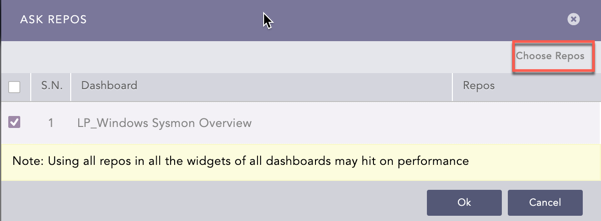
  4. Click Choose Repos.

Windows Ask Repos Panel

Selecting Repos

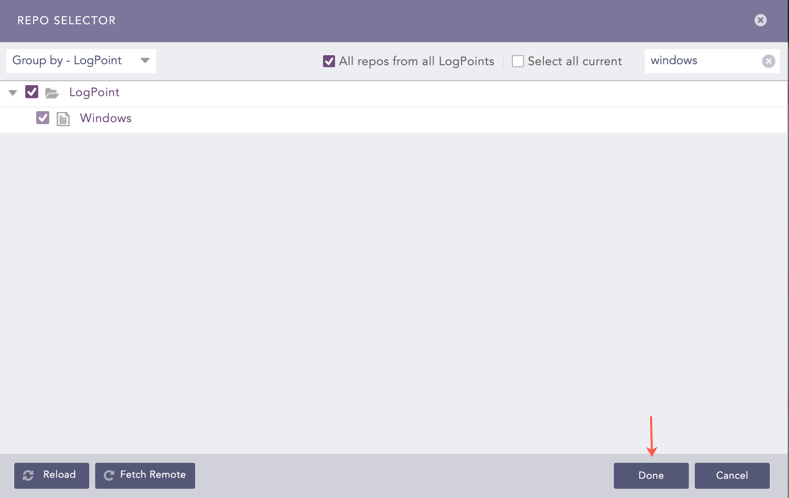
  1. Select the repo configured to store the Windows logs and click Done.

Windows Ask Repos Panel

Selecting Repos

  1. Select the dashboard and click Ok.

You can find the Windows dashboards under Dashboards.

Windows Dashboard

Windows Dashboard

Windows Dashboard

Windows Dashboard

Windows Alerts

The alert rules available for Windows are:

LP_Possible Pass the Hash Activity Detected

  • Trigger Condition: Use of pass-the-hash attack technique to move laterally inside the network.

  • ATT&CK Category: Lateral Movement, Defense Evasion

  • ATT&CK Tag: Use Alternate Authentication Material, Pass the Hash

  • ATT&CK ID: T1550, T1550.002

  • Minimum Log Source Requirement: Windows

  • Query:

    norm_id=WinServer event_id=4624 ((caller_id="S-1-0-0" logon_type="3" logon_process="NtLmSsp" key_length="0") OR (logon_type="9" logon_process="seclogo")) -user="ANONYMOUS LOGON" -user IN EXCLUDED_USERS
    

LP_Windows Directory Service State Change

  • Trigger Condition: Changes in the state of any directory objects/services except domain or OU.

  • ATT&CK Category: Privilege Escalation, Persistence

  • ATT&CK Tag: Create or Modify System Process, Windows Service

  • ATT&CK ID: T1543, T1543.003

  • Minimum Log Source Requirement: Windows

  • Query:

    norm_id=WinServer label=Service label=Directory (label=Delete OR label=Create OR label=Change OR label=Start OR label=Stop) -class IN ["domainDNS","organizationalUnit"] -user IN EXCLUDED_USERS
    

LP_Windows unBlock Inheritance on OU or Domain

  • Trigger Condition: Inheritance is set to unblock on OU or domain. Unblocking inheritance allows the settings in GPOs that are linked to higher-level sites, domains, or organizational units to automatically be inherited by the specified domain or OU unless the link for a GPO is enforced.

  • ATT&CK Category: Privilege Escalation, Defense Evasion

  • ATT&CK Tag: Group Policy Modification, Domain Policy Modification

  • ATT&CK ID: T1484.001, T1484

  • Minimum Log Source Requirement: Windows, Windows Sysmon

  • Query:

    label=Change label=Service label=Directory (value=0 OR attribute_value=0) class IN ["domainDNS", "organizationalUnit"] -user IN EXCLUDED_USERS
    

LP_Windows Users Enabled

  • Trigger Condition: User is enabled with the event ID 4722.

  • ATT&CK Category: -

  • ATT&CK Tag: -

  • ATT&CK ID: _

  • Minimum Log Source Requirement: Windows

  • Query:

    norm_id=WinServer label=Enable label=Management label=Account label=User -user IN EXCLUDED_USERS
    

LP_Windows Group Policy Object Creation

  • Trigger Condition: Creation of a Group Policy Object.

  • ATT&CK Category: Defense Evasion, Privilege Escalation

  • ATT&CK Tag: Group Policy Modification, Domain Policy Modification

  • ATT&CK ID: T1484.001, T1484

  • Minimum Log Source Requirement: Windows

  • Query:

    norm_id=WinServer label=Create label=Object label=Service label=Directory class="groupPolicyContainer" -user IN EXCLUDED_USERS
    

LP_Windows User Password Never Expires

  • Trigger Condition: User account granted the password never expires right with event ID 4738.

  • ATT&CK Category: Persistence

  • ATT&CK Tag: Account Manipulation

  • ATT&CK ID: T1098

  • Minimum Log Source Requirement: Windows

  • Query:

    norm_id=WinServer label=Change label=Management label=Account label=User user_account_control="*Don't Expire Password - Enabled" -target_user=*$ -user IN EXCLUDED_USERS | rename caller_user as user, caller_domain as domain
    

LP_Windows User Added to Administrator Group

  • Trigger Condition: A user is added to an administrative group or a security group.

  • ATT&CK Category: Persistence, Privilege Escalation

  • ATT&CK Tag: Account Manipulation, Local Accounts

  • ATT&CK ID: T1098, T1078.003

  • Minimum Log Source Requirement: Windows

  • Query:

    norm_id=WinServer (group="*Admins" OR group=Administrators) label=Add label=Member label=Management label=Group label=Security -user IN EXCLUDED_USERS
    

LP_Windows OU Deletion

  • Trigger Condition: Deletion of OU is created with the event ID 5141.

  • ATT&CK Category: Defense Evasion

  • ATT&CK Tag: Domain Policy Modification

  • ATT&CK ID: T1484

  • Minimum Log Source Requirement: Windows

  • Query:

    norm_id=WinServer label=Delete label=Object label=Service label=Directory class="organizationalUnit" -user IN EXCLUDED_USERS
    

LP_Windows Successful Brute Force Attack from Same User

  • Trigger Condition: More than the 10 failed login attempts are detected followed by a successful login from the same user.

  • ATT&CK Category: Credential Access

  • ATT&CK Tag: Brute Force

  • ATT&CK ID: T1110

  • Minimum Log Source Requirement: Windows

  • Query:

    [ 10 norm_id=WinServer* label=User label=Login label=Fail -user IN EXCLUDED_USERS | rename target_user as user having same user ] as s1 followed by [norm_id=WinServer* label=User label=Login label=Successful | rename target_user as user] as s2 within 5 minute on s1.user = s2.user | rename s2.user as User
    

LP_Windows User Rights Changes

  • Trigger Condition: User rights are changed with the event IDs 4704 and 4705.

  • ATT&CK Category: Privilege Escalation

  • ATT&CK Tag: Domain Policy Modification

  • ATT&CK ID: T1484

  • Minimum Log Source Requirement: Windows

  • Query:

    norm_id=WinServer event_id IN ["4704", "4705"] -user_id="S-1-5-18" -user IN EXCLUDED_USERS
    

LP_Windows User Removed from Administrator Group

  • Trigger Condition: User is removed from an administrative group or a security group.

  • ATT&CK Category: Persistence, Defense Evasion

  • ATT&CK Tag: Account Manipulation, Indicator Removal, Clear Persistence

  • ATT&CK ID: T1098, T1070, T1070.009

  • Minimum Log Source Requirement: Windows

  • Query:

    norm_id=WinServer (group="*Admins" OR group=Administrators) label=Remove label=Member label=Management label=Group label=Security -user IN EXCLUDED_USERS
    

LP_Windows Block Inheritance on OU

  • Trigger Condition: Inheritance is set to block an OU.

  • ATT&CK Category: Credential Access, Persistence, Defense Evasion

  • ATT&CK Tag: Group Policy Modification, Domain Policy Modification

  • ATT&CK ID: T1098, T1484

  • Minimum Log Source Requirement: Windows

  • Query:

    (norm_id=WinServer* OR MSWinEventLog) label=Change label=Service label=Directory class="organizationalUnit" value=1 or attribute_value=1 -user IN EXCLUDED_USERS | rename value as attribute_value, acl_change as ldap_display, type as operation_type
    

LP_Windows Kerberos Pre-authentication failed

  • Trigger Condition: Failure of Kerberos Service Ticket Pre-Authentication.

  • ATT&CK Category: -

  • ATT&CK Tag: -

  • ATT&CK ID: -

  • Minimum Log Source Requirement: Windows

  • Query:

    norm_id=WinServer* label=Kerberos label=User label=Fail label=Authentication -user IN EXCLUDED_USERS
    

LP_Windows User Added or Remove from Group

  • Trigger Condition: Addition or removal of a member from a group.

  • ATT&CK Category: Persistence, Defense Evasion

  • ATT&CK Tag: Indicator Removal, Clear Persistence, Account Manipulation

  • ATT&CK ID: T1070, T1070.009, T1098

  • Minimum Log Source Requirement: Windows

  • Query:

    norm_id=WinServer label=Group (label=Remove or label=Add) -user IN EXCLUDED_USERS
    

LP_Windows Password Never Expires

  • Trigger Condition: User is granted the password never expires right with the event ID 4738.

  • ATT&CK Category: Persistence, Credential Access, Defense Evasion

  • ATT&CK Tag: Account Manipulation, Valid Accounts, Abuse Elevation Control Mechanism, Bypass User Access Control

  • ATT&CK ID: T1098, T1078, T1548

  • Minimum Log Source Requirement: Windows

  • Query:

    norm_id=WinServer* label=Change label=Management label=Account label=User user_account_control="*Don't Expire Password - Enabled" -target_user=*$ -user IN EXCLUDED_USERS | rename caller_user as user, caller_domain as domain
    

LP_Windows User Account was Created with a Dollar Sign

  • Trigger Condition: Creation of a user account ending with the dollar sign ($).

  • ATT&CK Category: Persistence

  • ATT&CK Tag: Create Account

  • ATT&CK ID: T1136

  • Minimum Log Source Requirement: Windows

  • Query:

    norm_id=WinServer* label=User label=Account label=Create target_user=*$ -user IN EXCLUDED_USERS | rename caller_user as user, caller_domain as domain
    

LP_Windows Failed Login Followed by Lockout Event

  • Trigger Condition: Failed login attempt followed by account lockout.

  • ATT&CK Category: Defense Evasion, Persistence, Privilege Escalation, Initial Access, Credential Access

  • ATT&CK Tag: Valid Accounts, Brute Force

  • ATT&CK ID: T1078, T1110

  • Minimum Log Source Requirement: Windows

  • Query:

    [norm_id=WinServer label=User label=Login label=Fail -user IN EXCLUDED_USERS] as s1 followed by [norm_id=WinServer label=User label=Account label=Management label=Lock user=* -user=*$] as s2 within 1 minute on s1.user=s2.user | rename s1.caller_user as caller_user, s1.source_address as source_address, s2.host as host, s1.caller_domain as caller_domain, s2.target_domain as target_domain, s1.log_ts as last_failed_login_ts, s2.log_ts as locked_out_ts
    

LP_Windows Kerberos Service Ticket Request

  • Trigger Condition: Kerberos Service Ticket request is logged.

  • ATT&CK Category: Defense Evasion, Persistence, Privilege Escalation, Initial Access

  • ATT&CK Tag: Valid Accounts

  • ATT&CK ID: T1078

  • Minimum Log Source Requirement: Windows

  • Query:

    norm_id=WinServer* label=Kerberos label=Service label=Request result_code=* OR status_code=* -user IN EXCLUDED_USERS | rename result_code as status_code
    

LP_Windows Logon Rights Changes

  • Trigger Condition: Logon rights such as “Access this computer from the network” or “Logon as a service” are changed.

  • ATT&CK Category: Persistence, Defense Evasion, Privilege Escalation

  • ATT&CK Tag: Account Manipulation, Group Policy Modification, Domain Policy Modification

  • ATT&CK ID: T1098, T1484.001, T1484

  • Minimum Log Source Requirement: Windows

  • Query:

    norm_id=WinServer* (event_id=4717 OR event_id=4718) (rights=* OR privilege=*) -user="ANONYMOUS LOGON" -user IN EXCLUDED_USERS | rename rights as privilege, caller_user as user
    

LP_Windows Successful Remote Interactive Login

  • Trigger Condition: A remote interactive login event is detected.

  • ATT&CK Category: Lateral Movement

  • ATT&CK Tag: Remote Services, Remote Desktop Protocol

  • ATT&CK ID: T1021, T1021.001

  • Minimum Log Source Requirement: Windows

  • Query:

    norm_id=WinServer* label=User label=Login label=Successful logon_type=10 - target_user=*−user=∗−user=∗ -user IN EXCLUDED_USERS | rename target_user as user, target_domain as domain
    

LP_Windows unBlock Inheritance on OU and Domain

  • Trigger Condition: Inheritance is set to unblock on an OU or domain.

  • ATT&CK Category: Defense Evasion, Privilege Escalation

  • ATT&CK Tag: Domain Policy Modification, Group Policy Modification

  • ATT&CK ID: T1484, T1484.001

  • Minimum Log Source Requirement: Windows

  • Query:

    norm_id=WinServer* label=Change label=Service label=Directory (value=0 OR attribute_value=0) -user IN EXCLUDED_USERS
    

LP_Windows Block Inheritance on OU and Domain

  • Trigger Condition: Inheritance is set to block an OU and domain.

  • ATT&CK Category: Credential Access, Persistence, Defense Evasion

  • ATT&CK Tag: Account Manipulation, Group Policy Modification, Abuse Elevation Control Mechanism, Bypass User Access Control

  • ATT&CK ID: T1098, T1484, T1548

  • Minimum Log Source Requirement: Windows

  • Query:

    (norm_id=WinServer* OR MSWinEventLog) label=Change label=Service label=Directory value=1 or attribute_value=1 -user IN EXCLUDED_USERS | rename value as attribute_value, acl_change as ldap_display, type as operation_type
    

LP_Windows Failed Login Attempts using Disabled Account

  • Trigger Condition: User attempts to log in using a disabled account.

  • ATT&CK Category: -

  • ATT&CK Tag: -

  • ATT&CK ID: -

  • Minimum Log Source Requirement: Windows

  • Query:

    norm_id=WinServer* label=User label=Login label=Fail sub_status_code="0xC0000072" -target_user=*−user=∗−user=∗ -user IN EXCLUDED_USERS | rename user as target_user, domain as target_domain, reason as failure_reason
    

LP_Windows Authentication Policy Change

  • Trigger Condition: Authentication policy is changed.

  • ATT&CK Category: Defense Evasion, Privilege Escalation

  • ATT&CK Tag: Group Policy , Domain Policy Modification

  • ATT&CK ID: T1484.001, T1484

  • Minimum Log Source Requirement: Windows

  • Query:

    norm_id=WinServer label=Authentication label=Policy label=Change (caller_user=* or user=*) -user=*$ -caller_user=*$ -user IN EXCLUDED_USERS | rename caller_user as user
    

LP_Windows Group Policy Object Changes

  • Trigger Condition: Group Policy Object is changed.

  • ATT&CK Category: Privilege Escalation, Defense Evasion

  • ATT&CK Tag: Group Policy Modification, Domain Policy Modification

  • ATT&CK ID: T1484.001, T1484

  • Minimum Log Source Requirement: Windows

  • Query:

    norm_id=WinServer label=Change label=Directory label=Object label=Service -user=System acl_change="versionNumber" OR ldap_display="versionNumber" class="groupPolicyContainer" -user IN EXCLUDED_USERS | rename acl_change as ldap_display, type as operation_type
    

LP_Windows OU Creation

  • Trigger Condition: Creation of an organizational units (OU) with the event ID 5137.

  • ATT&CK Category: Privilege Escalation, Defense Evasion

  • ATT&CK Tag: Domain Policy Modification

  • ATT&CK ID: T1484

  • Minimum Log Source Requirement: Windows

  • Query:

    norm_id=WinServer label=Create label=Object label=Service label=Directory (class="organizationalUnit" OR "Class: organizationalUnit") -user IN EXCLUDED_USERS
    

LP_Windows Multiple Unique Lockouts

  • Trigger Condition: User account is locked out more than once in an hour.

  • ATT&CK Category: Credential Access

  • ATT&CK Tag: Brute Force, Password Guessing, Password Spraying, Credential Stuffing

  • ATT&CK ID: T1110, T1110.001, T1110.003, T1110.004

  • Minimum Log Source Requirement: Windows

  • Query:

    label=Lock label=Account -target_user=*$ -user=*$ | rename user as target_user| chart count() as cnt by target_user | search cnt>1
    

LP_Windows Successful Brute Force Attack from Same Source

  • Trigger Condition: More than 10 failed login attempts followed by a successful login from the same source address are detected.

  • ATT&CK Category: Credential Access

  • ATT&CK Tag: Brute Force

  • ATT&CK ID: T1110

  • Minimum Log Source Requirement: Windows

  • Query:

    [ 10 norm_id=WinServer label=User label=Login label=Fail having same source_address ] as s1 followed by [norm_id=WinServer label=User label=Login label=Successful -user IN EXCLUDED_USERS] as s2 within 10 minute on s1.source_address = s2.source_address | rename s2.user as successful_login_user, s2.host as host, s2.domain as domain, log_ts as last_failed_login_ts, s2.log_ts as successful_login_ts
    

LP_Windows Possible Ransomware Detection

  • Trigger Condition: File created a large number of new files in a short duration. This alert looks for more than 10 new files created in a minute. For this alert to work, the list KNOWN_FILE is created to remove false positives.

  • ATT&CK Category: Impact

  • ATT&CK Tag: Data Encrypted for Impact, Data Destruction, Proxy

  • ATT&CK ID: T1486, T1485, T1090

  • Minimum Log Source Requirement: Windows

  • Query:

    norm_id=WinServer* label=File label=Create -label=Change (image=* OR file=*) -image IN KNOWN_FILE -file IN KNOWN_FILE -user IN EXCLUDED_USERS | rename image as file | timechart count() as cnt by file every 1 minute | search cnt>10
    

LP_Windows unBlock Inheritance on Domain

  • Trigger Condition: Inheritance is set to block on the domain.

  • ATT&CK Category: Defense Evasion, Privilege Escalation

  • ATT&CK Tag: Domain Policy Modification, Group Policy Modification

  • ATT&CK ID: T1484, T1484.001

  • Minimum Log Source Requirement: Windows

  • Query:

    norm_id=WinServer* label=Change label=Service label=Directory class="domainDNS" value=0 OR attribute_value=0 -user IN EXCLUDED_USERS
    

LP_Windows User Account Change to End with Dollar Sign

  • Trigger Condition: User account is changed to end with the dollar sign ($).

  • ATT&CK Category: Persistence

  • ATT&CK Tag: Account Manipulation

  • ATT&CK ID: T1098

  • Minimum Log Source Requirement: Windows

  • Query:

    norm_id=WinServer* label=User label=Account label=Change label=Name new_user=*$ -user IN EXCLUDED_USERS | rename caller_user as user, caller_domain as domain
    

LP_Windows Users Disabled

  • Trigger Condition: User is disabled with the event ID 4725.

  • ATT&CK Category: Persistence, Defense Evasion

  • ATT&CK Tag: Indicator Removal, Clear Persistence, Account Manipulation

  • ATT&CK ID: T1070, T1070.009, T1098

  • Minimum Log Source Requirement: Windows

  • Query:

    norm_id=WinServer label=Disable label=Management label=Account label=User -user IN EXCLUDED_USERS
    

LP_Windows Audit Logs Cleared

  • Trigger Condition: Clearance of the Windows security audit log.

  • ATT&CK Category: Defense Evasion

  • ATT&CK Tag: Clear Windows Event Logs

  • ATT&CK ID: T1070.001

  • Minimum Log Source Requirement: Windows

  • Query:

    norm_id=WinServer label=Audit label=Log label=Clear -user IN EXCLUDED_USERS
    

LP_Windows Data Copied to Removable Device

  • Trigger Condition: File is copied to a removable storage device.

  • ATT&CK Category: Exfiltration

  • ATT&CK Tag: Exfiltration Over Physical Medium, Exfiltration over USB

  • ATT&CK ID: T1052, T1052.001

  • Minimum Log Source Requirement: Windows

  • Query:

    norm_id=WinServer* event_id=4663 event_category="Removable Storage" access="WriteData*" or access="*AppendData*" host IN CRITICAL_HOSTS -user IN EXCLUDED_USERS
    

LP_Windows Bulk Print at a Time

  • Trigger Condition: 30 or more successful files are printed.

  • ATT&CK Category: Exfiltration

  • ATT&CK Tag: Exfiltration Over Other Network Medium, Exfiltration Over Physical Medium

  • ATT&CK ID: T1011, T1052

  • Minimum Log Source Requirement: Windows

  • Query:

    norm_id=WinServer* label=Print label=Successful -user IN EXCLUDED_USERS | rename file as document | chart distinct_count(document) as DocumentPrinted by user order by DocumentPrinted desc | search DocumentPrinted>30
    

LP_Windows Multiple Failed Attempts against a Single Account

  • Trigger Condition: More than one failed login attempt is detected against the same account.

  • ATT&CK Category: Credential Access

  • ATT&CK Tag: Brute Force, Password Guessing, Password Spraying, Credential Stuffing

  • ATT&CK ID: T1110, T1110.001, T1110.003, T1110.004

  • Minimum Log Source Requirement: Windows

  • Query:

    norm_id=WinServer label=User label=Login label=Fail -target_user=*$ -user=*$ -user IN EXCLUDED_USERS | chart count() as FailedTimes by user,source_address,host,logon_type,caller_user,caller_domain order by count() desc | search FailedTimes>5
    

LP_Windows Excessive Amount of Files Copied to Removable Device

  • Trigger Condition: User copied more than 100 files to a removable storage device.

  • ATT&CK Category: Exfiltration

  • ATT&CK Tag: Exfiltration Over Physical Medium, Exfiltration over USB

  • ATT&CK ID: T1052, T1052.001

  • Minimum Log Source Requirement: Windows

  • Query:

    norm_id=WinServer event_id=4663 event_category="Removable Storage" (access_detail="WriteData*" OR access_detail="*AppendData*") -user IN EXCLUDED_USERS | chart distinct_count(object) as DataCopied by user | search DataCopied>100
    

LP_Windows Failed Login Attempt Using Service Account

  • Trigger Condition: User failed to log in using a service account.

  • ATT&CK Category: Defense Evasion, Persistence, Privilege Escalation, Initial Access

  • ATT&CK Tag: Valid Accounts

  • ATT&CK ID: T1078

  • Minimum Log Source Requirement: Windows

  • Query:

    norm_id=WinServer label=User label=Login label=Fail logon_type = 5 -user=*$ -user in EXCLUDED_USERS
    

LP_Windows User Account Created or Removed

  • Trigger Condition: User account is created or deleted.

  • ATT&CK Category: Persistence, Defense Evasion

  • ATT&CK Tag: Clear Persistence, Account Manipulation, Create Account

  • ATT&CK ID: T1070.009, T1098, T1136

  • Minimum Log Source Requirement: Windows

  • Query:

    norm_id=WinServer label=User label=Account (label=Create OR label=Delete) -target_user=*$ target_user=* -user IN EXCLUDED_USERS
    

LP_Windows Multiple Account Password Changes by User

  • Trigger Condition: User changed the password of multiple user accounts.

  • ATT&CK Category: Persistence, Impact

  • ATT&CK Tag: Account Manipulation, Account Access Removal

  • ATT&CK ID: T1098, T1531

  • Minimum Log Source Requirement: Windows

  • Query:

    norm_id=WinServer label=User label=Password (label=Change or label=Reset) -target_user=*$ -caller_user=*$ -user IN EXCLUDED_USERS | rename user as caller_user| chart distinct_count(target_user) as Account by caller_user | search Account > 1
    

LP_Windows Domain Policy Change

  • Trigger Condition: Domain policy is changed on a Domain Controller.

  • ATT&CK Category: Defense Evasion, Privilege Escalation

  • ATT&CK Tag: Group Policy Modification

  • ATT&CK ID: T1484.001

  • Minimum Log Source Requirement: Windows

  • Query:

    norm_id=WinServer* label=Domain label=Policy label=Change user=*$ -user IN EXCLUDED_USERS| rename target_domain as domain
    

LP_Windows Group Created or Deleted

  • Trigger Condition: Creation or deletion of a group.

  • ATT&CK Category: Persistence, Defense Evasion

  • ATT&CK Tag: Indicator Removal, Clear Persistence, Account Manipulation

  • ATT&CK ID: T1070, T1070.009, T1098

  • Minimum Log Source Requirement: Windows

  • Query:

    norm_id=WinServer label=Security label=Group label=Management -label=Member (label=Create or label=Remove) -user IN EXCLUDED_USERS
    

LP_Windows Group Policy Object Deletion

  • Trigger Condition: Deletion of Group Policy Object.

  • ATT&CK Category: Defense Evasion, Privilege Escalation

  • ATT&CK Tag: Group Policy Modification, Domain Policy Modification

  • ATT&CK ID: T1484.001, T1484

  • Minimum Log Source Requirement: Windows

  • Query:

    norm_id=WinServer label=Object label=Service label=Directory label=Delete class="groupPolicyContainer" -user IN EXCLUDED_USERS
    

LP_AD Privesc CVE-2022-26923 Exploitation

  • Trigger Condition: Creation of a computer account spoofing a domain controller name, followed by successfully requesting a Machine certificate template from the CA server. This indicates exploitation of the privilege escalation vulnerability (CVE-2022-26923) in the Active Directory (AD) that was patched on May 10, 2022. For the alert to work, the WINDOWS_DC list must contain all the FQDNs of domain controllers operating in your domain.

  • ATT&CK Category: Privilege Escalation

  • ATT&CK Tag: Exploitation for Privilege Escalation

  • ATT&CK ID: T1068

  • Minimum Log Source Requirement: Windows

  • Query:

    [norm_id=WinServer label=Computer label=Account label=Create dns_host IN WINDOWS_DC ] as s1 followed by [ norm_id=WinServer label=Certificate label=Request label=Approve attributes="CertificateTemplate:Machine" | norm on requester \<requester_account:'\S+'> ] as s2
    within 1 hour on s1.computer=s2.requester_account | rename s1.log_ts as account_creation_ts, s1.computer as computer, s1.user as user, s1.service as service, s1.dns_host as dns_host, s2.subject as certificate_subject | chart count() by account_creation_ts, computer, user, service, dns_host, certificate_subject
    

LP_AppLocker SmartlockerFilter detected file being written by process

  • Trigger Condition: AppLocker’s SmartlockerFilter detects a file written by a process.

  • ATT&CK Category: -

  • ATT&CK Tag: -

  • ATT&CK ID: -

  • Minimum Log Source Requirement: Windows

  • Query:

    norm_id="WinServer" event_source="Microsoft-Windows-AppLocker" label="Process" label=Change label=File
    

LP_Application Execution Attempt Blocked by AppLocker

  • Trigger Condition: A user attempts to execute an application but is blocked by AppLocker.

  • ATT&CK Category: -

  • ATT&CK Tag: -

  • ATT&CK ID: -

  • Minimum Log Source Requirement: Windows

  • Query:

    norm_id="WinServer" event_source="Microsoft-Windows-AppLocker" label=Application label=Block
    

LP_Curl Silent Mode Execution Detected

  • Trigger Condition: When curl runs in silent mode. Client URL (curl) is a command line tool that transfers data to and from a server. Adversaries can use this technique to prevent showing file transfer progress and redirect output to a file.

  • ATT&CK Category: Command and Control

  • ATT&CK Tag: T1105 - Ingress Tool Transfer

  • Minimum Log Source Requirement: Windows, Windows Sysmon

  • Query:

    label="Process" label=Create command="*curl*" ((command="*-s*" command="*-o*") OR command="*-s*")
    

LP_Non-Existent User Login Attempt Detected

  • Trigger Condition: When eight non-existent user login attempts on SSH service are detected in a minute. Secure Shell(ssh) is a protocol that provides a safe way to access a computer over a network. Adversaries can perform username brute force to find a valid username. Based on requirements and false positives, a user can modify the number of invalid login attempts and time frame.

  • ATT&CK Category: Credential Access

  • ATT&CK Tag: T1110 - Brute Force

  • Minimum Log Source Requirement: Unix

  • Query:

    [8 label=Invalid label=User "process"=sshd  having same source_address within 1 minutes]
    

LP_Malicious Image Loaded Via Excel

  • Trigger Condition: When an unsigned image is loaded via Excel. XLL file is an add-in used by Microsoft Excel, a popular spreadsheet application. It contains extra functions, templates, or other tools that enhance the capabilities of Excel. Some examples of add-ins include custom chart generators and template managers. Adversaries can use this technique to load their malicious unsigned add-ins to execute their payload or download malware from a remote server.

  • ATT&CK Category: Persistence

  • ATT&CK Tag: T1137 - Office Application Startup, T1137.001 - Office Template Macros

  • Minimum Log Source Requirement: Windows Sysmon

  • Query:

    label=Image label=Load "process"="*\excel.exe" file IN ["*.xlam ","*.xla","*.xll"]  is_sign=false
    

LP_Execution of Temporary Files Via Office Application

  • Trigger Condition: When Office applications create a child process that executes a file with the “.tmp” extension. Adversaries use this technique to avoid detection by using a legit application to run a payload masquerading as a temporary file.

  • ATT&CK Category: Defense Evasion

  • ATT&CK Tag: T1036 - Masquerading

  • Minimum Log Source Requirement: Windows Sysmon, Windows

  • Query:

    label="Process" label="Create" "parent_process" IN ["*\winword.exe", "*\powerpnt.exe", "*\excel.exe"] "process"="*.tmp"
    

LP_Binary Creation in System Folder Detected

  • Trigger Condition: When the system process drops a binary or DLL in the Windows root folder. The operating system uses a system folder to store files necessary for proper function. A system folder is a primary location for DLL files. Adversaries may copy files between internal victim systems to support lateral movement using inherent file sharing protocols such as file sharing over SMB/Windows Admin Shares to connected network shares or authenticated connections via Remote Desktop Protocol.

  • ATT&CK Category: Lateral Movement

  • ATT&CK Tag: T1570 - Lateral Tool Transfer

  • Minimum Log Source Requirement: Windows Sysmon

  • Query:

    label=File label=Create label=Overwrite "process"=system path IN ["C:\windows\*"]  file IN ["*.exe", "*.dll"]
    

LP_High Volume of File Modification or Deletion in Short Span

  • Trigger Condition: When LogPoint detects, 30 files are deleted or modified in a minute. A large number of file modifications and deletions is an indicator of ransomware in action. Based on the requirement and false positives detected, the user can modify the number of events required or the time frame. To generate logs, enable the auditing policy of desired folders. Many file modifications by a user/software can result in a false positive (FP), so to reduce it, exclude the process in the query.

  • ATT&CK Category: Impact

  • ATT&CK Tag: T1565 - Data Manipulation

  • Minimum Log Source Requirement: Windows Sysmon, Windows

  • Query:

[30 label=File label=Object label=Storage access IN ["Delete*","writedata*"] -"process" IN ["*\tiworker.exe","*\poqexec.exe","*\msiexec.exe"] having same host,domain,user,"process" within 1 minutes]

LP_Auditd High Volume of File Modification or Deletion in Short Span

  • Trigger Condition: When 30 files are deleted or modified in a minute. A large number of file modifications and deletions is an indicator of ransomware in action. Based on the requirement and false positives detected, the user can modify the number of events required or the time frame. To generate logs, enable the auditing policy of desired folders. Many file modifications by a user/software can result in a false positive (FP), so to reduce it, exclude the process in the query. Logs from the auditd configured Linux system is required to trigger this alert.

  • ATT&CK Category: Impact

  • ATT&CK Tag: T1565 - Data Manipulation

  • Minimum Log Source Requirement: Unix

  • Query:

[30 label=File label=Info label=Path "process"=audit -name_type IN ["parent","normal"] having same event_type,user_id,host,"process" within 1 minutes]

LP_Windows RDP Port Modified

  • Trigger Condition: When a remote desktop protocol (RDP) for Windows protocol is modified. RDP is a remote desktop protocol allowing users to have GUI access to a remote desktop. Adversaries can change the RDP port to evade the defense mechanism used to detect connections in the default RDP port.

  • ATT&CK Category: Lateral Movement

  • ATT&CK Tag: T1021.001 - Remote Desktop Protocol

  • Minimum Log Source Requirement: Windows Sysmon

  • Query:

label=Registry label=Value label=Set target_object="*\System\CurrentControlSet\Control\Terminal Server\WinStations\RDP-Tcp\PortNumber"

LP_Possible Pass the Hash Activity Detected

  • Trigger Condition: When a successful logon event (event ID 4624) occurs on a Windows Server under suspicious circumstances. Specifically, the logon involves either an anonymous caller using a network logon (type 3) with NTLM and no encryption, or a new credentials-based logon (type 9) using the “seclogo” process. This could indicate unauthorized or unusual access attempts, especially if the user is neither “ANONYMOUS LOGON” nor part of a predefined exclusion list. Adversaries may use such logon methods to establish persistence or perform lateral movement within the network while evading detection.

  • ATT&CK Category: Defense Evasion, Lateral Movement

  • ATT&CK Tag: T1550.002 - Pass the Hash, T1550 - Use Alternate Authentication Material

  • Minimum Log Source Requirement: Windows Sysmon

  • Query:

norm_id=WinServer event_id=4624 ((caller_id="S-1-0-0" logon_type="3" logon_process="NtLmSsp" key_length="0") OR (logon_type="9" logon_process="seclogo")) -user="ANONYMOUS LOGON" -user IN EXCLUDED_USERS

LP_Windows Block Inheritance on OU or Domain

  • Trigger Condition: Inheritance is set to block on an OU or Domain.

  • ATT&CK Category: Defense Evasion, Privilege Escalation

  • ATT&CK Tag: Group Policy , Domain Policy Modification

  • ATT&CK ID: T1484.001, T1484

  • Minimum Log Source Requirement: Windows

  • Query:

label=Change label=Service label=Directory (value=1 OR attribute_value=1) class IN ["domainDNS", "organizationalUnit"] -user IN EXCLUDED_USERS

LP_Windows Delegation of Authority Change on OU or Domain

  • Trigger Condition: Delegation of Control wizard is used, or security settings are changed on OU or Domain.

  • ATT&CK Category: Privilege Escalation, Defense Evasion

  • ATT&CK Tag: Domain Policy Modification

  • ATT&CK ID: T1484

  • Minimum Log Source Requirement: Windows

  • Query:

norm_id=WinServer label=Change label=Service label=Directory class IN ["organizationalUnit","domainDNS"] (ldap_display="nTSecurityDescriptor") -user IN EXCLUDED_USERS

LP_Windows GPO Linked or Unlinked to OU or Domain

  • Trigger Condition: Group policy object linked or unlinked on an OU.

  • ATT&CK Category: Defense Evasion, Privilege Escalation

  • ATT&CK Tag: Group Policy Modification, Domain Policy Modification

  • ATT&CK ID: T1484.001, T1484

  • Minimum Log Source Requirement: Windows

  • Query:

norm_id=WinServer* (label=Change or label=Remove) label=Object label=Directory ldap_display="gPLink" OR acl_change="gPLink" -user IN EXCLUDED_USERS | rename acl_change as ldap_display, type as operation_type

LP_Windows Security Service Terminated

  • Trigger Condition: Windows security services got terminated successfully with an error.

  • ATT&CK Category: Impact

  • ATT&CK Tag: Service Stop

  • ATT&CK ID: T1489

  • Minimum Log Source Requirement: Windows

  • Query:

norm_id=WinServer event_source="Service Control Manager" event_id="7023" (service IN WINDOWS_SECURITY_SERVICES OR binary_data IN WINDOWS_SECURITY_SERVICE_BINARIES)

LP_Windows User Account Created via Command Line

  • Trigger Condition: Creation of a user account via CLI like PowerShell or via net utility is detected.

  • ATT&CK Category: Execution, Persistence

  • ATT&CK Tag: PowerShell, Create Account, Local Account

  • ATT&CK ID: T1059.001, T1136, T1136.001

  • Minimum Log Source Requirement: Windows

  • Query:

label="process" label="create" (command="*New-LocalUser*" or command="*net user add*")

LP_Windows WMI Filter Linked or Unlinked with GPO

  • Trigger Condition: WMI filter linked or unlinked with a group policy object.

  • ATT&CK Category: Execution, Privilege Escalation, Defense Evasion

  • ATT&CK Tag: Windows Management Instrumentation, Group Policy Modification, Domain Policy Modification

  • ATT&CK ID: TT1047, T1484.001, T1484

  • Minimum Log Source Requirement: Windows

  • Query:

norm_id=WinServer label=Directory label=Object label=Service label=Change (acl_change="gPCWQLFilter" OR ldap_display="gPCWQLFilter") -user IN EXCLUDED_USERS | rename acl_change as ldap_display, type as operation_type

Using Windows Report Templates

The available report templates are:

  • LP_Windows Administrator Report is the incident summary report that provides statistical information on the Windows log events, account-related events, process events, event categories, member status, and policy changes in different formats such as graphs, time trends, and lists.

  • LP_Active Directory Authentication Requests is the incident summary report that provides statistical information on a user or a machine-initiated authentication request made on Domain Controllers using the Kerberos Authentication Ticket in different formats such as graphs, time trends, and lists.

  • LP_Active Directory Object Management is the incident summary report that provides statistical information on the Management of Security Principal Objects or Account and Group Management for an Active Directory-based IT Infrastructure in different formats such as graphs, time trends, and lists.

  • LP_Active Directory Report is the incident summary report that provides statistical information on the changes made in the Active Directory and various categories on policy changes in the system, in different formats such as graphs, time trends, and lists.

  • LP_Windows Configuration Report is the incident summary report that provides statistical information on the applications installed, removed, and their installation status in different formats such as graphs and lists.

  • LP_AD: Computer Account Management is the incident summary report that provides a statistical overview on Computer Account Management, which includes account-related actions performed on computers (domain controllers, member servers, or workstations) that are a member of domains. The actions are performed by users when a computer account is created, changed, or deleted. The statistical information is displayed in different formats such as graphs, a time trend, and lists.

  • LP_AD: Critical User Activities is the incident summary report that provides statistical information on account-related actions such as users added or removed to/from Active Directory or Administrator Group, users enabled or disabled, or usernames created with a dollar sign ($). The statistical information is displayed in different formats such as graphs, a time trend, and lists.

  • LP_AD: Machine Authentication Requests is the incident summary report that provides a statistical overview of the machines or services authenticated via Kerberos authentication protocol in different formats such as graphs and lists.

  • LP_AD: OU and GPO is the incident summary report that provides a statistical overview of the actions performed on Group Policy Object (GPO) and OU (Organizational Unit) such as GPO and OU created, deleted, updated, or failed GPO. The statistical information is displayed in different formats such as graphs, a time trend, and lists.

  • LP_AD: Policy Changes is the incident summary report that provides a statistical overview of the changes in audit policy, user rights, logon rights, and domain policy. The information is displayed in different formats, such as graphs and lists.

  • LP_AD: Security Group Management is the incident summary report that provides a statistical overview of the actions performed in the Security Group, such as security group created, deleted, or users added or removed to/from security groups. The statistical information is displayed in different formats, such as graphs and lists.

  • LP_AD: Service is the incident summary report that provides a statistical overview of the changes in Directory service and Audit Policy, Active Directory Objects, trust domain modifications, and significant policy changes such as Domain policy, System Audit policy, or Kerberos policy. The statistical information is displayed in different formats such as graphs, a time trend, and lists.

  • LP_AD: User Account Management is the incident summary report that provides a statistical overview of user’s accounts, such as created, deleted, user account locked or unlocked, and password change attempts, in different formats such as graphs and lists.

  • LP_AD: User Authentication Requests is the incident summary report that provides a statistical overview of users authenticated via Kerberos authentication protocol in different formats such as graphs and lists.

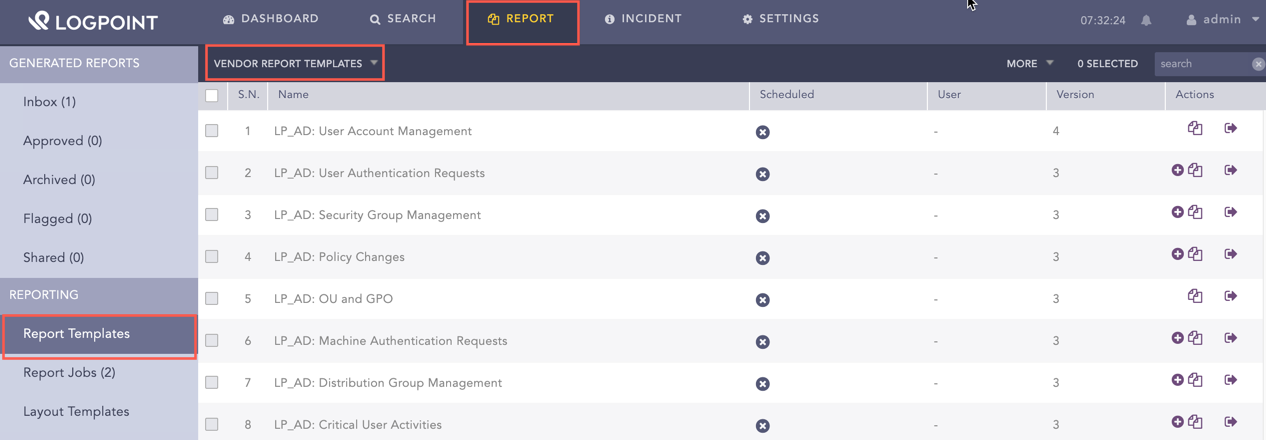
  1. Go to Report >> Report Template>> VENDOR REPORT TEMPLATES.

Using Windows Report Template

Using the Windows Report Templates

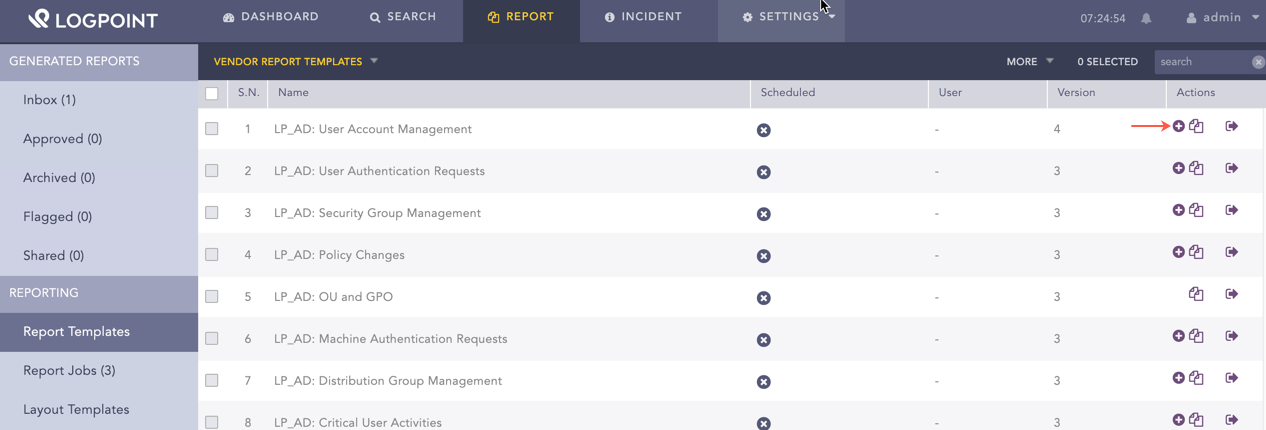
  1. Click Add under Actions.

Using Windows Report Template

Using Windows Report Templates

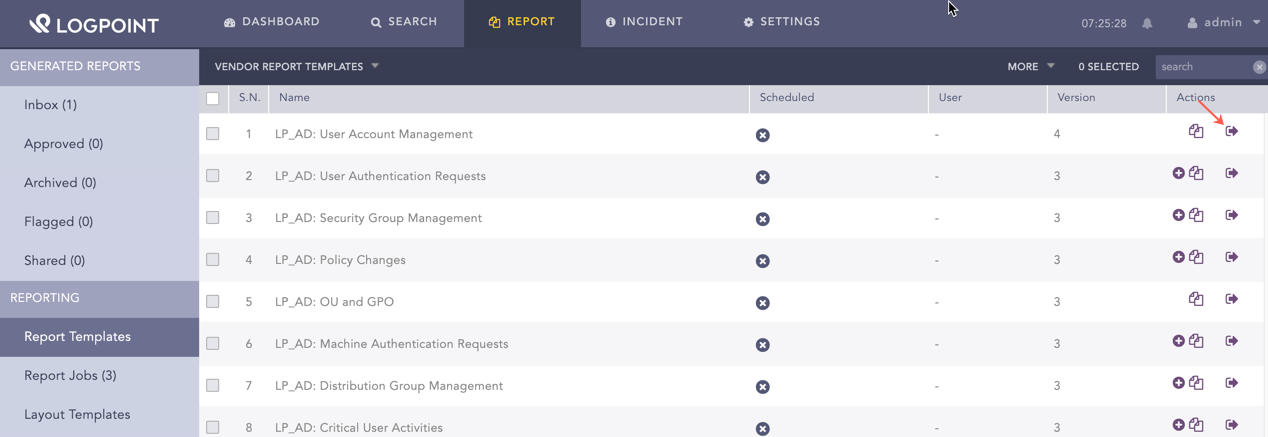
  1. Click Run this Report under Actions.

Run the Windows Activities Report Template

Running Windows Report Templates

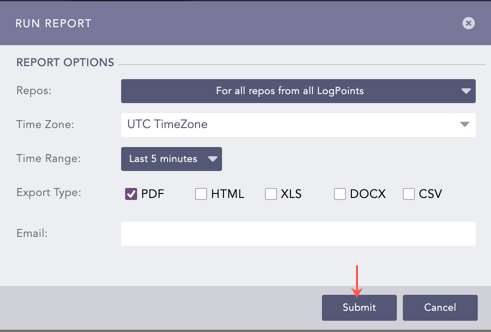
  1. Select Repos, Time Zone, Time Range, Export Type, and enter the Email address.

  2. Click Submit.

You can view the reports being generated under Report Jobs and download the generated reports from Inbox with .pdf extension by clicking PDF under the Download section.

Run Report Wizard

Generating a Report

You can view the reports being generated under Report Jobs and download them. Click PDF under Download to get .pdf formatted reports.

You can analyze the data using a report’s graphs, time trends, lists, and text. Report data summarizes incidents during a specific period, such as the past 24 hours or the past five minutes. While generating a report, you can customize the calendar period according to your needs. For more information on how to schedule reports, go to Scheduling.


Helpful?

We are glad this guide helped.


Please don't include any personal information in your comment

Contact Support