Log Management
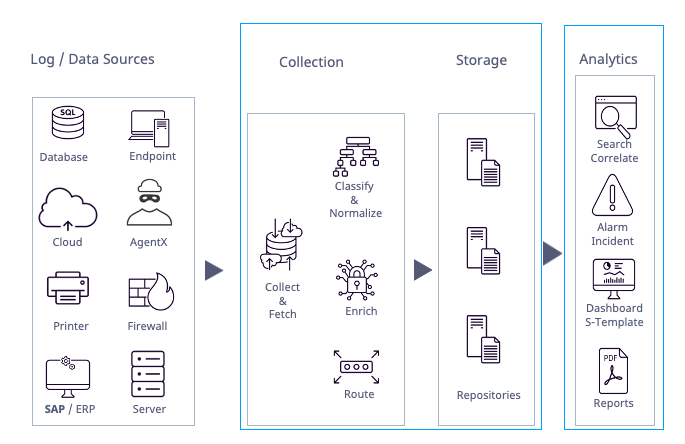
Log Ingestion
Log Ingestion starts by setting up third-party log integration. A collector or fetcher retrieves logs from the source. Parsers analyze the multiline logs and extract smaller, single-line logs. The parsed logs are fed back into the collection pipeline and processed separately. Parsing ensures that a complete log message is ingested from the incoming log stream, for example by identifying line feeds. Additionally, Windows Log Sources require an agent to ingest logs. Agents are used on Windows systems to perform security-related actions including sending log data, collecting log files, and performing registry and file integrity monitoring. They also support encryption, buffering, file collection, file integrity monitoring and Windows Registry monitoring.
Collector
A collector retrieves logs from the source and buffers them. It receives logs through specific ports and/or forwards them to a Logpoint Storage Node. The collector uses a normalizer to split each log message into key-value pairs and apply static enrichment during processing.
Fetcher
A fetcher is a component or process responsible for collecting and retrieving logs or data from various log sources, including servers, applications, or devices, and forwarding them to Logpoint for analysis and storage. They need permission to access these log sources. To grant access, you must add the required parameters to the log source configuration. Additionally, you can define a fetch interval to specify how frequently data is collected from the log source.
Whether a collector or fetcher is used depends on the log source.
Parser
Parser extracts and analyzes raw log messages and forwards them for further processing. Parsers are included with Logpoint integration. After setting up a parser, add it to a collector or a fetcher. A Syslog collector only supports the Syslog Parser.
Normalizers
Normalization translates a raw log message into Logpoint taxonomy. Raw log messages come from different source devices in a variety of different formats. Normalizing allows for searches and identification of patterns and correlation across log messages from different log sources. For example, different firewall vendors may label fields in logs differently or have no labels. Normalization takes various input fields like source, or third field from the left, and normalizes them into the standard field name source_address.
Logpoint uses two types of normalizers:
Compiled Normalizers: They are hard-coded and fast.
Normalization Packages: They contain one or more normalizers that use regex or signatures to find and extract the key-value pairs from the raw logs. The resulting key-value pairs depend on the log source and which signatures and potential labels are used. Use signature-based normalizers for raw logs that are not well-defined.
Enrichment
Enrichment adds additional metadata from an enrichment source to log events that were not part of the log message. Enriched fields in Logpoint logs are red.
There are two types of enrichment:
Static: This enrichment is applied at data ingestion, either during collection or storage. Static enrichment is indexed, which makes queries over large datasets run faster.
Dynamic: This enrichment is applied during analysis, or when a query runs. It is useful for lookups that are only possible long after logs are received (for example from a threat intelligence table, if the threat was unknown when the logs were originally ingested). Dynamic enrichment uses less storage than static enrichment, uses less of a collection load, and is good for small data sets and short time ranges. Dynamic enrichment adds metadata that is not stored or saved.
Static Enrichment is applied at data ingestion, either during collection or storage. Static Enrichment is faster and more efficient than Dynamic Enrichment. Because Static Enrichment is indexed, it performs well across large data sets.
Routing & Repositories
Routing specifies which repository on which specific device incoming log data should be stored based on a log message's key or key-value pair. After ingestion, normalization and potential enrichment, a log must be routed so it is forwarded and stored in the right repository.
A repository or repo is a log storage location where device logs are routed to. When you set up or run a search query, you select which repos to run the search on. A Routing Policy determines which repo logs are sent to. Repo properties control how long log data is stored until it is automatically deleted, which storage tier to use, where log data is potentially moved to, and whether the data is replicated using Logpoint High Availability.
Repos are different from actual storage volumes. A server can have multiple disks or volumes. These volumes will have the same or different mount points. While repos are logical volumes within Logpoint, a repository can use multiple storage tiers located on one or more of the underlying volumes.
After your logs are ingested, normalized, potentially enriched and stored you can analyze your data, apply a use case or respond to incidents.
Ingest Log Sources
Log Source Templates
Use Templates for 3rd party log sources. Logpoint provides a number of vendor-specific log source templates out-of-the-box. Templates simplify the process of configuring log sources by providing pre-defined settings, reducing the need for manual configuration and minimizing the risk of configuration errors. They also ensure consistency in collecting, processing, and analyzing log data, critical for accurate security event analysis and reporting. You can also set up a Log Source and save it as a Log Source template yourself for future use.
You must have Read, Create and Delete permissions of Devices, DeviceGroups, Log Collection Policy and Parsers to configure Log Sources and their templates.
Device
A device corresponds to a vendor product and represents the log source or where logs are collected or fetched. It is designated through its IP address or addresses. A device’s log files are retrieved from the 3rd party source by a collector or fetcher that is configured on the device itself or through a collection policy.
When you use a device for Log Management, first you add a device. After that you add a Collector or Fetcher to the device or a Collection Policy to ingest the logs.
Was this helpful?